
QuickData.ai vs SoloTools
Side-by-side comparison to help you choose the right AI tool.

QuickData.ai
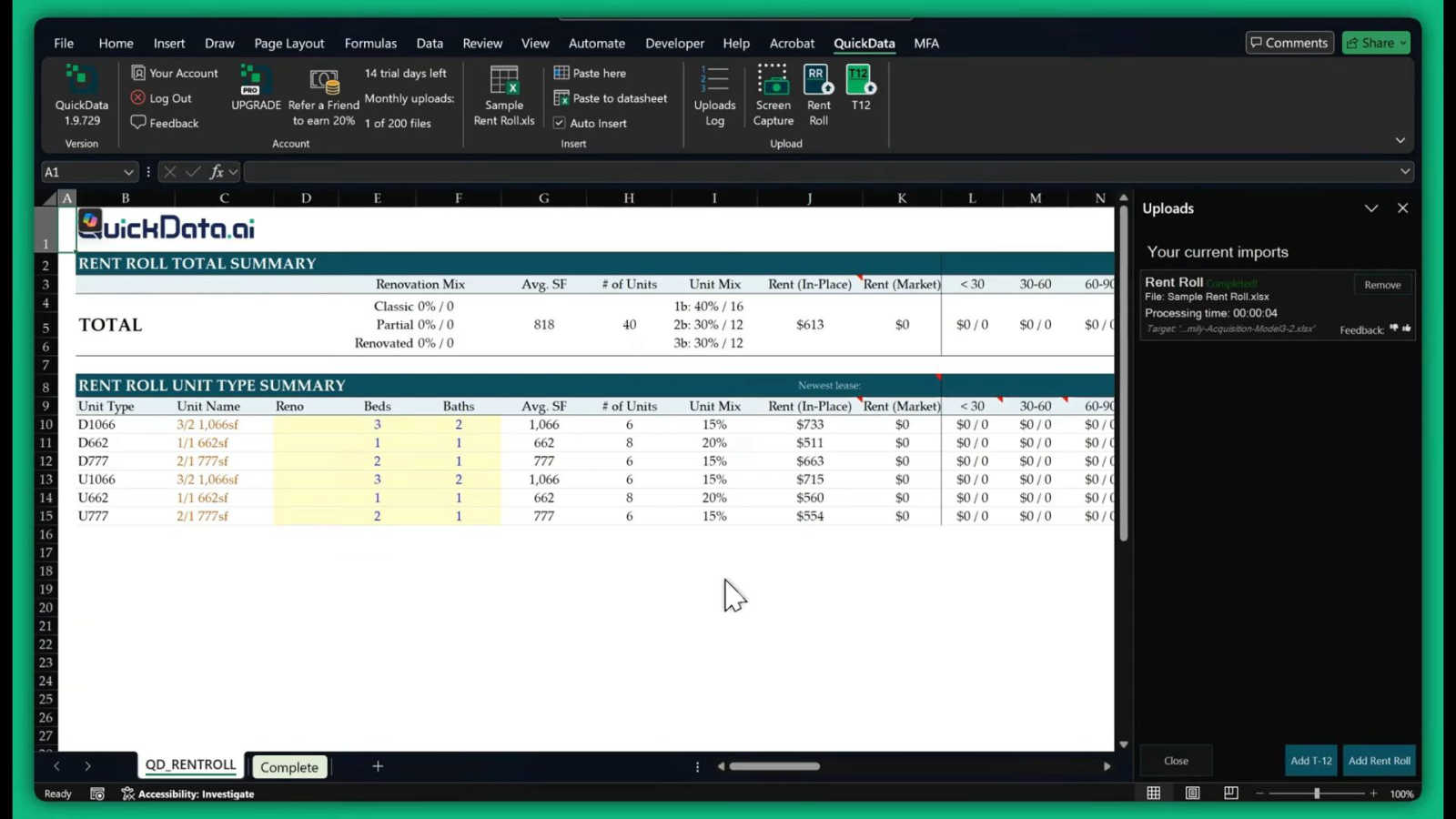
QuickData.ai automates rent roll and T12 data entry into Excel, streamlining multifamily deal underwriting by 10x.
Last updated: March 1, 2026

SoloTools
SoloTools instantly creates polished client proposals with AI, saving you hours of work.
Last updated: March 4, 2026
Visual Comparison
QuickData.ai
SoloTools

Feature Comparison
QuickData.ai
Multifamily Excel Model Automation
QuickData.ai automates the extraction of data from multifamily financial documents and populates it into your Excel models. This feature streamlines the data entry process, ensuring that your underwriting is both accurate and efficient.
T12 and Rent Roll Data Entry
With QuickData.ai, users can automatically input T12 and Rent Roll data into their Excel spreadsheets. This automation eliminates manual data entry, significantly reducing the time spent on tedious tasks and enhancing productivity.
User-Friendly Setup and Onboarding
Setting up QuickData.ai is quick and straightforward. Users can begin utilizing the tool within minutes, and the free 1:1 onboarding ensures that everyone gets personalized help to maximize their experience from the outset.
Comprehensive Insights and Reporting
The tool provides multifamily insights and reporting capabilities that can help users make informed investment decisions. By analyzing and presenting data efficiently, QuickData.ai empowers professionals to focus on strategic planning rather than administrative tasks.
SoloTools
AI-Powered Proposal Generation
Go beyond basic templates with an AI that writes and refines your proposals. It doesn't just fill in blanks; it generates compelling executive summaries, detailed scope breakdowns, professional pricing tables, and persuasive terms tailored to your specific project details. You describe the project in a few words, and in about 12 seconds, you have a complete, client-ready draft.
Intelligent AI Section-Level Editing
Maintain full creative control with powerful, context-aware editing tools. For any section of your proposal, you can instruct the AI to "Make more persuasive," "Make shorter," "Make more detailed," or "Rewrite in formal tone." This allows for rapid refinement and customization without starting from scratch, ensuring the final document perfectly matches your voice and goals.
Complete Client Experience & E-Signatures
Manage the entire proposal journey within SoloTools. Send proposals directly to clients via one-click email with a personalized message. Clients can then view the proposal, and you can collect legally-binding e-signatures where they draw their signature directly on the document. Set expiry dates to create urgency and automate follow-up reminders to keep the process moving without manual chasing.
Proposal Analytics & Real-Time Tracking
Gain valuable insights into your business performance. Track every proposal through a clear conversion funnel from "Sent" to "Viewed" to "Accepted/Declined." Receive real-time email notifications the moment a client opens your proposal for the first time, allowing for perfectly timed follow-ups. Understand your win rate and average close time to refine your approach.
Use Cases
QuickData.ai
Accelerated Underwriting Process
Acquisitions teams can leverage QuickData.ai to speed up their underwriting processes. By automating data entry from Rent Rolls and T12 statements, they can underwrite deals at a pace that significantly outmatches traditional methods.
Increased Deal Volume Management
Real estate brokers and analysts can handle a greater volume of deals with QuickData.ai. The ability to quickly extract and input critical data enables teams to take on more projects without needing additional personnel.
Enhanced Accuracy in Data Handling
Lenders and analysts benefit from reduced manual errors when using QuickData.ai. The tool's intelligent data extraction minimizes the chances of mistakes that often occur during manual entry, ensuring that financial analyses are based on reliable information.
Streamlined Reporting for Stakeholders
Investors and stakeholders can receive timely and accurate reports generated through QuickData.ai. The automation of data extraction provides a clear view of potential deals, allowing for informed discussions and decisions.
SoloTools
Freelance Web Designers & Developers
Quickly generate detailed proposals for website redesigns or development projects. The AI can incorporate technical scope, phased timelines (like Discovery, UI/UX, Development), and itemized pricing. Use the analytics to see which proposals get viewed and adjust your pitch for similar clients in the future.
Independent Marketing & SEO Consultants
Create persuasive proposals for campaign-based work like SEO audits, content marketing, or social media management. Leverage the AI's ability to write compelling executive summaries that focus on ROI and business outcomes. Use the e-signature feature to secure contracts for retainer or project-based work swiftly.
Solo Business & Strategy Consultants
Streamline the proposal process for high-value consulting engagements. Input the client's strategic challenge and desired budget, and let the AI structure a professional proposal with clear phases, deliverables, and investment summaries. The polished output helps establish credibility and authority from the first interaction.
Creative Freelancers (Writers, Designers, etc.)
Overcome the blank page and consistently produce professional proposals for various creative projects. Whether it's a branding project, a copywriting package, or illustration work, describe the scope in simple terms and get a structured proposal with clear terms, protecting your work and setting client expectations.
Overview
About QuickData.ai
QuickData.ai is a cutting-edge AI-powered Excel add-in tailored for multifamily real estate professionals. It addresses one of the industry's most labor-intensive challenges: manual data entry during the underwriting process. By intelligently extracting essential financial data from common industry documents like Rent Rolls, T12 (Trailing 12-Month) statements, and Offering Memorandums (OMs), QuickData.ai populates this information directly into your existing Excel underwriting models. This automation drastically reduces the time spent on repetitive tasks, freeing up acquisitions teams, brokers, lenders, and analysts to focus on strategic analysis and decision-making. With the ability to transform complex PDFs and spreadsheets into organized, usable data with a single click, users can underwrite potential deals up to 10 times faster. This not only enables them to manage a higher volume of deals without hiring additional staff but also significantly minimizes the risk of costly manual errors. The seamless integration with Excel ensures that users can harness powerful AI capabilities right within the tools they already use daily.
About SoloTools
SoloTools is the AI-powered proposal generator built for the modern freelancer and independent consultant. It transforms the tedious, hours-long process of creating client proposals into a task that takes about 30 seconds. Designed with a mobile-first, app-centric approach, the platform focuses entirely on streamlining your workflow and enhancing the client experience from start to signature. You simply input core project details like the client's name, project type, budget, and a few scope notes. In roughly 12 seconds, SoloTools' intelligent AI crafts a complete, polished proposal featuring a compelling executive summary, detailed scope of work, professional itemized pricing, a clear timeline, and standard terms. It's more than just a template filler; it's an intelligent writing partner that tailors content to your specific project. Beyond creation, SoloTools integrates the entire proposal lifecycle: send proposals directly via email, track when clients view them, and collect legally-binding e-signatures, all from one seamless interface. With a generous free plan offering 3 proposals per month, it's the essential tool for busy solo professionals who want to save time, appear more professional, and win more business.
Frequently Asked Questions
QuickData.ai FAQ
How does QuickData.ai integrate with my existing Excel models?
QuickData.ai seamlessly integrates into your existing Excel environment. Once installed, it works directly within your spreadsheets, allowing you to use its features without needing to learn a new software system.
What types of documents can QuickData.ai extract data from?
QuickData.ai is designed to extract data from standard industry documents, including Rent Rolls, T12 statements, and Offering Memorandums (OMs). This makes it highly relevant for multifamily real estate professionals.
Is there a trial period for QuickData.ai?
Yes, QuickData.ai offers a 14-day free trial, allowing potential users to explore its features and capabilities before making a commitment. This trial includes full access to the tool and its functionalities.
What support is available if I have questions about using QuickData.ai?
QuickData.ai provides free 1:1 onboarding to help users get started. Additionally, support is available through their contact email, ensuring that users can receive assistance whenever they need it.
SoloTools FAQ
How does the AI proposal generation work?
You provide basic project information such as the client name, project type, budget, and a few key scope notes. SoloTools' AI analyzes this input and generates a complete, structured proposal document in about 12 seconds. It creates all standard sections, including an executive summary, detailed scope of work, pricing table, timeline, and terms, tailored to your specific details.
Is there a free plan available?
Yes, SoloTools offers a completely free plan to get started. It allows you to create and send up to 3 proposals per month at no cost, with no credit card required to sign up. This includes access to core AI generation, basic editing, and sharing features, so you can fully test the platform's value for your business.
Can I edit the proposals generated by the AI?
Absolutely. Every part of the AI-generated proposal is fully editable. You can manually change any text. More powerfully, you can use the AI section-level editing commands to refine specific parts. Simply select any section and choose options like "Make more persuasive" or "Make shorter" to have the AI rewrite it on the spot.
How do clients sign the proposals?
SoloTools includes a built-in e-signature feature. When you send a proposal to a client, they can review it online and, if they accept, draw their signature directly on the document using their mouse, finger, or stylus. This creates a legally-binding electronic signature, and you receive an instant notification once the document is signed.
Alternatives
QuickData.ai Alternatives
QuickData.ai is an innovative AI-powered Excel add-in tailored for multifamily real estate professionals, designed to streamline the underwriting process by automating rent roll and T12 data entry. As a tool that enhances efficiency and accuracy, it belongs to the categories of AI Assistants and Business & Finance. Users often seek alternatives due to various reasons such as pricing constraints, specific feature requirements, or compatibility with different platforms. When exploring alternatives, it’s essential to consider factors like ease of use, integration capabilities, and the ability to meet your unique workflow needs.
SoloTools Alternatives
SoloTools is an AI-powered proposal generator in the business and finance category, designed to help freelancers and consultants create professional client proposals in seconds. It streamlines the entire process from project scope to pricing, saving valuable time. Users often explore alternatives for various reasons. Some may need a different pricing structure or a free tier with more allowances. Others might seek specific features like advanced integrations, more robust branding controls, or a platform that caters to larger teams beyond solo professionals. When evaluating other tools, consider your core needs. Key factors include the AI's output quality, ease of editing, available export formats, and the depth of analytics. Also, assess how well the tool fits your workflow, whether you need team collaboration features, and if the pricing aligns with your proposal volume.