
Perkoon vs Refbox
Side-by-side comparison to help you choose the right AI tool.

Send files directly to anyone for free with unlimited peer-to-peer transfers.
Last updated: March 4, 2026

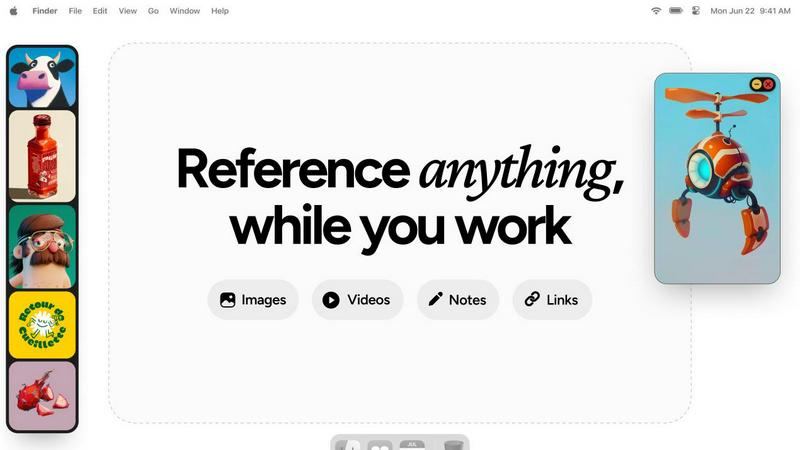
Refbox provides instant access to your images, videos, and notes right above your workspace for effortless referencing.
Last updated: February 28, 2026
Visual Comparison
Perkoon

Refbox
Feature Comparison
Perkoon
Unlimited Free P2P Transfers
Perkoon's core feature is its unlimited, free peer-to-peer file transfer. When both sender and recipient are online, files are beamed directly from one browser to another. This method imposes no file size limits, requires no accounts, and costs Perkoon nothing in server bandwidth—a saving they pass directly to you. Most importantly, because the data stream never passes through Perkoon's servers, it guarantees unparalleled privacy and speed for your transfers.
Encrypted Cloud Storage for Offline Sending
For when your recipient isn't online, Perkoon offers secure, encrypted cloud storage. This is a paid feature, and Perkoon is upfront about why: honestly covering the cost of running and maintaining the servers that hold your files. Your data is encrypted on their servers, providing a secure "hold" until the other person is ready to download, bridging the gap when instant P2P isn't possible.
Native AI & Automation Integration
Perkoon is built for the future of work. It features a native API (window.__perkoon) that allows AI assistants and automation scripts to interact with the service directly, without the need for inefficient screen-scraping. This means your workflows and AI agents can send and manage files through Perkoon programmatically, seamlessly integrating file transfer into automated processes.
Simple CLI & Browser Tool
Beyond the web interface, Perkoon provides a straightforward Command Line Interface (CLI) tool. This empowers developers, power users, and automated systems to initiate and manage file transfers directly from a terminal, offering flexibility and integration capabilities that go far beyond a standard web upload form.
Refbox
Floating Reference Frames
Refbox offers floating frames that stay on top of all other applications, providing instant access to your references without disrupting your workflow. You can resize these frames to fit your needs, ensuring that your workspace remains clutter-free while all your essential media is always within reach.
Infinite Canvas
The infinite canvas feature allows users to view all their media at once, flipping through items like a slideshow for quick comparisons. This capability makes it easy to assess multiple references simultaneously, streamlining the creative process and facilitating better decision-making.
Auto-Hide Functionality
Refbox includes an auto-hide option that lets you minimize distractions by hiding the floating frames until you need them. This feature ensures that your references are only visible when required, allowing you to maintain focus on your creative tasks without unnecessary interruptions.
Customizable Shortcuts
With customizable shortcuts, Refbox gives users complete control over their references. You can quickly swap out floating references, change collections, or lock frames, making it easier to manage your resources efficiently and enhancing your overall productivity.
Use Cases
Perkoon
Sending Large Project Files to Clients
Freelancers and agencies can use Perkoon's free P2P transfer to send massive video edits, design files, or code repositories to clients instantly. There's no need to compress files or split archives across multiple services. Just generate a link, share it, and the client downloads directly from you, with no size caps or wait times.
Secure Document Sharing for Teams
Teams handling sensitive documents, like legal contracts or financial reports, can leverage Perkoon's private P2P streaming. Since files never sit on a third-party server, the risk of a data breach is minimized. For asynchronous sharing, the encrypted cloud storage provides a secure dropbox that only the intended recipient can access.
Automating Backup & File Sync Tasks
Developers and IT professionals can use the Perkoon CLI to script automatic backups of logs, databases, or project assets. By integrating Perkoon into their cron jobs or automation pipelines, they can ensure critical data is transferred to another location without manual intervention, using a reliable and private service.
AI Agent File Management
An AI research assistant can be programmed to use Perkoon's native API to automatically fetch datasets, save processed results, or share generated reports. This turns Perkoon into an intelligent file transfer layer for autonomous agents, enabling them to handle file operations as part of a larger automated task without human oversight.
Refbox
Graphic Design
Graphic designers can utilize Refbox to keep all their reference images, color palettes, and typography samples visible while they create. This accessibility ensures that designers can maintain a consistent style and make quick adjustments as needed, ultimately enhancing their workflow.
Animation
Animators benefit from Refbox by pinning reference videos, character sketches, and storyboard notes in floating frames. This way, they can continuously refer to their visual assets without interrupting their creative process, leading to faster and more efficient animation creation.
UI/UX Development
UI/UX developers can leverage Refbox to organize design inspirations, user interface components, and feedback notes in an easily accessible format. This ensures that they can focus on creating user-friendly interfaces while having all necessary references at hand, streamlining their design process.
Photography
Photographers can use Refbox to pin inspirational images, editing guidelines, and color references during their post-processing work. With everything visible on their desktop, they can make informed decisions quickly, improving both the speed and quality of their editing process.
Overview
About Perkoon
Perkoon is a refreshingly honest file transfer service designed for the modern user who values simplicity, privacy, and genuine utility. It cuts through the noise of bloated platforms by focusing on one core job: moving your files from point A to point B without any hassle. Built for anyone tired of artificial limits, mandatory sign-ups, and services that monetize your data, Perkoon offers a powerful, privacy-first alternative. Its flagship feature is a completely free, unlimited peer-to-peer (P2P) transfer service that works directly between browsers when both parties are online, ensuring your data never touches a central server. For sending files to offline recipients, Perkoon provides encrypted, paid cloud storage, transparently covering the server costs. Uniquely, Perkoon is natively designed for the age of automation, with built-in tools for AI agents and a simple CLI, making it as accessible to machines as it is to people. It's the straightforward, powerful solution for real users who just want to share files, not become the product.
About Refbox
Refbox is an innovative floating reference app tailor-made for creative professionals who require immediate access to their sources of inspiration while working. It allows users to pin a variety of media—images, GIFs, videos, and notes—into always-on-top frames that hover above any application in use. This design eliminates the frustration of switching between multiple windows or tabs, letting artists, designers, and creators maintain their creative flow and focus. By seamlessly integrating different media types, from screenshots to video playback, Refbox ensures that professionals in graphic design, animation, and other creative fields have all their essential references at their fingertips. With Refbox, users can enhance their productivity, minimize distractions, and stay organized, making it an indispensable companion in the creative process.
Frequently Asked Questions
Perkoon FAQ
Is the P2P transfer really free forever?
Yes, Perkoon's peer-to-peer transfer service is completely free and unlimited, with no plans to charge for it. The company's stance is straightforward: since the data moves directly between users' browsers and costs them virtually nothing in server resources, they have no reason to charge you for it. It's free as a matter of principle, not as a temporary promotion.
What happens if the recipient is offline?
If the recipient is not online to receive the direct P2P transfer, Perkoon can hold the file for them using its encrypted cloud storage feature. This is a paid option because it involves Perkoon using its own servers to store your data temporarily. You can choose this method to ensure your file is delivered as soon as the recipient comes online.
Can Perkoon see what I'm sending via P2P?
No. During a peer-to-peer transfer, your file data is streamed directly between the two browsers (or devices) using a secure WebRTC data channel. Perkoon's servers only help establish the initial connection but do not intercept or have access to the actual file content. They literally cannot see what you are sending.
Which web browsers are supported?
Perkoon works best on Chromium-based browsers like Chrome, Edge, and Brave, which offer full, unrestricted support for the advanced P2P technology. Firefox and Safari can be used but have inherent browser limitations that may affect performance or file size capabilities for direct P2P transfers.
Refbox FAQ
What types of media can I pin in Refbox?
Refbox allows you to pin images, GIFs, videos, and text notes, enabling a diverse range of media to be organized and accessed easily while you work.
Is Refbox compatible with all applications?
Yes, Refbox is designed to float above any application, making it compatible with various software environments, including design tools, video editors, and web browsers.
Can I customize the appearance of the floating frames?
Absolutely! You can resize and reposition the floating frames according to your preferences, ensuring that they blend seamlessly into your workspace and suit your creative style.
Is there a mobile version of Refbox available?
Currently, Refbox is primarily designed for desktop use, focusing on providing an optimal experience for creatives working on their computers. Future mobile versions may be considered based on user demand.
Alternatives
Perkoon Alternatives
Perkoon is a straightforward file transfer service in the productivity category, designed to move files without mandatory accounts or artificial limits. Its core is a free, unlimited peer-to-peer transfer that works directly between browsers. Users often explore alternatives for various reasons. Some may need features Perkoon doesn't emphasize, like deep integration with specific cloud ecosystems or advanced team collaboration tools. Others might prioritize different pricing models or require guaranteed platform availability on all their devices. When evaluating other options, consider your primary needs. Key factors include transfer speed and reliability, the true cost structure (free tiers vs. subscriptions), platform support (web, mobile, desktop apps), and the provider's stance on privacy and data handling. The best choice aligns with your specific workflow.
Refbox Alternatives
Refbox is an innovative floating reference app tailored for creatives seeking easy access to their sources of inspiration while working. It falls under the productivity and management category, designed specifically to enhance workflow for artists, designers, and content creators by keeping essential resources visible above their applications. Users often search for alternatives to Refbox due to factors such as pricing, specific feature sets, or compatibility with different platforms. When selecting an alternative, it’s crucial to consider the availability of similar features, ease of use, and how well it integrates into your existing workflow. Ensuring that the chosen tool meets your creative needs without adding unnecessary complexity will significantly improve your productivity.