
Proofapp vs Refbox
Side-by-side comparison to help you choose the right AI tool.

Proofapp
Stop endless email feedback by pinning comments directly on your website.
Last updated: March 4, 2026

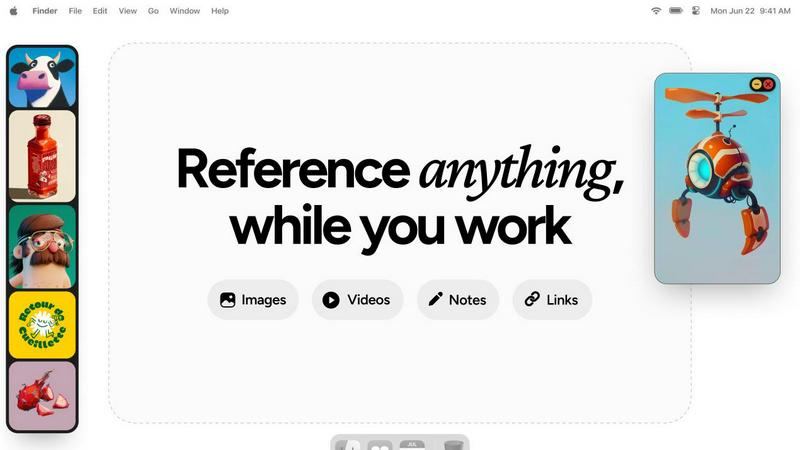
Refbox provides instant access to your images, videos, and notes right above your workspace for effortless referencing.
Last updated: February 28, 2026
Visual Comparison
Proofapp

Refbox
Feature Comparison
Proofapp
Visual Commenting
This is the heart of Proofapp. Instead of describing changes in lengthy emails, reviewers simply click on any part of the captured website screenshot to leave a comment. This pins the feedback directly to the exact pixel, eliminating confusing instructions like "move the button a bit to the left, under the header." Comments support rich threads, allowing for back-and-forth discussion directly on the design element in question, ensuring perfect clarity and context for every piece of feedback.
Multi-Breakpoint Testing
Proofapp understands modern web design requires a responsive approach. When you submit a URL, it automatically generates screenshots for both desktop and mobile views in one go. This allows teams and clients to review the user experience across critical breakpoints simultaneously, catching layout or functionality issues specific to each device without needing to manually resize browsers or take separate screenshots.
Secure, Account-Free Sharing
Streamlining client collaboration is a priority. With Proofapp, you can share a review project by generating a secure, shareable link. The powerful feature is that your clients or external stakeholders do not need to create an account or log in to view the screenshots and leave comments. This drastically reduces friction in the feedback collection process, making it as easy as sending a link, while you maintain control over project access.
Real-Time Collaboration & Resolution
Feedback becomes a live conversation. Team members and clients see new comments and replies appear in real-time, fostering a dynamic collaborative environment. Each comment can be marked as "resolved" once the feedback has been addressed, providing a clear, visual progress tracker for the entire project. This feature turns a static list of notes into an actionable workflow, ensuring nothing falls through the cracks.
Refbox
Floating Reference Frames
Refbox offers floating frames that stay on top of all other applications, providing instant access to your references without disrupting your workflow. You can resize these frames to fit your needs, ensuring that your workspace remains clutter-free while all your essential media is always within reach.
Infinite Canvas
The infinite canvas feature allows users to view all their media at once, flipping through items like a slideshow for quick comparisons. This capability makes it easy to assess multiple references simultaneously, streamlining the creative process and facilitating better decision-making.
Auto-Hide Functionality
Refbox includes an auto-hide option that lets you minimize distractions by hiding the floating frames until you need them. This feature ensures that your references are only visible when required, allowing you to maintain focus on your creative tasks without unnecessary interruptions.
Customizable Shortcuts
With customizable shortcuts, Refbox gives users complete control over their references. You can quickly swap out floating references, change collections, or lock frames, making it easier to manage your resources efficiently and enhancing your overall productivity.
Use Cases
Proofapp
Freelancer-Client Website Approvals
Freelancers and independent contractors can use Proofapp to present website drafts to clients professionally. Instead of exchanging dozens of emails with attached, annotated images, they share a single Proofapp link. Clients click to give precise visual feedback, which the freelancer can then address and mark as resolved. This use case saves hours per project, reduces miscommunication, and presents a polished, efficient workflow that enhances client trust and satisfaction.
In-House Design & Development Handoff
Internal teams can streamline the handoff process between designers and developers. A designer can upload a live prototype or staging site URL to Proofapp. Developers can then click directly on elements to ask specific implementation questions, report bugs visually, or confirm design specs, all within the context of the design itself. This visual thread creates a clear audit trail and reduces back-and-forth in chat apps.
Marketing Team Landing Page Reviews
Marketing teams often need collective input on campaign landing pages from copywriters, designers, and managers. Proofapp allows the entire team to collaborate on a single page simultaneously. Stakeholders can pin comments on headlines, call-to-action buttons, or form fields, ensuring all feedback is consolidated visually in one place, speeding up the revision process before the page goes live.
Agency Managing Multiple Client Projects
Digital agencies managing several client websites can use Proofapp as a centralized feedback hub for all projects. They can organize reviews by client or project, using the platform's dashboard to track open and resolved comments across all active work. The account-free sharing for clients simplifies their process, while the agency benefits from a standardized, professional review system that scales with their workload.
Refbox
Graphic Design
Graphic designers can utilize Refbox to keep all their reference images, color palettes, and typography samples visible while they create. This accessibility ensures that designers can maintain a consistent style and make quick adjustments as needed, ultimately enhancing their workflow.
Animation
Animators benefit from Refbox by pinning reference videos, character sketches, and storyboard notes in floating frames. This way, they can continuously refer to their visual assets without interrupting their creative process, leading to faster and more efficient animation creation.
UI/UX Development
UI/UX developers can leverage Refbox to organize design inspirations, user interface components, and feedback notes in an easily accessible format. This ensures that they can focus on creating user-friendly interfaces while having all necessary references at hand, streamlining their design process.
Photography
Photographers can use Refbox to pin inspirational images, editing guidelines, and color references during their post-processing work. With everything visible on their desktop, they can make informed decisions quickly, improving both the speed and quality of their editing process.
Overview
About Proofapp
Proofapp is a visual feedback and collaboration platform designed to eliminate the chaos of traditional website and design review processes. It transforms how designers, developers, marketers, and their clients work together by making feedback visual, contextual, and organized. The core idea is simple: stop the endless email chains and vague notes. Instead, users paste any website URL, and Proofapp automatically captures clean screenshots at both desktop and mobile breakpoints. Reviewers can then click directly on the image to pin comments, creating a precise, visual dialogue that leaves no room for misinterpretation. Built with a mobile-first and user-centric approach, the platform requires no accounts for clients, offers real-time notifications, and integrates seamlessly into existing workflows. Whether you're a solo freelancer needing to collect client sign-off or an in-house team managing multiple project stakeholders, Proofapp's value proposition is clear: save significant time, reduce revision cycles by up to 60%, and ship higher-quality work faster by keeping all feedback actionable and in one centralized, visual dashboard.
About Refbox
Refbox is an innovative floating reference app tailor-made for creative professionals who require immediate access to their sources of inspiration while working. It allows users to pin a variety of media—images, GIFs, videos, and notes—into always-on-top frames that hover above any application in use. This design eliminates the frustration of switching between multiple windows or tabs, letting artists, designers, and creators maintain their creative flow and focus. By seamlessly integrating different media types, from screenshots to video playback, Refbox ensures that professionals in graphic design, animation, and other creative fields have all their essential references at their fingertips. With Refbox, users can enhance their productivity, minimize distractions, and stay organized, making it an indispensable companion in the creative process.
Frequently Asked Questions
Proofapp FAQ
How do reviewers leave comments without an account?
The process is designed for maximum ease. When you create a project in Proofapp and share the generated secure link, anyone with that link can view the screenshots. They can click anywhere on the image to leave a comment, add attachments, and reply to threads immediately, without any sign-up form or login barrier. Account management is handled solely by the project creator.
Does Proofapp work on live websites or just static images?
Proofapp works directly on live websites. You simply paste any publicly accessible URL into the platform. It then uses its system to capture fresh, current screenshots of that live page at the defined breakpoints. This ensures feedback is always based on the most up-to-date version of the site or web app.
Can I review more than one page at a time?
Yes, Proofapp supports multi-page projects. You can add multiple URLs to a single project, and it will capture screenshots for each page. This is ideal for reviewing user flows, entire website sections, or a set of landing pages, keeping all related feedback organized together in one collaborative workspace.
What kind of files can I attach to comments?
To provide complete context, Proofapp allows users to attach various files directly to their comments. This typically includes images (like alternative design mockups), documents (PDFs, Word files), and other common file types. This ensures that all relevant reference material is pinned directly to the discussion point, avoiding separate email attachments.
Refbox FAQ
What types of media can I pin in Refbox?
Refbox allows you to pin images, GIFs, videos, and text notes, enabling a diverse range of media to be organized and accessed easily while you work.
Is Refbox compatible with all applications?
Yes, Refbox is designed to float above any application, making it compatible with various software environments, including design tools, video editors, and web browsers.
Can I customize the appearance of the floating frames?
Absolutely! You can resize and reposition the floating frames according to your preferences, ensuring that they blend seamlessly into your workspace and suit your creative style.
Is there a mobile version of Refbox available?
Currently, Refbox is primarily designed for desktop use, focusing on providing an optimal experience for creatives working on their computers. Future mobile versions may be considered based on user demand.
Alternatives
Proofapp Alternatives
Proofapp is a visual feedback and website review platform in the design tools category. It streamlines collaboration by letting teams and clients pin comments directly on live website screenshots, eliminating messy email threads and vague feedback. Users often explore alternatives for various reasons. These can include budget constraints, the need for specific integrations like project management apps, or requirements for more advanced features such as video feedback or user testing capabilities beyond static review. When choosing a different tool, prioritize a mobile-friendly experience and seamless workflow integration. Look for core functionality like in-context commenting, real-time notifications, and a simple review process for clients. The right platform should centralize feedback visually to keep projects moving fast.
Refbox Alternatives
Refbox is an innovative floating reference app tailored for creatives seeking easy access to their sources of inspiration while working. It falls under the productivity and management category, designed specifically to enhance workflow for artists, designers, and content creators by keeping essential resources visible above their applications. Users often search for alternatives to Refbox due to factors such as pricing, specific feature sets, or compatibility with different platforms. When selecting an alternative, it’s crucial to consider the availability of similar features, ease of use, and how well it integrates into your existing workflow. Ensuring that the chosen tool meets your creative needs without adding unnecessary complexity will significantly improve your productivity.