
Kling 5 vs Seedance 2.0
Side-by-side comparison to help you choose the right AI tool.

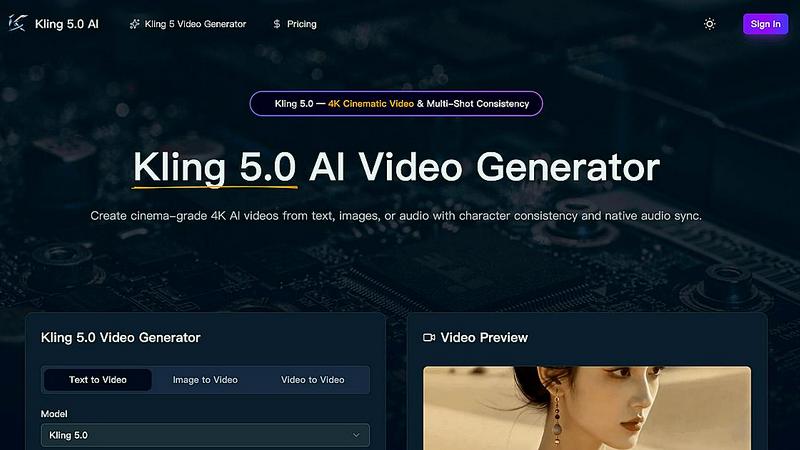
Kling 5.0 is an AI video generator that effortlessly creates 4K cinematic videos from text, images, or audio with stunning realism and consistency.
Last updated: April 13, 2026

Seedance 2.0
Seedance 2.0 instantly creates professional, stable videos from your text or images.
Last updated: February 28, 2026
Visual Comparison
Kling 5
Seedance 2.0

Feature Comparison
Kling 5
AI-Powered Video Generation
Kling 5.0 employs cutting-edge AI algorithms to generate high-quality videos directly from user-provided text prompts. This innovative technology ensures that users can create visually appealing content quickly and efficiently.
Cinematic Quality
With Kling 5.0, users can produce videos that boast a professional, cinematic look and feel. The platform's advanced rendering capabilities deliver stunning visuals, making your videos stand out in any competitive environment.
Easy to Use
The user-friendly interface of Kling 5.0 makes video creation accessible to everyone, regardless of their experience level. The straightforward process allows users to focus on creativity rather than navigating complex software.
Versatile Styles
Kling 5.0 supports a wide variety of video styles, such as cinematic, animated, and more. This versatility enables users to tailor their videos to suit different projects and audiences, ensuring effective communication of their ideas.
Seedance 2.0
Multimodal Video Generation
Seedance 2.0 accepts multiple input formats to kickstart your creation. Use a descriptive sentence for Text-to-Video, upload a reference image to guide composition and style with Image-to-Video, or provide a simple script to shape story beats and pacing. This flexibility lets you start your creative process from wherever inspiration strikes, all within a single, streamlined app interface designed for ease of use on any device.
Integrated Audio-Video Generation (Pro)
This groundbreaking feature sets Seedance 2.0 apart. The Pro version can generate video and perfectly synchronized audio in a single forward pass. It adds realistic sound effects, fitting background music, and even speech synthesis with multilingual lip-sync. This eliminates the need for separate audio editing software, dramatically simplifying your workflow and allowing you to produce complete, professional audiovisual content directly from your prompt.
Physics-Aware Motion Engine
The model excels at simulating real-world physical dynamics, making generated videos feel authentic and immersive. It accurately renders complex motions like cloth fluttering naturally in the wind, water with realistic splash physics, dynamic flames and smoke, and intricate particle effects. This deep understanding of physics contributes significantly to the hyper-realistic and coherent motion that defines the Seedance 2.0 experience.
Temporal Consistency Architecture
At its core, Seedance 2.0 uses a specialized diffusion transformer designed for time-consistent frames. Its advanced temporal attention mechanism reuses motion cues across frames to preserve character identity, body proportions, lighting conditions, and scene geometry. This results in remarkably stable videos with smoother transitions and significantly fewer visual artifacts or flickers, providing a polished, professional output every time.
Use Cases
Kling 5
Content Creation for Social Media
Kling 5.0 is perfect for content creators who need to produce engaging videos for platforms like Instagram, TikTok, or YouTube. The quick turnaround time allows for timely content that resonates with audiences.
Marketing and Promotional Videos
Businesses can leverage Kling 5.0 to create eye-catching promotional videos that highlight their products or services. The cinematic quality of the videos can enhance brand storytelling and improve audience engagement.
Educational and Training Videos
Educators can utilize Kling 5.0 to develop informative video content for online courses or training modules. The platform allows for the integration of various styles and formats, making learning more interactive and enjoyable.
Storyboarding and Prototyping
Filmmakers and animators can use Kling 5.0 to visualize concepts and storyboard ideas quickly. With character consistency and realistic physics simulation, this tool helps professionals prototype scenes effectively.
Seedance 2.0
Social Media Content Creation
Ideal for creators who need to produce engaging, high-quality video content quickly for platforms like TikTok, Instagram Reels, and YouTube Shorts. The app's mobile-friendly design and ability to generate complete, stylized clips from a single text prompt or image allow for rapid ideation and publishing, helping you maintain a consistent and captivating visual brand across all your channels.
Marketing and Advertisement Prototyping
Marketing teams can use Seedance 2.0 to rapidly visualize concepts and create compelling ad prototypes without extensive production budgets. The ability to generate video with synchronized audio and maintain consistent character identity makes it perfect for testing different creative directions, storyboards, and promotional styles efficiently before committing to full-scale production.
Storyboarding and Pre-Visualization
Filmmakers, animators, and game developers can leverage the tool to bring their scripts and ideas to life during pre-production. By inputting a script or descriptive prompts, they can generate dynamic visual sequences to explore scene composition, camera angles, and character motion, facilitating better planning, communication, and creative decision-making early in the project lifecycle.
Educational and Explainer Videos
Educators and trainers can transform complex information into engaging animated explainer videos. Using text or image inputs, they can create clear visual narratives with coherent motion and optional audio narration to illustrate concepts, processes, or historical events, making learning materials more accessible and memorable for students and trainees.
Overview
About Kling 5
Kling 5.0 is a groundbreaking AI video generator that empowers users to craft stunning video content effortlessly, regardless of their technical expertise. By harnessing advanced artificial intelligence, Kling 5.0 converts text prompts into high-quality, cinematic videos in mere seconds. Gone are the days of complicated editing software and tedious production workflows. This innovative platform allows you to bring your creative visions to life and share them with the world with just a few clicks.
Designed for a broad audience, from content creators to marketers, Kling 5.0 provides an intuitive user experience. Users can simply enter a text prompt detailing their desired video scene, characters, and style, and the AI will generate a unique, visually captivating video. With various video styles to choose from, including cinematic and animated options, Kling 5.0 caters to diverse projects, making it a versatile tool for anyone looking to enhance their video production capabilities.
About Seedance 2.0
Seedance 2.0 is the revolutionary AI video generation model developed by ByteDance's Seed research team, designed to put Hollywood-level production quality at your fingertips. This isn't just another video generator; it's a comprehensive, multimodal creative suite that transforms simple inputs like text, images, or scripts into stunning, coherent video clips with unmatched motion fluidity and detail. Built on a novel diffusion transformer architecture, its core innovation is a relentless focus on temporal consistency, ensuring characters, lighting, and scenes remain stable and believable frame-by-frame, eliminating the flicker and identity drift common in other AI tools. Whether you're a mobile-first content creator, a marketer needing rapid prototypes, or a filmmaker exploring new visual ideas, Seedance 2.0 streamlines your workflow. Its standout Pro feature integrates synchronized audio generation—including sound effects, music, and lip-sync—directly into the video creation process in a single step. This means you can go from a simple prompt to a polished, audiovisual scene without jumping between different apps, making professional video creation more accessible, intuitive, and efficient than ever before.
Frequently Asked Questions
Kling 5 FAQ
What types of videos can I create with Kling 5?
You can create a wide range of videos, including cinematic, animated, and narrative styles. The platform allows for customization based on your specific project needs.
Can I use my own audio in the videos?
Yes, Kling 5.0 allows you to add music and sound effects to your videos. You can also generate native audio that is synchronized with the visuals for a complete audio-visual experience.
Is there a limit to the length of videos I can create?
Kling 5.0 supports video generation up to 15 seconds long. This length is ideal for quick, impactful content that captures viewers' attention.
How does the character consistency feature work?
The character consistency feature ensures that characters maintain identical facial features and proportions across different shots. This is achieved through the Omni Subject Library, which locks character appearances for seamless multi-shot projects.
Seedance 2.0 FAQ
What makes Seedance 2.0 different from other AI video generators?
Seedance 2.0 distinguishes itself through its proprietary diffusion transformer architecture built specifically for exceptional temporal consistency, drastically reducing flicker and identity drift. Its most unique offering is the integrated audio-video generation in the Pro version, which creates synchronized sound and video in one step. Furthermore, its physics-aware motion engine produces remarkably realistic dynamic effects like cloth movement and water physics, leading to more coherent and professional results.
Can I control the aspect ratio and quality of the generated video?
Yes, the platform provides intuitive controls for tailoring your output to different platforms. You can select from standard aspect ratios like 9:16 (vertical), 1:1 (square), and 16:9 (widescreen). You also have clarity/resolution options to match your quality needs, ensuring your videos are optimized whether for mobile stories, social feeds, or widescreen presentations.
What is the "Fixed Lens" option in the video generator?
The "Fixed Lens" feature keeps the camera view static and stable throughout the generated video clip. This is useful for creating scenes where you want the focus to remain on the subject's action and motion without any camera movement, simulating a tripod-shot scene and providing more directorial control over the final output.
How does the Image-to-Video feature work?
When you upload a reference image, Seedance 2.0 uses it to guide multiple aspects of the generated video. The model analyzes the image's composition, visual style, color palette, and subject identity, then animates the scene while striving to preserve these core elements. This allows you to animate a still photo, continue a scene from a specific frame, or ensure a character looks consistent across multiple video generations.
Alternatives
Kling 5 Alternatives
Kling 5 is an innovative AI video generator that allows users to create high-quality, cinematic videos effortlessly. This platform caters to individuals and businesses alike, aiming to simplify the video production process by transforming text prompts into engaging visual narratives. Users commonly seek alternatives to Kling 5 for various reasons, such as pricing structures, specific feature sets, or platform compatibility with their unique needs. When exploring alternatives, it's essential to consider factors like ease of use, quality of output, and the variety of styles available for video creation. Additionally, users should evaluate customization options, resolution capabilities, and overall value for money to ensure they find a solution that best fits their video production goals.
Seedance 2.0 Alternatives
Seedance 2.0 is a leading AI video generator that transforms text prompts or reference images into high-quality, dynamic videos. It's known for its advanced motion physics and consistent style, making it a powerful tool for creators who need professional-looking video content without complex editing. Users often explore alternatives for various reasons. Some may need a different pricing model or a free tier to start. Others might require specific features like longer video outputs, different artistic styles, or integration with their existing mobile or desktop workflow. The platform's availability or specific use-case restrictions can also prompt a search for other options. When choosing an alternative, focus on your core needs. Consider the quality of motion and frame stability, the ease of use on your preferred device, and the flexibility of input methods like text or image. Also, evaluate the cost structure and whether the tool's output aligns with your creative or professional goals.