
conceptviz vs SimpleDraw
Side-by-side comparison to help you choose the right AI tool.

conceptviz
ConceptViz transforms simple text into clear, classroom-ready science and math diagrams for all education levels.
Last updated: February 28, 2026

SimpleDraw
Create precise scale drawings and floor plans instantly online with SimpleDraw, no experience or downloads needed.
Last updated: March 1, 2026
Visual Comparison
conceptviz

SimpleDraw
Feature Comparison
conceptviz
Mobile-First Design
ConceptViz is optimized for mobile use, allowing educators and researchers to create diagrams anytime, anywhere. The app-centric interface ensures a smooth user experience on all devices, making it easy to generate visuals during lesson planning or while conducting research.
Plain English Input
Users can describe the diagrams they need using simple, plain-English descriptions. This intuitive feature allows for quick and accurate generation of visuals, making it accessible for users of all skill levels without requiring any design or drawing expertise.
Projector-Ready Output
The generated diagrams are designed with clarity in mind, featuring high contrast, thick lines, and readable labels. This ensures that visuals remain clear and effective, whether displayed on a classroom projector or printed on handouts for students.
Subject and Grade Presets
ConceptViz offers a range of presets tailored for various subjects and grade levels, including physics, biology, chemistry, earth and space science, and math. These presets streamline the diagram creation process, making it easy to find appropriate templates for specific educational needs.
SimpleDraw
Accurate Measurements & Scale Drawing
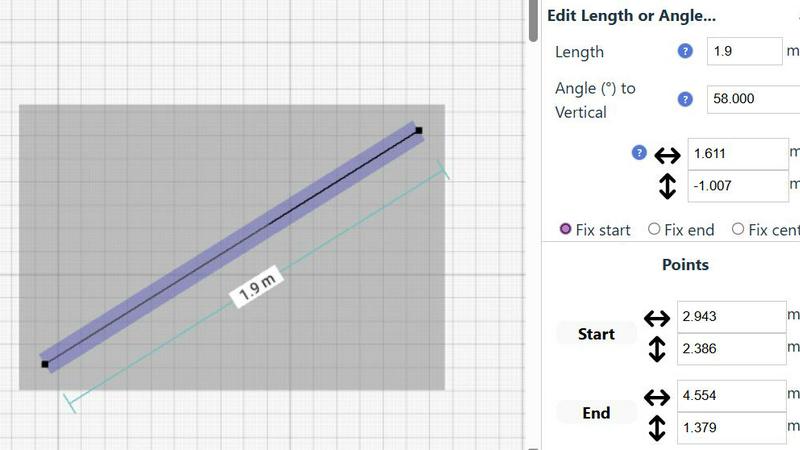
SimpleDraw excels in providing precise measurements and scale drawing capabilities. With smart alignment features, users can ensure that their drawings are not only accurate but also perfectly to scale, allowing for professional-quality results without the need for specialized training.
Specialized Floor Plan Creator
The dedicated Floor Plan Mode allows users to create detailed layouts with walls, doors, and furniture in just a few clicks. This feature streamlines the design process, making it easy to visualize spaces before embarking on any renovation or decoration project.
Smart Alignment System
This intelligent system assists users in placing points and lines exactly where they want them. By providing visual indicators and contextual help, it enhances precision and control, making it easier to achieve the desired layout without frustration.
Comprehensive Measurement System
SimpleDraw includes a robust measurement system that allows users to choose between metric and standard US units. Dynamic contextual measurements display as you work, ensuring that your drawings are as accurate as possible and tailored to your specifications.
Use Cases
conceptviz
Classroom Presentations
Teachers can use ConceptViz to quickly create engaging and informative diagrams for classroom presentations. This allows them to illustrate complex concepts in a visually appealing way, enhancing student understanding and retention.
Homework Assignments
Students can generate diagrams for their homework assignments, providing them with the tools to visually explain their understanding of scientific or mathematical concepts. This fosters a deeper comprehension and encourages them to engage more actively with the material.
Research Publications
Researchers can rely on ConceptViz to create precise, publication-ready diagrams that accurately represent their findings. This helps in conveying complex ideas clearly and effectively, making their research accessible to a wider audience.
Collaborative Projects
Groups of students working on collaborative projects can use ConceptViz to produce cohesive and consistent visuals that reflect their collective understanding. This tool enables them to communicate their ideas better and present their work in a professional manner.
SimpleDraw
Kitchen & Bathroom Planning
Users can plan their kitchen and bathroom renovations with accurate measurements to visualize layouts before beginning any work. This practical use of SimpleDraw allows for better decision-making and efficient design.
Room Layouts & Furniture Planning
Designing room layouts becomes effortless with SimpleDraw. Users can experiment with different furniture arrangements in bedrooms, living rooms, or offices, ensuring that everything fits perfectly before making any purchases.
House & Apartment Plans
Create complete floor plans for various home projects, whether for personal use or rental listings. SimpleDraw provides the tools necessary to generate comprehensive layouts, aiding in effective space planning.
DIY and Home Renovation Projects
For DIY enthusiasts, SimpleDraw offers a platform to sketch out home improvement ideas. From initial layouts to detailed designs, users can refine their concepts and visualize the final outcome without needing extensive drafting skills.
Overview
About conceptviz
ConceptViz is an innovative AI-powered diagram generator tailored specifically for STEM education and research. Designed to simplify the process of creating accurate and visually appealing diagrams, it enables educators, students, and researchers to transform intricate scientific and mathematical concepts into clear, classroom-ready visuals in mere seconds. The primary value proposition of ConceptViz lies in its ability to save users significant time and effort by eliminating the tedious tasks of manually drawing diagrams or sifting through unsuitable stock images online. With its mobile-first and app-centric design, users can seamlessly create diagrams from any device, making it an ideal companion for lesson planning or research sessions on-the-go. ConceptViz caters to a broad spectrum of users, from K-12 teachers needing simple diagrams for worksheets to graduate-level researchers requiring detailed figures for publications. By allowing users to describe diagrams in plain English, it empowers content experts to craft precise visuals that align with their unique teaching styles or explanatory needs.
About SimpleDraw
SimpleDraw is an innovative, free online tool that democratizes the art of scale drawing, making it accessible for everyone from DIY enthusiasts to casual users. With its intuitive interface, SimpleDraw simplifies the complexities of technical drafting, allowing users to create precise floor plans and architectural drawings directly from their web browser. No installation or login is required, making it easy to dive right into your projects without any prior CAD experience. Whether you are sketching a layout for your new kitchen or planning a detailed renovation, SimpleDraw offers professional-grade precision in a user-friendly package. The platform is designed to empower users with features like real-time measurements and smart alignment, ensuring that your drawings are both accurate and visually appealing. With SimpleDraw, you can effortlessly bring your ideas to life, creating clear visual plans that cater to any project, whether it be home improvement, rental listings, or interior design.
Frequently Asked Questions
conceptviz FAQ
How does ConceptViz work?
ConceptViz operates by allowing users to sign in, select a subject, and describe the diagram they need in plain English. The AI then generates a high-quality, projector-ready visual based on the input provided.
Is there a mobile app for ConceptViz?
Yes, ConceptViz is designed with a mobile-first approach, ensuring that users can access the platform and create diagrams from any mobile device, making it convenient for on-the-go use.
Can I download the diagrams created with ConceptViz?
Absolutely! Users can download generated diagrams in high-resolution PNG format, making it easy to incorporate them into slides, handouts, or other educational materials.
What subjects does ConceptViz cover?
ConceptViz caters to a wide range of subjects including physics, biology, chemistry, earth and space science, and math, with specific presets available for different grade levels from elementary to high school and beyond.
SimpleDraw FAQ
Is SimpleDraw free to use?
Yes, SimpleDraw is completely free to use. There are no hidden fees, and you do not need to sign up or download any software to start drawing.
Do I need any prior CAD experience to use SimpleDraw?
No, SimpleDraw is designed for everyone, including those with no prior CAD experience. Its intuitive interface makes it easy for beginners to create professional-quality drawings.
Can I access SimpleDraw on my mobile device?
Yes, SimpleDraw works directly in your web browser, making it accessible on various devices, including smartphones and tablets, for a seamless drawing experience on the go.
How can I provide feedback or request new features?
Users are encouraged to join the SimpleDraw Discord community, where they can share feedback and suggest new features. The team actively listens to user input to continuously improve the platform.
Alternatives
conceptviz Alternatives
ConceptViz is an AI-powered diagram generator tailored for STEM education and research. It allows users to effortlessly create clear and effective science and math diagrams from simple text descriptions, making it an invaluable tool for educators and researchers alike. However, users often seek alternatives due to varying needs such as budget constraints, specific feature requirements, or preferences for different platforms or user interfaces. When searching for an alternative to ConceptViz, it's essential to consider factors like ease of use, the range of subjects and grade levels supported, and the quality of the visual output. Additionally, look for solutions that fit seamlessly into your existing workflow, whether that involves integration with other educational tools or compatibility with various devices for optimal user experience.
SimpleDraw Alternatives
SimpleDraw is an innovative online design tool that enables users to create accurate scale drawings and detailed floor plans directly in their web browser, all for free. As a part of the design tools category, it caters to casual users, DIY enthusiasts, and anyone looking to visualize their space without the need for complex software. However, many users may seek alternatives for various reasons, including the need for additional features, specific platform compatibility, or different pricing structures. When searching for an alternative, consider the ease of use, the range of functionalities offered, and whether it meets your specific project requirements. Choosing the right alternative also involves evaluating how well the tool can adapt to your workflow and whether it offers robust support for the types of projects you undertake. Look for features that enhance your design process, such as smart alignment systems, flexibility in zooming, and precision control. Ultimately, the goal is to find a tool that not only meets your technical needs but also enhances your overall user experience.