
Sketch To vs Vailo AI
Side-by-side comparison to help you choose the right AI tool.

Sketch To
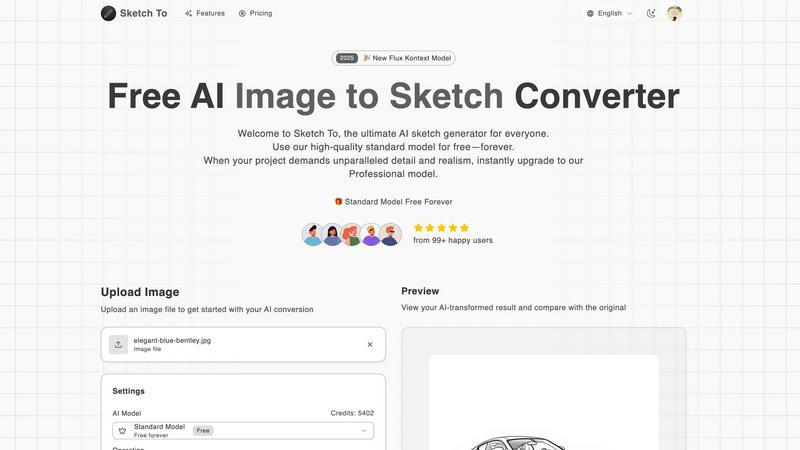
Sketch To instantly transforms your photos into AI sketches and sketches back into images.
Last updated: February 28, 2026

Vailo AI
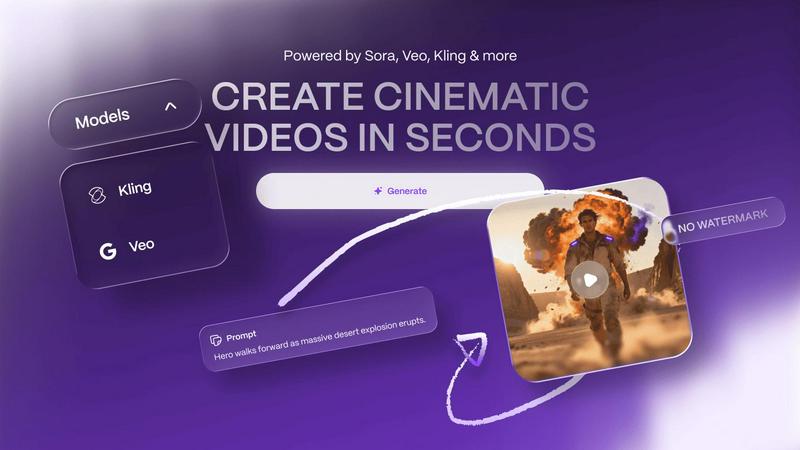
Vailo AI effortlessly transforms your text and images into stunning videos and images in seconds, no design skills.
Last updated: February 28, 2026
Visual Comparison
Sketch To
Vailo AI
Feature Comparison
Sketch To
Dual-Direction AI Conversion
Sketch To's core power lies in its two-way conversion engine. Not only can you transform any uploaded photo into a variety of artistic sketches, but you can also take a simple line drawing or sketch and use AI to generate a fully realized, photorealistic image from it. This unique functionality serves as both a fantastic artistic filter and a powerful ideation tool, bridging the gap between initial concept and final visual.
Mobile-First, Web-Based Platform
Access powerful AI conversion without ever downloading an app. Sketch To is built for the modern creator, offering a fully responsive, browser-based experience that works flawlessly on smartphones, tablets, and desktops. This eliminates software installation hurdles and device compatibility issues, putting professional-grade artistic tools directly in your pocket for creativity on the go.
Tiered AI Model System (Standard & Pro)
The platform caters to every need with its two-tier model system. The Standard Model is a powerful, free-to-use option perfect for social media content, hobbies, and personal projects. For projects demanding the highest fidelity, the Professional Model unlocks superior detail, texture, and realism, making it suitable for commercial work and professional portfolios, all managed through a simple credit system.
Extensive Artistic Style Library
Go beyond a simple pencil filter. Sketch To offers a wide array of pre-configured artistic styles to choose from, including Pencil Sketch, Charcoal, Ink, Colored Pencil, Comic, Concept Art, and Watercolor simulations. This allows users to match the output to their specific creative vision, whether they're aiming for a classic drawing look or a specific illustrative aesthetic.
Vailo AI
Text-to-Video (T2V)
The Text-to-Video feature allows users to transform written content into engaging videos seamlessly. By simply inputting text, users can generate cinematic visuals that bring their narratives to life, making storytelling more dynamic and visually appealing.
Image-to-Video (I2V)
With the Image-to-Video capability, users can convert static images into animated videos effortlessly. This feature is perfect for enhancing product showcases or creating lively visual content from existing images, saving time while delivering high-quality results.
User-Friendly Interface
Vailo AI's professional user interface is designed with user experience in mind. It provides a streamlined workflow, making it easy for users, regardless of their technical skills, to navigate and utilize the platform's powerful tools effectively.
Motion Control and Editing
Vailo AI offers advanced motion control and editing features that allow users to adjust video elements precisely. Users can manipulate motion, apply effects, and fine-tune their videos to achieve a polished finish, making content creation more versatile and creative.
Use Cases
Sketch To
Social Media Content Enhancement
Creators and influencers can instantly generate eye-catching, artistic versions of their photos for Instagram, TikTok, or Pinterest. Transforming a standard portrait or landscape into a pencil sketch or digital art piece adds a unique, engaging aesthetic that helps content stand out in a crowded feed, all done quickly from a phone.
Professional Concept Art & Storyboarding
Artists and designers can rapidly visualize concepts. By starting with a rough sketch and using the 'Sketch to Image' Pro model, they can generate detailed, realistic mock-ups to present ideas to clients or teams. Conversely, turning reference photos into clean figure or concept sketches aids in the initial drafting and storyboarding process.
Educational & Hobbyist Projects
Students and hobbyists can explore art and design without needing advanced drawing skills. The tool is perfect for school art projects, creating custom illustrations for personal blogs, or simply experimenting with different artistic styles on personal photographs, fostering creativity in a fun, accessible way.
Commercial Design & Marketing Assets
Marketing professionals and small businesses can create unique branded assets. Convert product photos into sketch-style illustrations for website banners, promotional materials, or merchandise. The high-resolution output from the Pro model ensures the quality is suitable for print and professional digital campaigns.
Vailo AI
Social Media Content Creation
Vailo AI is ideal for marketers and brands looking to produce engaging social media content quickly. Users can create short videos that capture attention and drive engagement, ensuring their messaging stands out in crowded feeds.
Product Showcases
E-commerce businesses can leverage Vailo AI to create compelling product showcase videos. By converting images and text into dynamic video formats, brands can highlight features and benefits, enhancing customer interest and driving sales.
Storyboarding for Filmmakers
Filmmakers can utilize Vailo AI to develop storyboards efficiently. By generating video sequences from scripts, they can visualize scenes and improve planning without the need for extensive pre-production resources.
User-Generated Content (UGC)
Creators can harness Vailo AI to produce user-generated content that resonates with audiences. By allowing easy video creation, Vailo empowers users to share their experiences and stories, enriching brand narratives and community engagement.
Overview
About Sketch To
Sketch To is a revolutionary, web-based AI creative suite designed to transform your artistic workflow instantly, right from your mobile device or computer browser. It breaks down the barrier between photography and hand-drawn art with its powerful dual functionality. You can effortlessly convert any photo into a stunning, detailed sketch in styles ranging from pencil and charcoal to watercolor. Uniquely, you can also perform the reverse, breathing life into a simple sketch by transforming it into a photorealistic image with incredible detail. Built with a mobile-first philosophy, the platform requires no software installation, offering a seamless, app-like experience accessible anywhere. It empowers a vast community, from social media hobbyists and students to professional artists and commercial designers. At its core, Sketch To democratizes advanced AI artistry by offering a robust, always-free Standard Model to get started, complemented by a premium Professional Model that delivers world-class realism for critical projects. With instant processing, trial credits for new users, and a flexible credit system, Sketch To makes high-end creative transformation accessible to everyone.
About Vailo AI
Vailo AI is an innovative generative AI studio that revolutionizes the creation of cinematic videos from text and images in mere seconds, offering this service entirely free of charge and without watermarks. It serves a wide array of users, including creators, filmmakers, designers, marketers, and brands, making it easier for them to produce compelling user-generated content (UGC), product showcases, storyboards, and short-form social media videos. The platform's advanced Text-to-Video (T2V) and Image-to-Video (I2V) functionalities empower users to craft visually stunning videos without the need for intricate equipment or editing expertise. With the launch of V2, Vailo AI enhances the user experience with a professional interface, a multi-model engine, and advanced features like video editing and voice synthesis. Whether you're a novice or a seasoned creative, Vailo AI is your ultimate solution for efficiently elevating your creative output.
Frequently Asked Questions
Sketch To FAQ
Is Sketch To really free to use?
Yes, Sketch To offers a powerful always-free Standard Model. New users receive trial credits to explore the platform's capabilities immediately. Ongoing use of the Standard Model operates on a credit system, with options to earn or purchase credits. For the highest quality Professional Model, credits are required, which can be purchased via various plans.
What image formats and sizes does Sketch To support?
You can upload common image file formats to get started. The platform specifies a maximum file size of 5MB for uploads. For output, Sketch To provides high-resolution downloads suitable for both digital use and print, ensuring your creations maintain quality whether for social media or professional portfolios.
How does the 'Sketch to Image' feature work?
This feature uses advanced generative AI models. You upload a sketch or line drawing, and the AI intelligently interprets the lines, shapes, and implied forms to create a detailed, textured, and photorealistic image. For the best results, using the Professional Model is recommended as it provides world-class detail and accuracy.
What is the difference between the Standard and Pro model?
The Standard Model is optimized for speed and accessibility, delivering great results for everyday creativity. The Professional Model uses more advanced, computationally intensive AI to achieve significantly higher levels of detail, texture, lighting accuracy, and realism, making it the choice for commercial work and projects where quality is paramount.
Vailo AI FAQ
What types of content can I create with Vailo AI?
You can create a wide variety of content, including cinematic videos, product showcases, storyboards, social media clips, and user-generated content, all tailored to your creative needs.
Is there a cost associated with using Vailo AI?
Vailo AI offers a free plan that includes credits for video and image generation. There are also paid plans available for users who need more access to premium features and higher generation limits.
Do I need any design skills to use Vailo AI?
No, Vailo AI is designed for users of all skill levels. Its intuitive interface allows anyone to create high-quality content without prior design or video editing experience.
Can I edit videos created with Vailo AI?
Yes, Vailo AI includes advanced editing tools that enable users to customize their videos further. You can adjust motion, apply effects, and fine-tune your final product to meet your creative vision.
Alternatives
Sketch To Alternatives
Sketch To is a web-based AI tool in the image and photo category that instantly transforms photos into sketches and sketches into realistic images. It's designed for mobile and desktop browsers, making creative AI art accessible without downloads. Users often explore alternatives for various reasons. Some may need different pricing structures, specific artistic styles not offered, or a tool integrated into a larger creative suite. Others might prioritize offline functionality or have unique workflow requirements that demand a different feature set. When choosing an alternative, consider your primary goal. Look at the quality and style of the AI output, the cost and subscription model, and whether the platform fits your device preference, like a dedicated mobile app versus a web tool. Ease of use and the ability to handle your specific creative projects are key.
Vailo AI Alternatives
Vailo AI is a cutting-edge generative AI studio that allows users to transform text and images into captivating videos in mere seconds. Designed for a broad audience, including creators, marketers, and brands, this platform stands out in the AI Assistants and Generative Art categories. Users often seek alternatives to Vailo AI for various reasons, such as different pricing structures, specific feature sets, or compatibility with various platforms and devices. When choosing an alternative, it's essential to consider the core functionalities that matter most to your creative process. Look for user-friendly interfaces, versatile features like text-to-video and image-to-video capabilities, and the ability to produce high-quality content without extensive technical skills. Evaluating these factors will help ensure you find a solution that meets your unique needs and enhances your video creation experience.