
TinyFast vs Yardyly
Side-by-side comparison to help you choose the right AI tool.

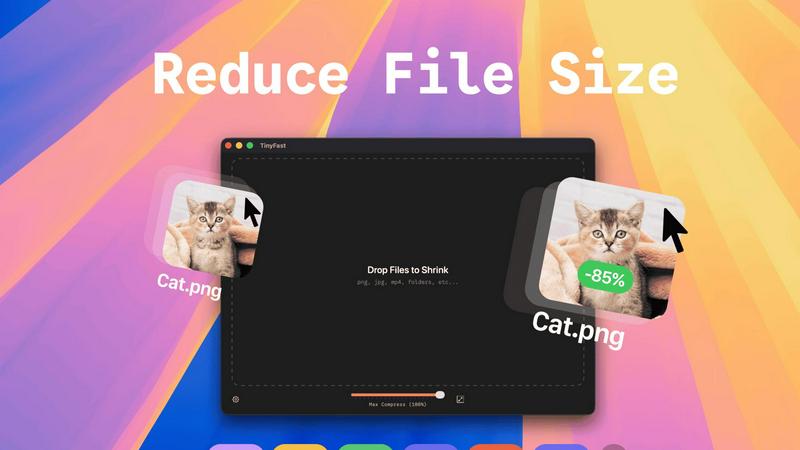
TinyFast instantly compresses images and videos privately on your Mac with simple drag and drop.
Last updated: February 28, 2026

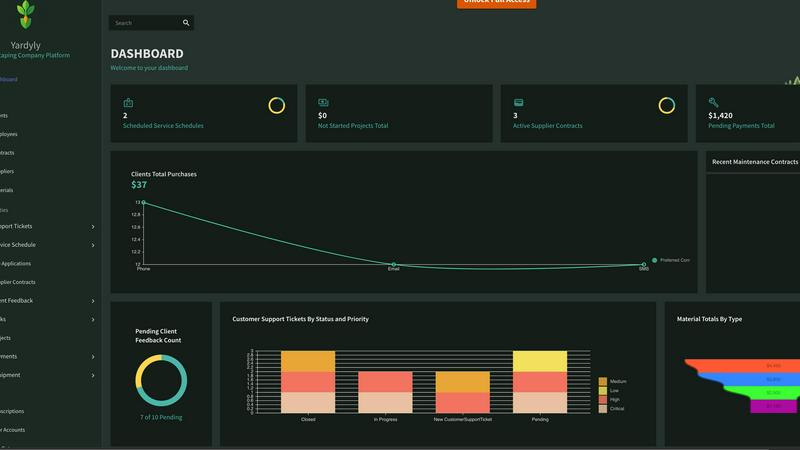
Yardyly is the mobile app that streamlines your landscaping business operations.
Last updated: March 4, 2026
Visual Comparison
TinyFast
Yardyly
Feature Comparison
TinyFast
100% Local & Private Compression
Your files never leave your Mac. TinyFast processes everything directly on your device, ensuring total privacy by design. This is crucial for handling sensitive documents, proprietary designs, or any work covered by non-disclosure agreements, as there are no uploads to cloud servers and no risk of third-party data storage.
Blazing-Fast Drag & Drop Workflow
Experience compression at the speed of your workflow. Just drag your files or entire folders into the TinyFast app and get optimized output in seconds. The app uses optimized native engines built for macOS to shrink large files quickly, eliminating the long wait times associated with uploading and downloading from online tools.
Universal File Format Support
TinyFast supports a wide range of common file types used by creators and professionals. This includes images (PNG, JPG, WEBP, SVG, GIF), videos (MP4, MOV), documents (PDF), audio (MP3), and even code files (JS, CSS, JSON). This versatility means you can consolidate your compression tasks into one simple, always-available Mac app.
Batch Processing & Resolution Control
Boost your productivity by compressing multiple files at once. Drop an entire folder of images or videos, and TinyFast will process them all in a single batch. Additionally, for images and videos, you have the option to automatically resize the resolution during compression, giving you precise control over the final output size and quality.
Yardyly
Centralized Drag-and-Drop Scheduling
Optimize your daily and weekly workflow with an intuitive, visual scheduler. Easily drag and drop jobs to assign crews, adjust timelines, and manage resources in real-time. This mobile-friendly feature allows for on-the-fly changes from any device, ensuring your schedule is always accurate and your team knows exactly where to be, eliminating confusion and missed appointments.
Integrated Customer Management & Invoicing
Keep all client details, communication history, and service records in one secure place. Yardyly’s built-in CRM lets you track customer preferences and job history effortlessly. Coupled with seamless invoicing and payment tracking, you can generate estimates, send invoices, and monitor transactions from a single platform, ensuring precise financial control and faster payments.
Real-Time Team Coordination & Task Management
Enhance field crew productivity with instant updates and clear task delegation. Assign jobs, share customer notes, and update job statuses directly through the app. Your team in the field can mark tasks complete, log hours, and request materials, while you gain live visibility into progress, all from your mobile device, keeping everyone aligned and accountable.
Automated Client Communication & Feedback Loop
Improve customer experience with automated notifications for booking confirmations, service reminders, and invoice alerts. More importantly, Yardyly incorporates a direct feedback channel, allowing clients to provide input that is instantly integrated into project management. This ensures high satisfaction and enables you to make informed, data-driven decisions for service improvements.
Use Cases
TinyFast
Developers Preparing Assets for Deployment
Developers can use TinyFast to quickly optimize application assets like icons, screenshots, and UI graphics directly on their Mac before bundling or deployment. This ensures faster app load times and smaller download sizes while keeping proprietary code and assets completely secure and local throughout the process.
Designers Sharing Portfolios or Client Work
Graphic and UX designers often need to send high-quality proofs or portfolio pieces via email or messaging apps with file size limits. TinyFast allows them to compress images and videos locally without sacrificing critical detail, enabling fast, professional sharing while protecting unreleased client work.
Content Creators Managing Media Libraries
Video editors, bloggers, and social media managers dealing with large libraries of photos and videos can use TinyFast to free up significant storage space on their Mac. Compressing footage for edits or archiving projects becomes a quick, drag-and-drop task that doesn't require a slow internet connection or compromise original files.
Professionals Working Under Confidentiality
Lawyers, consultants, and engineers working with sensitive documents, schematics, or confidential reports can safely reduce file sizes for email or secure transfer. Since TinyFast operates entirely offline, there is zero risk of exposing private information to online compression services, ensuring compliance with strict privacy protocols.
Yardyly
Streamlining Operations for a Growing Landscaping Crew
A small but expanding landscaping business uses Yardyly to move from paper-based scheduling to a digital system. The owner can now assign jobs via drag-and-drop, send automated route details to crew phones, and instantly update clients on arrival times. This reduces daily planning from hours to minutes, minimizes drive time, and supports scaling operations without administrative chaos.
Managing Seasonal Peaks for a Lawn Care Company
During the busy spring and summer seasons, a lawn care company leverages Yardyly to handle a surge in weekly recurring appointments. The automated scheduling and reminder system prevents double-booking and no-shows. Integrated invoicing ensures timely billing after each service, while the mobile app allows crews to quickly close out jobs and move to the next, maximizing daily revenue.
Enhancing Client Relations for a Design-Build Firm
A high-end outdoor design and installation firm uses Yardyly’s CRM and feedback tools to deliver premium service. They track detailed client preferences, project phases, and material selections in one profile. After project milestones, they solicit direct client feedback through the platform, using the insights to adjust plans in real-time, fostering trust and leading to more referral business.
Coordinating Subcontractors and Supplier Orders
For complex projects requiring multiple trades, a project manager uses Yardyly to coordinate subcontractor schedules and track supplier contracts. They can schedule different teams sequentially, share site access notes, and monitor material delivery timelines against the project schedule. This central oversight prevents delays, ensures budget compliance, and streamlines communication with all stakeholders.
Overview
About TinyFast
TinyFast is the ultimate, privacy-first file compression app built exclusively for macOS. It's designed for developers, designers, and creators who need to shrink files instantly and securely, right on their Mac. Forget slow, unreliable online tools that require uploading sensitive assets to unknown servers. With TinyFast, your entire workflow stays local and private. Simply drag and drop your files—including PNG, JPEG, MP4, MOV, PDF, SVG, WebP, MP3, or GIF—into the app and get optimized versions in seconds. Born from a developer's need to handle confidential files safely, TinyFast ensures your assets never leave your machine, making it perfect for anyone working under NDAs or with proprietary content. Engineered for speed with native compression engines, it handles large files without the lag of internet transfers. It's more than a compressor; it's a seamless extension of your creative suite that respects your privacy and turbocharges your productivity by keeping everything fast, simple, and on your device.
About Yardyly
Yardyly is the all-in-one mobile-first platform built specifically to run a smarter, more efficient landscaping, lawn care, or outdoor service business. Designed as your digital partner, it replaces the chaotic jumble of spreadsheets, paper notes, and disconnected apps with a single, intuitive cloud hub. Yardyly combines the essential tools you need for daily operations, including online booking, drag-and-drop job scheduling, customer management (CRM), invoicing, and team coordination. This unified approach gives you clarity and control, whether you're a solo operator just starting out or managing a growing team. The core value proposition is simple: automate repetitive tasks, drastically reduce manual admin work, and improve communication with both your crew and your clients. With its mobile-friendly design, you can manage routes, check schedules, update job statuses, and track revenue directly from your truck or on-site. Ultimately, Yardyly helps you cultivate success by letting you spend less time on logistics and more time doing what you do best—creating beautiful outdoor spaces and growing your business.
Frequently Asked Questions
TinyFast FAQ
Is TinyFast really free to use?
Yes, TinyFast offers a free forever plan that allows you to compress up to 5 files per day with access to all core features. This is perfect for testing the app or for users with light compression needs. For unlimited use, you can upgrade to a monthly subscription or a one-time lifetime purchase.
What happens to my original files after compression?
TinyFast is non-destructive. The app creates a new, optimized version of your file. Your original, full-quality file remains untouched and saved in its original location on your Mac. You are always in complete control of your source assets.
How does TinyFast compare to online compression tools?
Unlike online tools, TinyFast works 100% locally on your Mac. This means your files are never uploaded to unknown servers, your privacy is guaranteed, and compression is instant—no waiting for uploads, processing queues, or downloads. It's faster, more reliable, and completely secure.
Can I compress an entire folder of files at once?
Absolutely. TinyFast supports batch processing. You can simply drag and drop an entire folder containing supported file types into the app, and it will automatically compress all the compatible files within it, saving you considerable time and effort compared to processing files one by one.
Yardyly FAQ
Is Yardyly easy to set up and use?
Absolutely. Yardyly is designed with a user-experience-first approach, featuring an intuitive drag-and-drop interface. You can tailor the platform with customizable fields to match your business workflow. The mobile-friendly design means you and your team can learn quickly and manage operations from anywhere, with no complex training required.
Can I use Yardyly on my phone or tablet?
Yes, Yardyly is built as a mobile-first, cloud-based platform. It is fully accessible and optimized for use on smartphones and tablets. You can schedule jobs, update task statuses, communicate with your team and clients, and handle invoicing directly from your mobile device, giving you complete control while in the field.
How does Yardyly help with customer communication?
Yardyly automates key touchpoints by sending booking confirmations and service reminders to clients. It also provides a professional channel for updates and a structured system for collecting client feedback directly within the platform. This improves transparency, reduces missed calls, and helps you proactively address client needs.
Is my business data secure with Yardyly?
Yes. Yardyly meets high industry standards for security. The platform is SSL secured, ensuring all data transmitted is encrypted. Your business and customer information is stored securely in the cloud, with reliable access controls. You can operate with confidence knowing your data is protected.
Alternatives
TinyFast Alternatives
TinyFast is a privacy-first, Mac-exclusive app that instantly compresses images, videos, and documents locally on your device. It belongs to the category of desktop utility and productivity tools, designed for creators and professionals who prioritize security and a streamlined workflow. Users often explore alternatives for various reasons. Some may need a cross-platform solution for Windows or web use, while others might seek different pricing models or more advanced, format-specific tuning options. The need for a tool that integrates with specific cloud services or offers different feature balances is also common. When evaluating other options, key considerations include the compression engine's privacy policy (local vs. cloud), supported file formats, processing speed, and overall ease of use. The ideal tool should fit seamlessly into your existing creative or development process without compromising on your core requirements.
Yardyly Alternatives
Yardyly is a comprehensive business management software designed specifically for landscaping, lawn care, and outdoor service companies. It falls into the productivity and management software category, helping owners streamline operations like scheduling, customer communication, and invoicing from a single, mobile-friendly platform. Users often explore alternatives for various reasons. These can include budget constraints, a need for different or more specialized features, or a preference for a platform that integrates with other specific tools they already use. The search for the right fit is a normal part of finding software that aligns perfectly with a business's unique workflow and growth stage. When evaluating other options, focus on core needs like ease of use on mobile devices, the quality of customer support, and how well the software handles your most critical daily tasks. The goal is to find a solution that reduces administrative chaos, saving you time to focus on your craft and client relationships.