
Kane AI vs URL to Any
Side-by-side comparison to help you choose the right AI tool.

Kane AI
Kane AI simplifies quality engineering by enabling teams to plan, create, and evolve tests using natural language.
Last updated: February 28, 2026

URL to Any
Convert any URL to PDF, text, images, and more with one free, easy-to-use tool.
Last updated: February 28, 2026
Visual Comparison
Kane AI

URL to Any
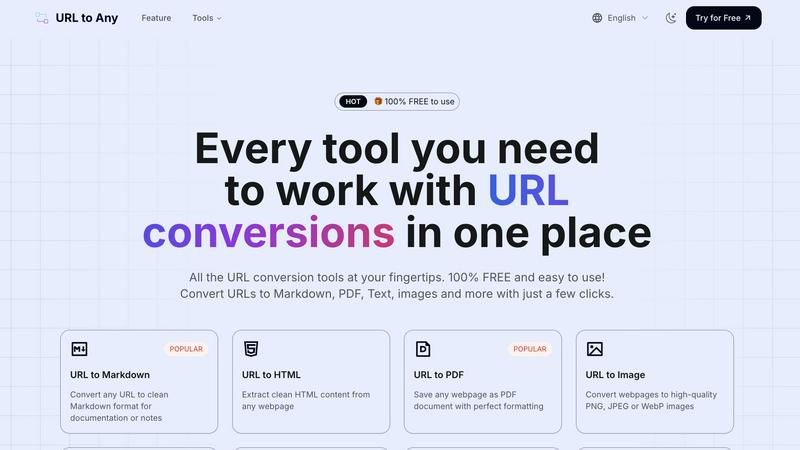
Feature Comparison
Kane AI
Intelligent Test Generation
Kane AI utilizes NLP-based instructions to facilitate intelligent test generation. Teams can easily converse with Kane AI to create and automate tests without the need for extensive coding knowledge. Simply input high-level objectives, and Kane AI will generate detailed test cases that meet your requirements.
Unified Testing Framework
Kane AI supports an all-in-one flow for testing various layers, including databases, APIs, and accessibility. This unified approach ensures that users can plan, author, and evolve end-to-end tests in one seamless workflow, allowing for comprehensive coverage across all aspects of the software.
Smart Bug Detection
Kane AI incorporates advanced bug detection capabilities that automatically identify failures during test execution. When issues arise, Kane AI allows users to raise tickets directly in JIRA or Azure DevOps, streamlining the bug-tracking process and enhancing team collaboration.
Seamless Integrations
Kane AI integrates effortlessly with existing workflows, enabling users to execute tests across multiple environments and devices without extra setup. Its native test case creation feature allows teams to build and assign test cases directly in JIRA or Azure DevOps, ensuring a smooth transition from authoring to execution.
URL to Any
One-Click Multi-Format Conversion
Transform any URL into your desired format with a single action. The platform supports a wide array of outputs including Markdown, PDF, PNG/JPEG images, clean Text, structured JSON and XML, and even MP3 audio. This eliminates the need for separate tools or complex software, providing a unified, app-like experience where you paste a link, choose your format, and get a perfectly converted result ready to use or share instantly.
Advanced Content Extraction & AI Tools
Beyond basic conversion, URL to Any offers powerful extraction utilities that act like a Swiss Army knife for web content. Instantly pull all links from a page with the URL Extractor, analyze SEO elements with the Meta Tags and Heading Extractors, or get a concise summary using the built-in AI Summarizer. These tools are designed for deep content work, providing structured data (like CSV exports) and insights that are invaluable for research, development, and content analysis.
Secure, Cloud-Based Processing Engine
Every conversion happens securely in the cloud, ensuring no heavy processing drains your device's battery or resources. Your data is processed with privacy in mind and is never stored on the servers after the conversion is complete. This guarantees a fast, reliable, and secure experience whether you're on a mobile network or Wi-Fi, giving you the power of desktop software with the convenience of a web app.
Intuitive, Mobile-First Interface
Built with user experience at its core, URL to Any features a clean, intuitive design that works flawlessly on smartphones, tablets, and desktops. The interface is streamlined for quick navigation between tools, with clear labels and a straightforward process: paste, select, convert. This thoughtful design minimizes learning curves and makes professional-grade conversions accessible to everyone, anywhere.
Use Cases
Kane AI
Automated Test Case Creation
Teams can leverage Kane AI to automatically generate structured test cases from various sources, including JIRA tickets, PRDs, and even multimedia content. This capability significantly speeds up the testing process and ensures comprehensive test coverage.
Continuous Testing in Agile Environments
Kane AI facilitates continuous testing by allowing teams to trigger automation directly from JIRA conversations. This integration supports agile methodologies, enabling quicker feedback loops and more frequent releases without compromising quality.
API and UI Flow Validation
With Kane AI, users can validate APIs alongside UI flows seamlessly. This integrated approach eliminates silos and gaps, ensuring full coverage that enhances both frontend and backend quality.
Custom Environment Testing
Kane AI allows teams to customize test environments, choosing where tests run—whether on local builds, target regions, or across geographies. This flexibility ensures that tests remain relevant and effective in varied conditions.
URL to Any
Content Creation & Blogging
Bloggers and content creators can efficiently research and compile information by converting source webpages into clean Markdown or Text. This allows for easy quoting, fact-checking, and note-taking without messy formatting issues. The image conversion feature is also perfect for creating standardized visual references or thumbnails for social media posts directly from article headers or infographics.
Academic Research & Study
Students and researchers can save online articles, journals, or reference pages as well-formatted PDFs for offline reading and annotation. The ability to extract pure text helps in quickly gathering citations, while the AI Summarizer can provide quick overviews of lengthy papers or chapters, accelerating the initial review and study process.
Web Development & SEO Analysis
Developers and SEO specialists use the tool to extract clean HTML for code reference, convert page data into JSON/XML for APIs, or analyze a site's structure. The URL Extractor and Meta Tags tools are invaluable for auditing websites, checking competitor SEO strategies, and exporting technical data for reports in CSV format, all from a simple, unified interface.
Professional Documentation & Sharing
Professionals needing to archive web-based reports, terms of service, or project briefs can save them as perfectly formatted PDFs for official records. For team collaboration, generating a QR code from a project management URL makes sharing in meetings or printed materials instantaneous and efficient, enhancing communication and reference.
Overview
About Kane AI
Kane AI by TestMu AI is a groundbreaking GenAI-native testing agent tailored for high-speed Quality Engineering teams. It revolutionizes the testing landscape by enabling test authoring, management, debugging, and evolution through natural language, which significantly reduces both the time and expertise usually required for test automation. Unlike traditional low-code tools, Kane AI is designed to manage complex workflows across all major programming languages and frameworks without sacrificing performance. This makes it an indispensable tool for teams looking to enhance their testing capabilities. With features like intelligent test generation, seamless integration with tools such as JIRA, and support for API testing, Kane AI empowers teams to achieve comprehensive test coverage efficiently. Its user-friendly approach allows testers to focus on quality rather than getting bogged down in technical complexities, making it ideal for teams aiming for continuous testing and rapid software delivery.
About URL to Any
URL to Any is your essential mobile and desktop companion for instantly transforming web content into the format you need. It’s a comprehensive, cloud-based toolkit designed for content creators, developers, students, and professionals who work with digital information daily. The core value proposition is stunningly simple: provide immediate, one-click access to a vast array of conversion tools without any cost, registration, or software installation. Whether you're on your phone during a commute or at your desk, you can seamlessly convert any webpage into Markdown for your notes, PDF for archiving, an image for a presentation, or even a QR code for easy sharing. It eliminates the friction of using multiple, complicated apps by putting a powerful, intuitive converter directly in your browser or pocket. With support for over 10 output formats, lightning-fast cloud processing, and a commitment to privacy, URL to Any streamlines your workflow, making saving, sharing, and referencing web content effortless and efficient from any device.
Frequently Asked Questions
Kane AI FAQ
What programming languages and frameworks does Kane AI support?
Kane AI is designed to handle complex workflows across all major programming languages and frameworks, providing flexibility and performance for diverse testing needs.
How does Kane AI ensure test accuracy?
Kane AI incorporates intelligent test generation and real-time network checks to validate test accuracy, alongside smart bug detection that identifies failures during execution.
Can Kane AI be integrated with other tools?
Yes, Kane AI offers seamless integration with popular tools like JIRA and Azure DevOps, allowing teams to manage test cases and bug tracking without disrupting existing workflows.
Is Kane AI suitable for enterprise use?
Absolutely. Kane AI is built for enterprise readiness, featuring SSO, RBAC, audit logs, and compliance controls to meet the highest organizational standards for security and performance.
URL to Any FAQ
Is URL to Any really free to use?
Yes, URL to Any is 100% free to use. Every tool and feature listed, from URL to PDF and Markdown conversion to the AI Summarizer and advanced extractors, is available without any cost, hidden fees, or requirement to create an account. You can start converting immediately.
Do I need to install any software?
No installation is required. URL to Any is a fully cloud-based web application that runs directly in your browser on any device (phone, tablet, or computer). For added convenience, a browser extension is available to make conversions even faster from your toolbar, but it is optional.
What happens to the data from the URLs I convert?
Your privacy is a priority. The content from the URLs you submit is processed securely in the cloud solely for the purpose of conversion. Once the conversion is complete and delivered to you, the data is not stored on our servers, ensuring your information remains private.
Can I use the tool on my mobile phone?
Absolutely. URL to Any is designed with a mobile-first approach, featuring a responsive and intuitive interface optimized for smartphones and tablets. The experience is just as fast and seamless as on a desktop, allowing you to convert web content on the go with ease.
Alternatives
Kane AI Alternatives
Kane AI is a groundbreaking GenAI-native testing agent designed specifically for high-speed Quality Engineering teams. By utilizing natural language for test authoring, management, and debugging, it allows teams to streamline their testing processes and significantly reduce the expertise required for automation. As an AI assistant, Kane AI positions itself at the forefront of modern testing solutions, but users often seek alternatives due to varying needs such as pricing, feature sets, and compatibility with existing platforms. When exploring alternatives, it's essential to consider factors like ease of use, integration capabilities, and the ability to handle complex workflows. Users should assess whether the alternative can provide similar or enhanced functionalities, support for multiple programming languages, and an intuitive interface that aligns with their team's workflow. Ultimately, finding the right solution hinges on balancing cost, features, and the specific demands of the projects at hand.
URL to Any Alternatives
URL to Any is a versatile, no-cost web content conversion tool in the AI Assistants category. It allows you to instantly transform any webpage into formats like Markdown, PDF, HTML, images, and QR codes directly from your mobile browser, all without needing to sign up. Users often explore alternatives for various reasons. Some may need advanced features like batch processing or API access, while others might require specific integrations with their existing app ecosystem. Platform compatibility, such as a dedicated mobile app versus a web tool, can also influence the search for a different solution. When evaluating other tools, consider your core needs. Look at the range of output formats, the overall user experience on mobile devices, and any potential costs or usage limits. Security and privacy policies for handling URLs are also crucial, as is the tool's speed and reliability for on-the-go conversions.