
TrafficClaw vs URL to Any
Side-by-side comparison to help you choose the right AI tool.

TrafficClaw
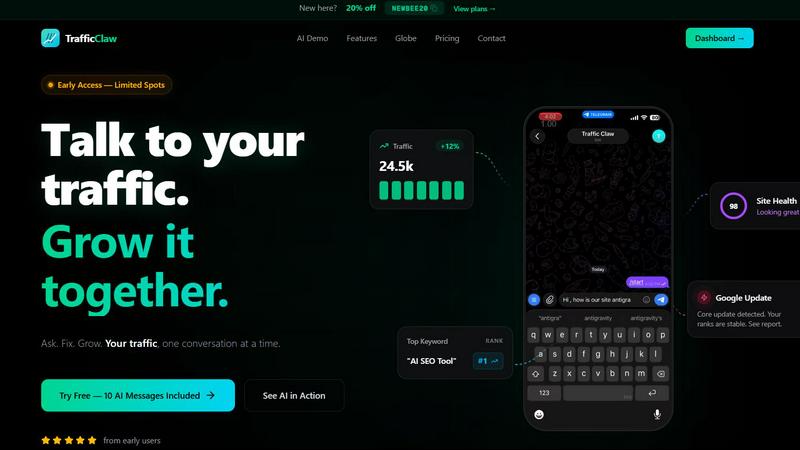
TrafficClaw transforms your SEO and analytics data into actionable insights, helping you grow your traffic with every conversation.
Last updated: April 13, 2026

URL to Any
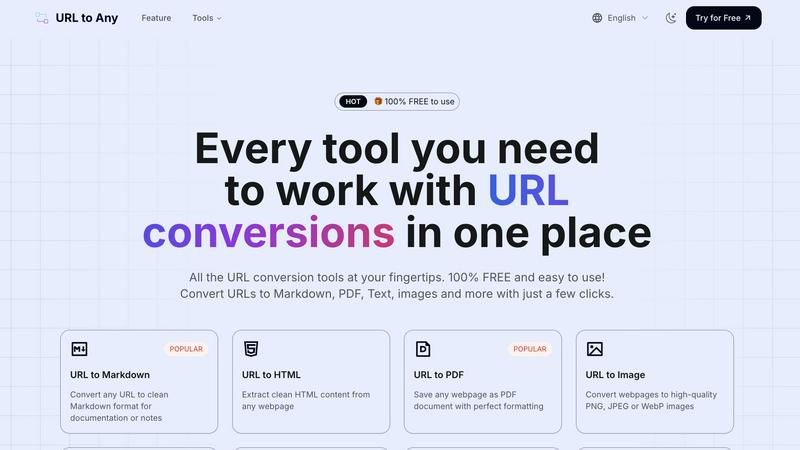
Convert any URL to PDF, text, images, and more with one free, easy-to-use tool.
Last updated: February 28, 2026
Visual Comparison
TrafficClaw
URL to Any
Feature Comparison
TrafficClaw
AI Chat
The AI Chat feature allows users to engage with their analytics in natural language. Instead of sifting through complex data, you can ask straightforward questions and receive instant answers, charts, and actionable insights, enhancing your understanding of traffic trends and performance metrics.
SEO Intelligence
TrafficClaw’s SEO Intelligence feature equips users with valuable insights into keyword gaps, content decay alerts, and cannibalization detection. This tool ensures you stay ahead in the SEO game by identifying opportunities for optimization and helping you align your content strategy with search engine demands.
Analytics Dashboard
The Analytics Dashboard provides a comprehensive overview of your website's performance. Users can monitor real-time visitors, traffic trends, bounce rates, and conversion funnels all in one place. This feature simplifies the data analysis process, enabling users to make informed decisions quickly.
Site Audit
TrafficClaw’s Site Audit feature conducts deep page-level audits, assessing factors like performance scores and Core Web Vitals. It also offers auto-fix suggestions that help you enhance your site’s health and improve user experience, making it easier to maintain optimal performance.
URL to Any
One-Click Multi-Format Conversion
Transform any URL into your desired format with a single action. The platform supports a wide array of outputs including Markdown, PDF, PNG/JPEG images, clean Text, structured JSON and XML, and even MP3 audio. This eliminates the need for separate tools or complex software, providing a unified, app-like experience where you paste a link, choose your format, and get a perfectly converted result ready to use or share instantly.
Advanced Content Extraction & AI Tools
Beyond basic conversion, URL to Any offers powerful extraction utilities that act like a Swiss Army knife for web content. Instantly pull all links from a page with the URL Extractor, analyze SEO elements with the Meta Tags and Heading Extractors, or get a concise summary using the built-in AI Summarizer. These tools are designed for deep content work, providing structured data (like CSV exports) and insights that are invaluable for research, development, and content analysis.
Secure, Cloud-Based Processing Engine
Every conversion happens securely in the cloud, ensuring no heavy processing drains your device's battery or resources. Your data is processed with privacy in mind and is never stored on the servers after the conversion is complete. This guarantees a fast, reliable, and secure experience whether you're on a mobile network or Wi-Fi, giving you the power of desktop software with the convenience of a web app.
Intuitive, Mobile-First Interface
Built with user experience at its core, URL to Any features a clean, intuitive design that works flawlessly on smartphones, tablets, and desktops. The interface is streamlined for quick navigation between tools, with clear labels and a straightforward process: paste, select, convert. This thoughtful design minimizes learning curves and makes professional-grade conversions accessible to everyone, anywhere.
Use Cases
TrafficClaw
Identifying Traffic Drops
When you notice a decline in website traffic, TrafficClaw allows you to quickly identify the root cause. By asking the AI the right questions, you receive data-backed insights that help you understand what went wrong and how to fix it.
SEO Optimizations
TrafficClaw is perfect for SEO professionals looking to optimize their content strategy. With features that detect keyword gaps and cannibalization issues, users can refine their approach to boost search engine rankings and improve overall visibility.
Content Creation
For content creators, TrafficClaw simplifies the content generation process. By utilizing AI-powered tools, users can generate blog ideas, optimize for keywords, and create internal linking strategies that enhance their overall content marketing efforts.
Performance Monitoring
Website owners can leverage TrafficClaw to monitor their site’s health continuously. With the Analytics Dashboard and Site Audit features, users can stay informed about their site's performance, ensuring they address issues proactively before they impact traffic.
URL to Any
Content Creation & Blogging
Bloggers and content creators can efficiently research and compile information by converting source webpages into clean Markdown or Text. This allows for easy quoting, fact-checking, and note-taking without messy formatting issues. The image conversion feature is also perfect for creating standardized visual references or thumbnails for social media posts directly from article headers or infographics.
Academic Research & Study
Students and researchers can save online articles, journals, or reference pages as well-formatted PDFs for offline reading and annotation. The ability to extract pure text helps in quickly gathering citations, while the AI Summarizer can provide quick overviews of lengthy papers or chapters, accelerating the initial review and study process.
Web Development & SEO Analysis
Developers and SEO specialists use the tool to extract clean HTML for code reference, convert page data into JSON/XML for APIs, or analyze a site's structure. The URL Extractor and Meta Tags tools are invaluable for auditing websites, checking competitor SEO strategies, and exporting technical data for reports in CSV format, all from a simple, unified interface.
Professional Documentation & Sharing
Professionals needing to archive web-based reports, terms of service, or project briefs can save them as perfectly formatted PDFs for official records. For team collaboration, generating a QR code from a project management URL makes sharing in meetings or printed materials instantaneous and efficient, enhancing communication and reference.
Overview
About TrafficClaw
TrafficClaw is an innovative AI-driven analytics tool designed to help website owners, marketers, and SEO professionals identify and resolve traffic issues efficiently. When your website experiences a drop in traffic, traditional tools like Google Analytics and Search Console often leave you searching for answers. TrafficClaw changes the game by allowing users to simply ask questions, such as "Why did my traffic drop?" The platform uses real data from your Google Analytics 4 and Search Console accounts to provide actionable insights tailored to your specific situation. With a user-friendly interface, TrafficClaw empowers individuals and teams to understand their site’s performance better, pinpoint issues like keyword cannibalization, and generate content that resonates with their audience, all while maintaining data privacy. This makes it an essential tool for anyone looking to enhance their online presence and drive growth.
About URL to Any
URL to Any is your essential mobile and desktop companion for instantly transforming web content into the format you need. It’s a comprehensive, cloud-based toolkit designed for content creators, developers, students, and professionals who work with digital information daily. The core value proposition is stunningly simple: provide immediate, one-click access to a vast array of conversion tools without any cost, registration, or software installation. Whether you're on your phone during a commute or at your desk, you can seamlessly convert any webpage into Markdown for your notes, PDF for archiving, an image for a presentation, or even a QR code for easy sharing. It eliminates the friction of using multiple, complicated apps by putting a powerful, intuitive converter directly in your browser or pocket. With support for over 10 output formats, lightning-fast cloud processing, and a commitment to privacy, URL to Any streamlines your workflow, making saving, sharing, and referencing web content effortless and efficient from any device.
Frequently Asked Questions
TrafficClaw FAQ
How does TrafficClaw analyze my data?
TrafficClaw securely connects to your Google Analytics 4 and Search Console accounts to access your live data. The AI then analyzes this data to provide tailored insights and actionable recommendations specific to your site's performance.
Is my data safe with TrafficClaw?
Absolutely! TrafficClaw uses Google OAuth for secure authentication, ensuring that your data remains private and only accessible by you. You retain full control over your information at all times.
Can I use TrafficClaw for multiple websites?
Yes, TrafficClaw supports multiple properties and sites. You can connect various Google Analytics and Search Console accounts, allowing you to manage and analyze data for all your projects in one platform.
What if I have questions about how to use TrafficClaw?
TrafficClaw provides comprehensive support through tutorials and a dedicated help center. Additionally, you can ask the AI Analyst within the platform for guidance on specific functionalities and features.
URL to Any FAQ
Is URL to Any really free to use?
Yes, URL to Any is 100% free to use. Every tool and feature listed, from URL to PDF and Markdown conversion to the AI Summarizer and advanced extractors, is available without any cost, hidden fees, or requirement to create an account. You can start converting immediately.
Do I need to install any software?
No installation is required. URL to Any is a fully cloud-based web application that runs directly in your browser on any device (phone, tablet, or computer). For added convenience, a browser extension is available to make conversions even faster from your toolbar, but it is optional.
What happens to the data from the URLs I convert?
Your privacy is a priority. The content from the URLs you submit is processed securely in the cloud solely for the purpose of conversion. Once the conversion is complete and delivered to you, the data is not stored on our servers, ensuring your information remains private.
Can I use the tool on my mobile phone?
Absolutely. URL to Any is designed with a mobile-first approach, featuring a responsive and intuitive interface optimized for smartphones and tablets. The experience is just as fast and seamless as on a desktop, allowing you to convert web content on the go with ease.
Alternatives
TrafficClaw Alternatives
TrafficClaw is an innovative tool designed to enhance your SEO and analytics experience by allowing users to interact with their data through natural language queries. Positioned within the realms of AI Assistants, Analytics & Data, and SEO, it simplifies the often complex task of understanding traffic fluctuations by providing actionable insights based on your unique data. Users frequently seek alternatives to TrafficClaw for various reasons including pricing concerns, specific feature requirements, or compatibility with existing platforms. When evaluating alternatives, consider factors such as user-friendliness, the ability to integrate with your current systems, and the depth of insights provided to ensure that you find a solution that meets your needs effectively.
URL to Any Alternatives
URL to Any is a versatile, no-cost web content conversion tool in the AI Assistants category. It allows you to instantly transform any webpage into formats like Markdown, PDF, HTML, images, and QR codes directly from your mobile browser, all without needing to sign up. Users often explore alternatives for various reasons. Some may need advanced features like batch processing or API access, while others might require specific integrations with their existing app ecosystem. Platform compatibility, such as a dedicated mobile app versus a web tool, can also influence the search for a different solution. When evaluating other tools, consider your core needs. Look at the range of output formats, the overall user experience on mobile devices, and any potential costs or usage limits. Security and privacy policies for handling URLs are also crucial, as is the tool's speed and reliability for on-the-go conversions.