

Browsilla
Browsilla replaces your Chrome new tab with a clean dashboard for tasks, bookmarks, and weather.
AI tool Details
Explore More
Alternatives

About Browsilla
Browsilla is a lightweight Chrome extension designed to transform your default new tab page into a powerful, purpose-built productivity dashboard. It replaces the blank or cluttered page you usually see with a clean, focused workspace that puts your essential tools front and center. The core value proposition is simplicity and focus: instead of being greeted by distracting news feeds or ads, you get instant access to your task list, key bookmarks, local weather, and a search bar—all in one glance. Built for makers, founders, and professionals, Browsilla is engineered to help you start every browsing session with intention. It operates entirely locally within your browser, meaning no accounts, no tracking, and no data sent to external servers. This privacy-first, no-fuss approach ensures you get a faster, more useful new tab experience without any complexity or compromise. Install it once, and every new tab becomes a moment of clarity and productivity.
Features
Integrated Task Manager
Stop juggling between separate to-do apps. Browsilla features a built-in task manager right on your new tab. You can quickly add, organize into folders, and check off tasks as you complete them. Seeing your immediate priorities every time you open a new tab ensures nothing gets forgotten and helps you maintain momentum throughout your workday without ever leaving your browser.
Quick Access Bookmarks
Eliminate the hassle of navigating through nested bookmark folders. With Browsilla, you can pin your most frequently visited websites directly onto your dashboard. This allows for one-click access to your essential tools, resources, and pages. You can add, rearrange, and launch your bookmarks instantly, saving valuable seconds with every action and keeping your workflow seamless.
At-a-Glance Local Weather
Plan your day without opening another app or tab. Browsilla displays the current weather conditions and temperature for your location directly on the dashboard. This information updates automatically, giving you a quick, relevant snapshot of the outside world so you can dress appropriately or plan your schedule before diving into your online work.
Distraction-Free Instant Search
A powerful, clean search bar is placed prominently at the heart of your new tab. Simply start typing to perform a Google search instantly. There's no need to first navigate to a search engine homepage, eliminating extra clicks and potential distractions. This feature provides fast, direct access to the entire web, keeping your focus on completing your query.
Use Cases
The Daily Planner
For professionals starting their workday, Browsilla serves as the perfect launchpad. Open a new tab to immediately review your task list for the day, check the weather to plan any outings or commutes, get a dose of daily inspiration, and quickly jump into your first booked-marked work app. This ritual creates a focused, organized start, setting a productive tone.
The Focused Researcher or Student
When working on deep research or study sessions, tab clutter is a major distraction. Browsilla helps by providing one-click access to all essential research portals, library sites, and reference tools via pinned bookmarks. The clean interface with no news feeds minimizes the temptation to wander off-task, while the integrated task manager helps track research milestones.
The Project Manager
Managing multiple projects requires constant context-switching. Browsilla centralizes key project management tools as quick bookmarks and allows you to maintain separate task lists or folders for different projects. Every new tab becomes a quick status check, enabling you to see next actions for any active project without opening separate project management software.
The Privacy-Conscious User
For individuals wary of data collection and bloated software, Browsilla offers a minimalist, respectful alternative. It provides genuine utility—task management, quick links, weather—without requiring an account, collecting personal data, or slowing down the browser. All data stays locally in Chrome, making it ideal for anyone who values efficiency and privacy.
Frequently Asked Questions
Is Browsilla really free?
Yes, Browsilla is completely free to use. There are no hidden fees, premium tiers, or subscription plans. You can install the extension from the Chrome Web Store and access all its features—the task manager, bookmarks, weather, and more—at no cost, now and in the future.
Do I need to create an account?
No, you do not need to create any account to use Browsilla. It is designed for instant use. Simply install the extension from the Chrome Web Store, and it will be ready to go when you open your next new tab. There is no sign-up process, email requirement, or password to remember.
Is my data private and secure?
Absolutely. Privacy is a core principle of Browsilla. The extension operates locally within your browser. Your tasks, bookmarks, and settings are stored on your own device using Chrome's sync storage with an anonymous identifier. No personal data is sent to external servers, and there are no third-party trackers.
How do I customize Browsilla?
Customization is straightforward and done directly on the dashboard. You can add and organize your tasks and task folders, pin or remove quick-access bookmarks, and rearrange the layout of these elements by simply dragging and dropping them. There is no complex settings menu; you personalize it interactively on the new tab page itself.
Similar to Browsilla
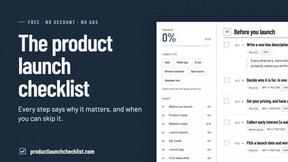
Product Launch Checklist
A free launch checklist for SaaS, apps, AI tools and more. Every step says why it matters and when you can skip it.
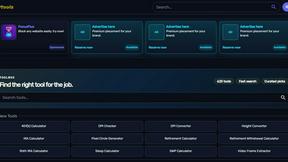
Kody Tools
Free collection of online developer utilities, code formatters, and digital converters designed to streamline your daily workflow.
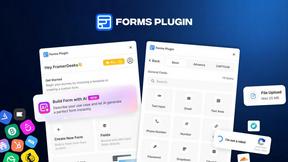
Forms Plugin
The #1 Native Form Builder Plugin for Framer - No Code, No Embeds, No External Platforms.



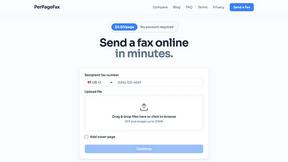
PerPageFax
PerPageFax lets you send a fax online from any browser for a flat $0.50 per page — no account, no subscription, no fax machine.
