

CustomTattoo AI
Design your own tattoo, preview it on your skin in seconds, and arrive at the studio with a clear, artist-ready concept.
AI tool Details
Explore More
Alternatives
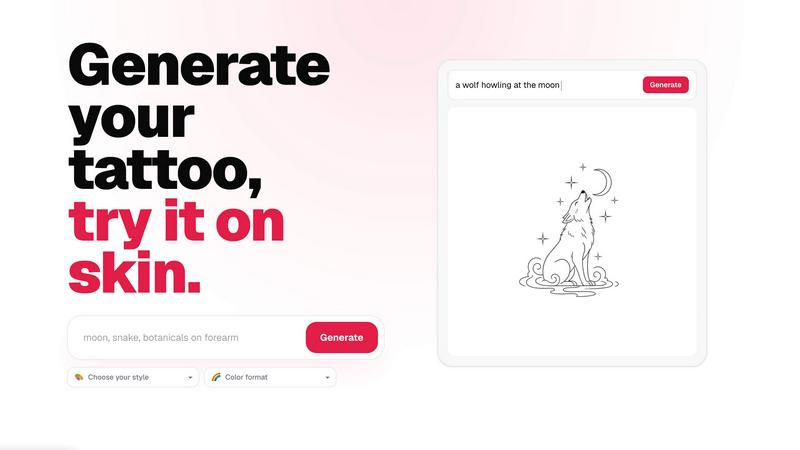
About CustomTattoo AI
CustomTattoo AI is a specialized AI-powered platform designed to transform how people plan, visualize, and commit to their next tattoo. Instead of relying on vague descriptions or generic images found online, users can describe their tattoo idea in natural language, select from a wide range of artistic styles and color formats, and instantly generate unique, high-quality tattoo concepts. The core value proposition lies in its ability to bridge the gap between imagination and reality: users can preview these generated designs directly on their own skin using a realistic try-on feature, allowing them to see exactly how a tattoo will look in a specific placement before ever booking an appointment. This eliminates guesswork, reduces anxiety, and builds confidence in the design choice. CustomTattoo AI serves a broad audience, from first-time tattoo clients who may feel overwhelmed by the process to seasoned tattoo enthusiasts exploring new styles or cover-up ideas. The platform functions as a personal design studio, offering a personal library to save and compare favorite concepts, refine visual direction, and ultimately bring a clear, artist-ready reference to their tattoo artist. By focusing on mobile-first usability and a streamlined user experience, CustomTattoo AI makes the entire design exploration process intuitive, accessible, and risk-free, starting with three free credits for new users to test the generator and try-on preview without any upfront payment.
Features
AI Tattoo Generator
The core engine of the platform allows users to describe their tattoo idea in simple text, such as "crescent moon and botanicals" or "gothic dragon with wide wings." The AI then interprets this prompt and generates unique, custom tattoo concepts in a matter of seconds. Users can refine their results by choosing from a variety of predefined tattoo styles, including Gothic blackwork, traditional, watercolor, geometric, and many others, as well as selecting the color format, such as black and grey, full color, or sepia. This feature provides endless creative possibilities and ensures the generated designs align perfectly with the user's vision.
On-Skin Try-On Preview
This is a standout feature that provides a realistic preview of how a generated tattoo design will look on the user's own body. By uploading a photo of the desired placement area, such as an arm, leg, or back, the AI intelligently maps the design onto the skin, accounting for body contours and perspective. This allows users to evaluate the size, placement, and overall visual impact of the tattoo in a real-world context. The try-on preview is crucial for building confidence, as it helps users decide if a design truly works for them before making a permanent commitment.
Personal Design Library
Every generated tattoo concept is automatically saved to the user's personal library within the app. This feature acts as a private portfolio where users can organize, compare, and revisit their favorite designs at any time. They can easily view different style variations of the same idea side-by-side, track their evolving preferences, and select the strongest concepts to refine further. The library ensures that no creative idea is lost and provides a central hub for managing the entire tattoo planning journey from initial concept to final selection.
Artist-Ready Export
CustomTattoo AI is designed to be a practical tool that bridges the user and the tattoo artist. Once a user has settled on a design and placement, they can export the final concept as a high-resolution, clear reference image. This export is formatted to be easily shared with a professional tattoo artist, providing a precise visual direction that minimizes miscommunication. The platform explicitly markets this as an "artist-ready direction," empowering users to walk into a studio with a concrete, well-considered design that an artist can directly interpret and execute.
Use Cases
First-Time Tattoo Planning
For individuals getting their first tattoo, the process can be intimidating. CustomTattoo AI removes the fear of the unknown by allowing them to explore countless design possibilities without any pressure. A first-timer can start with a simple idea like "a small flower on my wrist," generate multiple style variations, and then use the on-skin preview to see how each option looks on their actual wrist. This iterative process helps them build confidence in their choice, understand scale, and arrive at a design they truly love before ever stepping into a tattoo parlor.
Exploring Different Artistic Styles
Tattoo enthusiasts often want to experiment with different aesthetics before committing to one. CustomTattoo AI makes this exploration effortless. A user with a concept like "a dragon" can instantly generate versions in styles ranging from traditional American and Japanese to minimalist linework or realistic blackwork. By saving these variations to their personal library, they can compare the mood, intricacy, and visual impact of each style side-by-side. This helps them discover new artistic directions they might not have considered and refine their personal taste.
Testing Placement and Scale
One of the biggest challenges in tattoo design is visualizing how a piece will fit on a specific body part. CustomTattoo AI directly addresses this with its try-on preview. A user considering a large back piece can test different sizes and orientations, while someone thinking about a forearm tattoo can see how the design wraps around the limb. This use case is critical for avoiding common mistakes, such as choosing a design that is too small for the area or one that does not follow the natural muscle lines, ensuring the final tattoo complements the body's anatomy.
Creating a Collaborative Reference for Artists
CustomTattoo AI serves as an excellent communication tool between the client and the tattoo artist. Instead of bringing a vague idea or a generic Pinterest image, a user can present their artist with a custom-generated, high-resolution design that they have already previewed on their own skin. This "artist-ready direction" clearly communicates the desired style, placement, and scale. It saves the artist time in the consultation phase and ensures both parties are aligned from the start, leading to a smoother collaboration and a final tattoo that meets the client's expectations.
Frequently Asked Questions
Is CustomTattoo AI free to try?
Yes, CustomTattoo AI offers a free trial. When you sign up for an account, you automatically receive 3 free credits. These credits allow you to test the AI tattoo generator and use the on-skin preview feature without any upfront payment. No credit card is required to claim this offer, making it completely risk-free to explore the platform and see if it meets your needs before committing to a purchase.
How does the on-skin preview work?
The on-skin preview feature uses AI technology to map a generated tattoo design onto a photo of your body. To use it, you simply upload a clear photo of the area where you want the tattoo, such as your arm, leg, or shoulder. The AI then analyzes the photo's contours and perspective, and realistically overlays the design onto your skin. This allows you to see exactly how the tattoo will look in terms of size, placement, and fit on your unique body shape.
Will there be hidden subscriptions?
No, there are no hidden subscriptions with CustomTattoo AI. The platform operates on a transparent credit-based system. You start with 3 free credits, and if you wish to generate more designs, you can purchase additional credit packs. There are no recurring monthly fees or surprise charges. You only pay for what you use, and you have full control over your spending. The pricing model is designed to be simple and upfront.
Can I take the design to my tattoo artist?
Absolutely. CustomTattoo AI is built to provide you with an "artist-ready direction." Once you have finalized a design you love and have previewed it on your skin, you can export a high-resolution image of the concept. This image serves as a clear and precise visual reference that you can bring directly to your tattoo artist. It helps communicate your exact vision, including the style, placement, and scale, facilitating a more productive consultation and a smoother tattooing process.
Similar to CustomTattoo AI

Presentation Intelligence
AI-native presentation and visual content platform that turns prompts, documents, images, videos, and data into polished, shareable decks.


IsThisAIImage
Free AI image checker: upload a photo for AI-generated and deepfake scores, a clear verdict, and optional generator hints.
Merge Two Photos
Merge two photos free in your browser: side by side, stacked, overlay, or AI. Download a clean PNG, no watermark.
StopScroll
StopScroll is an AI thumbnail maker that generates YouTube thumbnail concepts from a URL, title, or prompt.
HubVanta AI
HubVanta AI helps creators generate images and videos with advanced AI tools for visual content workflows.
Kirkify
Kirkify AI instantly swaps any face in your photos with Charlie Kirk's iconic look for hilarious, viral-ready memes.