AI tool Details
Explore More
Alternatives
About ProcessSpy
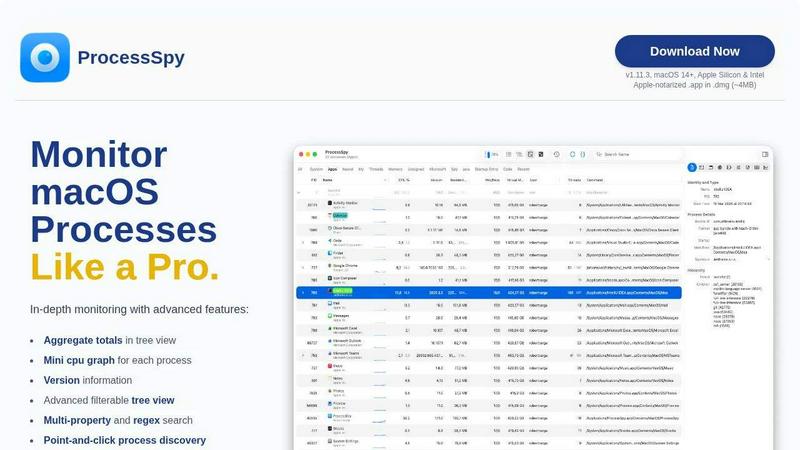
ProcessSpy is a powerful macOS utility designed for developers and power users who need to monitor processes with precision and depth. Unlike the built-in Activity Monitor, ProcessSpy reveals crucial details often hidden from view, such as full command-line arguments, version information, and environment variables. With its intuitive interface and advanced features, ProcessSpy empowers users to visualize process trees, inspect open files, and manage stubborn applications with ease. Whether you are debugging Java applications or simply want to understand what is running on your Mac, ProcessSpy provides the tools necessary to gain insights into your system's performance. Built natively for macOS, it ensures a seamless experience without the bloat of cross-platform frameworks, making it the ideal choice for those who demand robust process monitoring capabilities.
Features
Advanced Tree View
The advanced tree view in ProcessSpy allows users to see processes in a hierarchical format, complete with real-time filtering and search capabilities. Users can view aggregate totals for CPU, memory, and threads, making it easier to identify resource-hungry applications at a glance.
Javascript Filters
ProcessSpy supports complex filtering through Javascript, enabling users to define intricate criteria for process discovery. This feature allows for multi-condition searches, making it simple to find exactly what you're looking for among numerous processes.
Environment Variables
Unlock the ability to view environment variables of a process with a paid license. This feature is invaluable for developers who need to understand the context in which their applications are running, providing insights that can aid in debugging and optimization.
Process History Recording
With ProcessSpy, users can record historical values for CPU, memory, and threads, including aggregate metrics. This feature allows for detailed analysis over time, and the results can even be exported to CSV for further examination.
Use Cases
Debugging Java Applications
Developers working with multiple Java applications can leverage ProcessSpy to differentiate between processes that share the same name. By viewing full command-line details and version information, they can quickly identify which process corresponds to which application.
Resource Management
System administrators can use ProcessSpy to monitor CPU and memory usage across processes, allowing them to manage resources effectively. By identifying resource-intensive applications, they can take action to optimize performance.
Security Auditing
For security professionals, ProcessSpy offers insights into running processes and their environment variables. This information is critical for identifying unauthorized processes or applications that may pose a security risk.
Application Development
Developers can utilize ProcessSpy to gain a deeper understanding of their applications' runtime behavior. By analyzing process trees and monitoring resource usage, they can optimize performance and troubleshoot issues more effectively.
Frequently Asked Questions
Is ProcessSpy safe to install on my Mac?
Yes, ProcessSpy is Apple-notarized and distributed as a signed .app inside a .dmg. It is verified and safe to use on both Intel and Apple Silicon Macs, ensuring that users can install it with confidence.
Does ProcessSpy support older versions of macOS?
ProcessSpy is specifically designed for macOS 14 and newer. Users running older versions of macOS will need to upgrade to take advantage of the features offered by ProcessSpy.
What is the license model?
The license for ProcessSpy is valid for one user across unlimited devices. It includes lifetime updates and access to new features, providing excellent value for users who require ongoing support and enhancements.
How does ProcessSpy compare to Activity Monitor?
ProcessSpy significantly outperforms Activity Monitor by offering features like full command-line visibility, process tagging, and advanced filtering capabilities. These enhancements allow users to manage and understand their processes in ways that Activity Monitor simply cannot facilitate.
Similar to ProcessSpy


MD to Text
Convert Markdown to clean plain text instantly in your browser. Formatting stripped, readable output ready to copy - fully private, no sign-up.

Enlisted
Search 20,000+ open-source and SaaS tools by the job you need done or the app you want to replace.

Product Launch Checklist
A free launch checklist for SaaS, apps, AI tools and more. Every step says why it matters and when you can skip it.


laya.tools
Free directory of 950+ projects built on Laya, the open-source model that turns text into typed decisions. Ports, SDKs, agents and demos.

Forms Plugin
The #1 Native Form Builder Plugin for Framer - No Code, No Embeds, No External Platforms.