

QuickTextTools
QuickTextTools offers 76 free online utilities for writers and creators to effortlessly optimize text and boost productivity in your browser.
AI tool Details
Explore More
Alternatives

About QuickTextTools
QuickTextTools is a free and intuitive online platform designed to streamline the workflows of writers, marketers, developers, students, SEO professionals, and content creators. With a robust suite of over 76 browser-based tools, QuickTextTools enhances productivity by offering utilities that address various needs, such as text formatting, SEO analysis, writing assistance, keyword management, and developer utilities. The main value proposition lies in its simple, fast, and privacy-focused approach, allowing users to operate directly from their browser without the need for complex setups or software downloads. Whether you're cleaning up a keyword list, analyzing SEO meta tags, converting text case formats, or improving your overall writing process, QuickTextTools provides practical solutions that empower users to work smarter and more efficiently. Emphasizing security and user experience, this platform ensures that all processing happens securely and privately within your browser.
Features
Text Formatter
The Text Formatter tool allows users to clean up and organize messy text effortlessly. It removes unwanted formatting, extra spaces, and hidden HTML tags, enabling you to present your content in a polished manner. This is especially beneficial for writers and content creators looking to enhance readability.
Keyword Density Checker
With the Keyword Density Checker, users can analyze the frequency and distribution of keywords within their content. This tool is essential for SEO professionals and marketers aiming to optimize their text for search engines, ensuring that their content ranks well while maintaining readability.
Meta Tag Analyzer
The Meta Tag Analyzer provides a comprehensive preview of how your website's meta tags will appear in search engine results. This feature is crucial for SEO experts who want to optimize their site's visibility and click-through rate by fine-tuning their meta descriptions and titles.
Case Converter
The Case Converter tool offers a straightforward way to change the capitalization of text. Whether you need to transform text to uppercase, lowercase, or title case, this tool simplifies the process, saving time and ensuring consistency across your content.
Use Cases
For Writers
Writers can leverage QuickTextTools to enhance their writing process by utilizing tools like the Word Counter and Text Formatter. These utilities help ensure that content is concise, well-structured, and free of errors, making it easier to meet deadlines and maintain quality.
For SEO Professionals
SEO professionals benefit from tools like the Keyword Density Checker and Meta Tag Analyzer. These features allow them to optimize their content effectively, ensuring that it meets search engine standards and attracts more organic traffic.
For Students
Students can use QuickTextTools for various purposes, such as analyzing text length with the Character Counter or cleaning up messy documents with the Text Cleaner. These tools help streamline their study materials and assignments, enhancing overall productivity.
For Developers
Developers can utilize tools like the JSON Formatter and URL Encoder to manage code and data more effectively. QuickTextTools provides essential utilities that simplify common tasks, allowing developers to focus on building and improving applications without distraction.
Frequently Asked Questions
Is QuickTextTools really free to use?
Yes, QuickTextTools is completely free to use. There are no hidden costs, and users do not need to sign up or provide personal information to access the tools.
How does QuickTextTools ensure user privacy?
QuickTextTools operates entirely within your browser, meaning that no data is sent to external servers. This approach protects your information and ensures a secure experience.
Can I use QuickTextTools on mobile devices?
Absolutely! QuickTextTools is designed with a mobile-first approach, making it accessible and easy to use on smartphones and tablets as well as desktop computers.
What types of tools are available on QuickTextTools?
QuickTextTools offers a wide range of tools including text formatting utilities, SEO analysis tools, writing assistants, keyword management tools, and developer utilities, all aimed at enhancing productivity across various tasks.
Similar to QuickTextTools
Novastart
Apps and files on an infinite canvas where people and AI agents work together.

MD to Text
Convert Markdown to clean plain text instantly in your browser. Formatting stripped, readable output ready to copy - fully private, no sign-up.
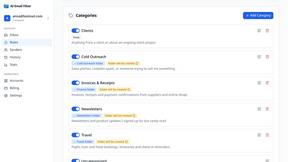
AI Email Filter
AI Email Filter sorts incoming mail into folders using plain-language prompts you write. Works with any IMAP mailbox; bring your own LLM if you want.

Product Launch Checklist
A free launch checklist for SaaS, apps, AI tools and more. Every step says why it matters and when you can skip it.

Kody Tools
Free collection of online developer utilities, code formatters, and digital converters designed to streamline your daily workflow.
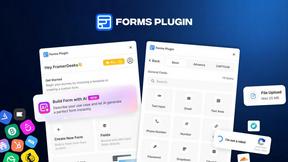
Forms Plugin
The #1 Native Form Builder Plugin for Framer - No Code, No Embeds, No External Platforms.

