TaleHug AI Story Generator for Kids
Turn a child's voice, drawing, or idea into a safe, illustrated AI storybook for co-reading in minutes.
AI tool Details
Explore More
Alternatives
About TaleHug AI Story Generator for Kids
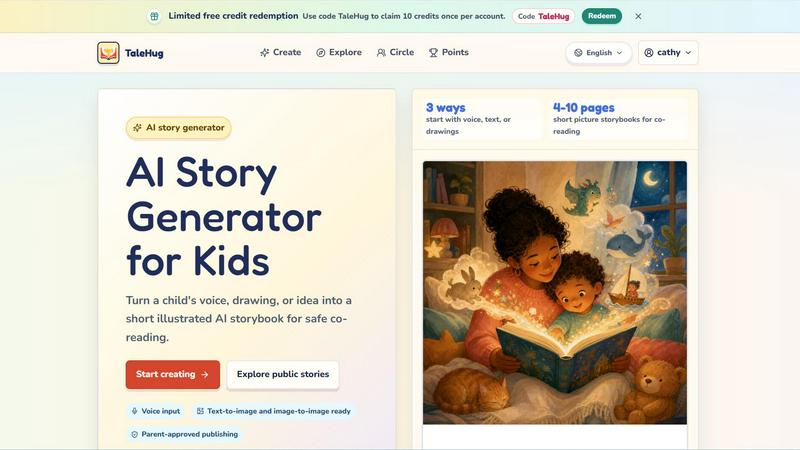
TaleHug is an AI-powered storytelling platform designed specifically for children, turning their voices, drawings, or simple ideas into beautifully illustrated, short storybooks. Built for mobile-first interaction, the app makes story creation as easy as speaking into a microphone or uploading a crayon drawing. TaleHug targets preschool and kindergarten-aged children, typically ages 3 to 6, and focuses on safe, parent-guided co-reading experiences. The core value proposition is simple: give young kids a creative outlet where they can become authors and illustrators of their own picture books, all within a protected environment. Every story starts from a child's imagination, whether they describe a character, draw a scene, or pick a parent-approved prompt. The AI then generates 4 to 10 illustrated pages, each with a short sentence perfect for early readers. TaleHug emphasizes safety with private drafts by default, no public comments, and parent approval required before any story is shared. This approach encourages creativity without exposing children to the risks of open social platforms. The app also uses safe display names instead of real names and collects no school addresses or contact details. With support for voice input, text-to-image generation, and image-to-image transformation, TaleHug removes barriers to entry for young creators who may not yet write fluently. The result is a delightful, engaging tool that fosters literacy, imagination, and family bonding through shared story creation.
Features
Voice, Text, and Drawing Input
TaleHug offers three distinct ways for children to start a story. They can speak their idea aloud using voice input, type a simple sentence, or upload a drawing they made by hand. The AI then interprets the input and generates a full storybook with matching illustrations. This flexibility ensures that even pre-literate children can participate fully, using their natural voice or art to express their ideas. The voice input feature is particularly powerful for young kids who have big imaginations but limited writing skills, letting them dictate characters, settings, and plot points directly into the app.
AI-Powered Illustrated Story Generation
Once a child provides their starting idea, TaleHug's AI generates a complete picture storybook with 4 to 10 pages. Each page includes a strong, colorful illustration and one short sentence that matches the scene. The AI stores prompts for each page, allowing parents or children to regenerate specific images if they want a different look or style. This feature turns a simple concept into a polished, readable book in seconds, giving kids immediate satisfaction and a tangible result they can be proud of. The visual-first approach keeps young readers engaged and helps them connect words with images.
Parent-Approved Publishing and Visibility Controls
TaleHug prioritizes child safety with a three-tier visibility system: private, circle, and public. All drafts start as private by default, visible only to the child and their parent. Before a story can be shared with a circle of trusted family or published publicly in the gallery, an adult must review and approve it. The public gallery features only approved examples, and there are no public comments in the MVP to prevent unwanted interactions. This design gives parents full control over their child's digital footprint while still allowing young creators to share their work in a safe, moderated way.
Safe and Kid-Friendly Design
The entire TaleHug experience is built around safety defaults and age-appropriate interactions. Children use safe display names instead of full names, and no school names, addresses, or contact details are collected. The interface uses bright colors, large buttons, and simple navigation that young children can understand and use independently. The app also includes a tutorial video that walks kids and parents through the story creation process. These design choices reduce friction for young users while giving parents peace of mind that their child is exploring creativity in a protected digital space.
Use Cases
Bedtime Story Creation
Parents can use TaleHug to turn a child's bedtime idea into a personalized storybook in minutes. Instead of reading a generic book, a parent can ask their child what they want to dream about, then use voice input to capture the idea and generate a custom 4-page story with illustrations. This turns bedtime reading into an interactive, co-creative experience that strengthens family bonds and makes children excited about storytelling. The "Moon rabbit bedtime" prompt is a perfect example of a gentle, winding-down story ready for immediate generation.
Classroom Storytelling Activities
Teachers in preschool and kindergarten settings can use TaleHug as a group activity to encourage literacy and creativity. Children can take turns speaking ideas or drawing scenes, and the teacher can generate a class storybook that everyone contributed to. Stories like "Sharing the red truck" or "First school morning" provide ready-made social story templates that help children navigate common classroom situations. The short page count keeps young attention spans engaged, and the visual output gives each child a sense of ownership over the final product.
Developing Early Literacy Skills
TaleHug helps emerging readers connect spoken language with written words and images. When a child speaks a story idea and sees it transformed into printed sentences on illustrated pages, they learn that their words have meaning and can be written down. Parents can use the generated stories for co-reading practice, pointing to each word as they read aloud. The 4 to 10 page format is ideal for short reading sessions that build confidence without overwhelming new readers. Stories like "Feelings under the sea" also help children name and understand emotions through narrative.
Creative Expression for Reluctant Writers
For children who find writing difficult or intimidating, TaleHug removes the barrier of putting pen to paper. They can draw a picture, upload it, and watch the AI turn their art into a full story. Alternatively, they can simply speak their ideas without worrying about spelling or handwriting. This low-pressure approach encourages reluctant writers to engage with storytelling on their own terms. The immediate visual feedback and the ability to see their drawing become part of a professional-looking book builds confidence and motivates further creative exploration.
Frequently Asked Questions
Is TaleHug safe for my child to use alone?
Yes, TaleHug is designed with child safety as the top priority. All story drafts are private by default and only visible to the child and their parent. Before any story can be shared with a circle of family or published publicly, a parent must review and approve it. The app uses safe display names instead of real names and collects no school addresses, home addresses, or child contact details. There are no public comments in the MVP, which prevents unwanted interactions. Parents can feel confident letting their child explore creativity within this protected environment.
How does the voice input feature work for children who cannot write?
The voice input feature is simple and intuitive. A child taps the microphone button and speaks their story idea aloud, describing characters, settings, or actions. The AI captures their words and uses them as the basis for generating a full illustrated storybook. This means even pre-literate children or those with limited writing skills can create stories independently. The voice input is designed to recognize natural speech patterns, so children can talk as they normally would without needing to use specific commands or formats.
Can my child upload their own drawings to create a story?
Yes, TaleHug supports image input where children can upload a drawing they made by hand, either on paper or digitally. The AI analyzes the drawing and uses it as inspiration for the generated storybook. This feature allows children to see their own artwork transformed into a polished, illustrated book. It is a powerful way to validate their creative efforts and show them that their drawings can become part of a larger narrative. The image-to-image capability ensures the final illustrations maintain the spirit of the original child-created art.
How many pages are in a typical TaleHug story?
TaleHug generates short picture storybooks with 4 to 10 pages, which is ideal for preschool and kindergarten-aged children. This length is designed for co-reading sessions where a parent and child can read through the entire book in one sitting without losing attention. The concise format also helps emerging readers build confidence as they can successfully complete a whole book. Each page includes one short sentence and a corresponding illustration, making the reading experience manageable and enjoyable for young children.
Similar to TaleHug AI Story Generator for Kids
PracticeNetworking
Master networking with interactive, hands-on practice directly in your browser. Solve real terminal challenges, debug routes, and build core IT skills

Verla AI
Verla is an AI academic assistant for university and college students, combining AI essay writing, academic research, AI detection, AI humanization

Riff
Free Chrome extension. Paste your rough point and Chrome's built-in AI writes a fresh reply for that post on X, LinkedIn, Facebook or Instagram.

MD to Text
Convert Markdown to clean plain text instantly in your browser. Formatting stripped, readable output ready to copy - fully private, no sign-up.

Clever AI Humanizer
Clever AI Humanizer is a free tool that makes AI-generated text sound more human.
Wordy
Learn languages with real movie and TV show clips.