
CleanPaste.org vs Hush Touch | Voice-to-Text for MacOS
Side-by-side comparison to help you choose the right AI tool.
CleanPaste.org
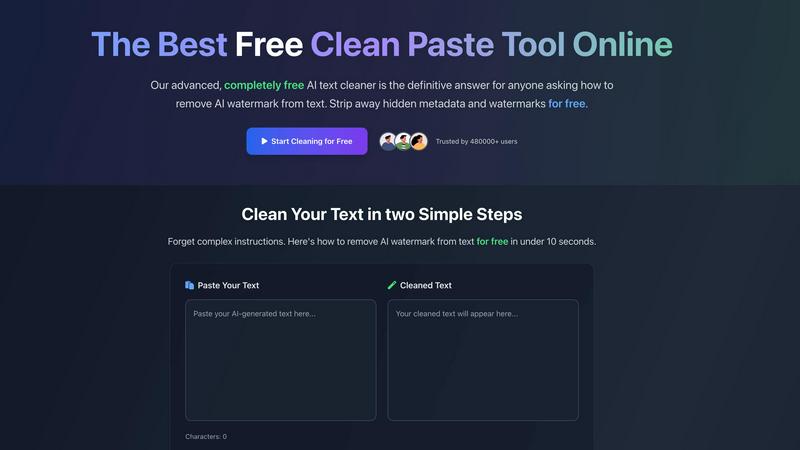
CleanPaste instantly strips invisible characters and AI watermarks from your text for free.
Last updated: February 28, 2026

Hush Touch | Voice-to-Text for MacOS
Hush Touch is offline voice-to-text software for Mac that learns your vocabulary for smarter, accurate dictation.
Last updated: February 28, 2026
Visual Comparison
CleanPaste.org
Hush Touch | Voice-to-Text for MacOS

Feature Comparison
CleanPaste.org
Instant AI Watermark Removal
This core feature strips away AI-specific watermarks and patterns embedded by text generators. With a single click, it processes your content to help it pass AI detection tests while meticulously preserving the original meaning, flow, and quality of your writing. It's designed for real-time use, ensuring your text sounds natural and human-authored without any manual rewriting or complex adjustments.
Deep-Scan for Invisible Characters & Metadata
Going beyond surface-level cleaning, CleanPaste.org employs an advanced algorithm to deep-scan your text. It detects and eliminates a wide range of hidden artifacts, including zero-width spaces, non-printable characters, and hidden formatting metadata that are often invisible in standard text editors. This thorough cleansing ensures your text is technically clean for any platform or submission system.
One-Click, Zero-Friction Processing
The user experience is streamlined for maximum efficiency. The tool features a clean, intuitive interface where you simply paste your text and click the "Remove AI Watermarks" or "Clear Invisible Characters" button. Processing happens instantly in your browser, with no account creation, software download, or waiting period, embodying a true mobile-first and app-centric design philosophy.
100% Free with No Limits
Unlike many online tools, CleanPaste.org is completely free without any hidden paywalls, tiered plans, or premium features. Every user gets access to the full power of the tool for unlimited use. This commitment ensures it remains an accessible resource for students, freelancers, and professionals alike, removing financial barriers to producing clean, authentic content.
Hush Touch | Voice-to-Text for MacOS
Dual-Engine Recognition
Hush Touch employs a dual-engine recognition system that combines DictationTranscriber for natural flow and punctuation with SFSpeechRecognizer for custom vocabulary enhancement. This sophisticated blend ensures that your transcriptions are not only accurate but also reflect the nuances of your unique speech patterns.
Custom Vocabulary
With an impressive capacity for recognizing up to 500 custom terms, Hush Touch learns from your corrections and preferences. This feature is particularly beneficial for professionals in specialized fields—like medicine or technology—ensuring that the software can accurately transcribe complex terminology and jargon that other apps might misinterpret.
Smart Text Processing
The app excels in smart text processing by automatically removing filler words and correcting common mistakes in real time. Features such as voice snippets for repeated phrases and formatted numbered lists enhance the overall dictation experience, helping users to produce polished documents faster and with less effort.
100% On-Device Privacy
Hush Touch guarantees that all processing is conducted on your Mac, ensuring that your voice data is never sent to the cloud. This fully on-device operation not only enhances privacy but also allows the app to function offline, making it a reliable tool regardless of your internet connectivity.
Use Cases
CleanPaste.org
For Students Submitting Academic Work
Students using AI for research assistance or draft ideation can use CleanPaste.org to ensure their final submissions are free of invisible characters and AI traces. This helps maintain academic integrity by presenting work that reflects their own understanding and effort, giving them confidence when submitting essays, research papers, and assignments to strict plagiarism and AI detection systems.
For Content Creators & Bloggers
Bloggers, SEO specialists, and digital marketers can refine AI-assisted drafts to protect their brand's authentic voice. CleanPaste.org removes watermarks and hidden formatting, ensuring content resonates naturally with human readers and performs well with search engines. It's the perfect final step before publishing to guarantee content is polished, professional, and undetectably human.
For Professionals Drafting Communications
Professionals who use AI to draft emails, reports, proposals, or client communications can rely on CleanPaste.org to add a final layer of polish. It removes any robotic or artificial tone left by AI watermarks, ensuring all business correspondence is clear, professional, and authentically human, which is crucial for maintaining trust and credibility in professional relationships.
For Non-Native English Speakers
Individuals who use AI tools to help draft text in English can use CleanPaste.org to refine the output. It helps make the AI-assisted text undetectable and flow more naturally, smoothing out any awkward phrasing or artifacts that might reveal it was machine-generated. This allows them to communicate more effectively and confidently in professional or academic settings.
Hush Touch | Voice-to-Text for MacOS
Drafting Emails
Hush Touch simplifies the process of composing emails by allowing users to dictate messages hands-free. Whether you are responding to colleagues or sending quick updates, you can effortlessly convert your thoughts into written text with just your voice.
Taking Notes in Meetings
During meetings or lectures, Hush Touch serves as an invaluable tool for capturing ideas and discussions without the distraction of typing. Users can focus on the conversation while the app transcribes their voice into notes, making it easier to stay engaged.
Writing Content and Articles
For bloggers and content creators, Hush Touch provides a seamless way to brainstorm and draft articles. By dictating their thoughts, users can maintain a natural flow of ideas, enhancing creativity and productivity.
Creating Technical Documentation
Professionals in technical fields can leverage Hush Touch to produce documentation that includes specialized terminology. The custom vocabulary feature ensures that terms related to coding, medical practices, or engineering are accurately captured, saving time and reducing errors.
Overview
About CleanPaste.org
CleanPaste.org is the essential, free online tool designed to instantly purify your text. In today's digital landscape, where AI-generated content is ubiquitous, ensuring your writing appears authentic and human-crafted is more critical than ever. CleanPaste.org addresses this need directly by removing AI watermarks, hidden metadata, and invisible characters that can reveal the artificial origins of your text. The platform is built for everyone—from students polishing essays and professionals drafting reports to content creators and bloggers refining their work. Its core value proposition is powerful simplicity: deliver a clean, human-like text output with zero friction. The experience is completely free, requiring no sign-ups, subscriptions, or usage limits. With instant processing trusted by over 480,000 users, CleanPaste.org guarantees your content maintains its integrity, originality, and readability, allowing you to submit, publish, and communicate with total confidence.
About Hush Touch | Voice-to-Text for MacOS
Hush Touch is an innovative voice-to-text application designed specifically for macOS, transforming the dictation experience into something that feels both fast and natural. It stands out by ensuring complete privacy with its on-device processing, meaning users can enjoy robust voice recognition without relying on cloud services. This lightweight app, at just 5.5 MB, integrates seamlessly into daily writing workflows, making it ideal for anyone looking to enhance their productivity without the hassle of complicated setups. Whether you are a busy professional drafting emails, a student taking notes, or a creative writer brainstorming ideas, Hush Touch adapts to your needs. Its dual-engine transcription system, combined with advanced learning capabilities, produces cleaner, more accurate text outputs. With a one-time purchase of $20 for a lifetime license, Hush Touch is an affordable solution for those seeking efficiency and privacy in their dictation tasks.
Frequently Asked Questions
CleanPaste.org FAQ
How does CleanPaste.org remove invisible characters?
CleanPaste.org uses advanced, proprietary algorithms designed to detect and strip a wide array of non-visible elements from your text. This includes zero-width spaces, hidden metadata tags, AI-generated watermark patterns, and other formatting artifacts. The process is automatic and happens instantly upon clicking the clean button, with all processing occurring securely in your browser.
Is CleanPaste.org truly free? What's the catch?
Yes, it is 100% free with absolutely no catch. There are no usage limits, no premium features locked behind a paywall, and no requirement to sign up for an account. The tool is supported as a free resource to help anyone clean their text, making advanced text purification accessible to students, professionals, and creators without any cost.
What types of hidden characters does the tool remove?
The tool is engineered to remove all types of invisible characters and hidden data. This includes, but is not limited to, zero-width spaces and joiners, non-printable Unicode characters, hidden formatting metadata from AI platforms and word processors, and specific linguistic patterns used as AI watermarks. Every cleaning feature is available for free.
Will using CleanPaste.org alter my original text content?
No, the primary function of CleanPaste.org is to remove only the invisible, non-content elements. It is designed to preserve your original wording, sentence structure, and meaning completely unchanged. The goal is to clean the technical substrate of the text—the hidden artifacts and watermarks—without editing or rewriting the actual content you've created or curated.
Hush Touch | Voice-to-Text for MacOS FAQ
How does Hush Touch maintain user privacy?
Hush Touch processes all voice data entirely on your Mac, with no reliance on cloud services. This ensures your dictations remain private and secure, protecting sensitive information from potential breaches.
Can I use Hush Touch offline?
Yes, Hush Touch is designed for offline use. Its on-device processing means you can dictate your thoughts and ideas without needing an internet connection, making it highly convenient for users on the go.
What is the cost of Hush Touch?
Hush Touch is available for a one-time fee of $20, providing a lifetime license with no recurring subscription costs. This makes it an affordable choice compared to other voice dictation services that charge monthly fees.
How does the adaptive learning feature work?
Hush Touch’s adaptive learning feature improves accuracy by detecting when you correct a transcription. It automatically adds the corrected terms to your custom vocabulary, enhancing the app’s performance and responsiveness over time.
Alternatives
CleanPaste.org Alternatives
CleanPaste.org is a specialized web app in the AI assistant category that instantly cleans your text. It removes AI watermarks, hidden metadata, and invisible characters to ensure your writing appears authentic and human. This is crucial for anyone from students to professionals who need to maintain the integrity of their work. Users often explore other apps for various reasons. Some may need a tool that integrates directly into their favorite writing platform or mobile device. Others might look for additional features like advanced rewriting or a different privacy approach. Finding the right fit depends on your specific workflow and needs. When choosing a different text-cleaning tool, consider your priorities. Look for a seamless, mobile-friendly experience that works where you do. Key factors include the core cleaning capabilities, ease of use, data security, and whether the tool offers a free tier or requires a subscription. The best app is one that fits invisibly into your process.
Hush Touch | Voice-to-Text for MacOS Alternatives
Hush Touch | Voice-to-Text for MacOS is a cutting-edge dictation application that allows users to convert spoken words into text seamlessly and privately. It falls under the AI Assistants category, focusing on enhancing productivity through offline voice-to-text capabilities. Users often seek alternatives due to various reasons such as pricing, specific feature sets, or platform compatibility. Finding the right alternative involves considering aspects like ease of use, accuracy of transcription, data privacy, and the ability to integrate with existing workflows. When choosing an alternative, assess the software’s performance, especially in terms of transcription accuracy and processing speed. It's essential to consider whether the solution operates offline for privacy and convenience, as well as its compatibility with your MacOS version. Additionally, look for features that cater to your specific dictation needs, such as customizable commands or vocabulary learning, to ensure that the chosen application enhances your everyday writing experience.