
Crops vs Linkfinder AI
Side-by-side comparison to help you choose the right AI tool.

Crops
Crops is the AI workspace where creative teams organize assets, streamline approvals, and catch errors instantly.
Last updated: February 28, 2026

Linkfinder AI
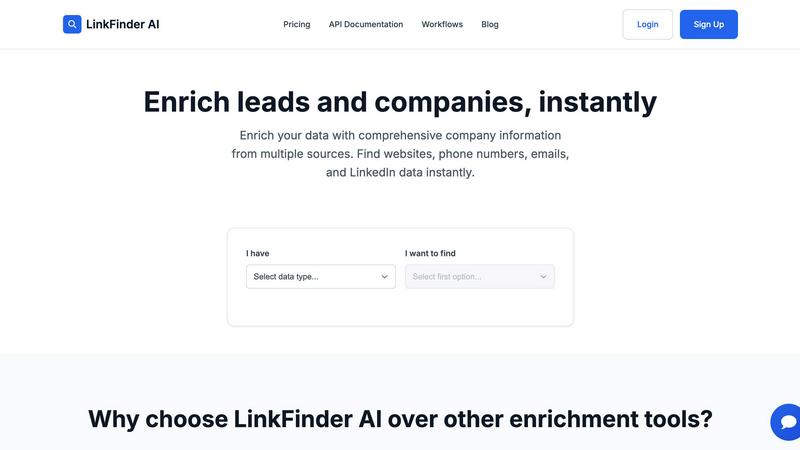
Instantly enrich your leads with complete company details and LinkedIn data.
Last updated: February 27, 2026
Visual Comparison
Crops

Linkfinder AI
Feature Comparison
Crops
Smart Asset Organization
Crops uses AI to automatically tag and categorize every uploaded file, transforming a chaotic library into an instantly searchable database. Assets can be placed on multiple project boards without duplication, and complex searches that used to take hours are resolved in seconds. This intelligent organization ensures your team can immediately locate the right hero image, logo, or final design version, restoring creative momentum and ending the hunt through emails and disparate cloud drives.
Streamlined Approvals & Collaboration
This feature centralizes all feedback and approvals directly on the asset itself, eliminating scattered comments. Stakeholders can leave visual annotations and comments on designs via secure review links that require no login. Teams can track approval status with custom workflows, ensuring everyone knows what's finalized. This creates a single source of truth for feedback, accelerating review cycles and enabling faster campaign shipping with clear, contextual direction.
AI-Powered Quality Control
Crops deploys AI to act as an automated final inspector, scanning content instantly for a wide range of errors before they reach a client or go live. It checks for spelling and grammar mistakes, accessibility issues like poor color contrast, forgotten placeholder text like "Lorem ipsum," and brand inconsistencies. By integrating these checks into your workflow, you can catch what human eyes miss and deliver flawless, professional work with confidence every single time.
Secure & Simple Sharing
Designed for frictionless client and stakeholder interaction, this feature allows you to generate password-protected, expiring links for sharing assets. Recipients can review, download (based on permissions), and comment directly without needing to create an account. This professional approach eliminates email attachment chaos, speeds up feedback, and presents your brand securely, all while maintaining full control over your assets.
Linkfinder AI
Multi-Source Data Enrichment
Linkfinder AI doesn't rely on a single point of failure. It cross-references and validates information from a powerful blend of sources including LinkedIn profiles, authoritative company databases, and public records. This multi-pronged approach ensures you get the most complete and accurate picture of a company or contact, far surpassing tools that use limited data sets.
Batch Processing & CSV Upload
Designed for efficiency at scale, this feature allows you to upload thousands of records via a simple CSV file. Perfect for handling large campaigns or cleaning entire lead lists, the system processes everything in parallel, delivering fully enriched data back to you in minutes, not hours, directly through the app or via download.
Real-Time API Integration
Automate your enrichment workflow by integrating Linkfinder AI directly into your tech stack. The robust API allows for instant, real-time data enrichment as new leads come in through forms, CRMs, or outreach platforms like Clay and Zapier, ensuring your systems are always updated with the latest information without manual intervention.
Intuitive, No-Training Interface
Built with user experience as a priority, Linkfinder AI features a clean, straightforward interface that anyone can navigate immediately. From uploading data to reviewing results, the process is streamlined and intuitive, requiring no training or technical setup, so your team can become productive from the very first use.
Use Cases
Crops
Marketing Campaign Launch
For launching a multi-channel campaign, teams use Crops to centralize all final assets—from social media graphics to video files—in one organized workspace. They utilize streamlined approval workflows to gather fast, contextual feedback from stakeholders and leverage AI quality control to automatically catch typos or brand guideline deviations before anything goes public, ensuring a flawless and synchronized launch.
Creative Team Asset Management
In-house or agency creative teams implement Crops to end the chaos of managing thousands of images, logos, and templates. AI auto-tagging makes every asset searchable in moments. The ability to place assets on multiple boards without duplication allows for flexible project organization, saving countless hours previously wasted searching through emails, Slack, and disparate folders for the right file.
Client Review & Approval Process
Agencies and freelancers use Crops to transform a typically messy client review process. Instead of emailing large files and compiling feedback from multiple sources, they share a single, secure review link. Clients comment directly on the designs with visual annotations, and all feedback is tracked in one place, eliminating version confusion and ensuring the "final-final" file is clearly identified and approved.
Ensuring Brand Compliance & Accessibility
Brand managers and operations teams integrate Crops to enforce quality and compliance at scale. The AI quality control feature is configured to automatically audit all outgoing content for adherence to brand guidelines (like correct logo usage and colors) and to flag accessibility issues (like insufficient text contrast). This proactive check safeguards the brand and promotes inclusive design without manual, last-minute reviews.
Linkfinder AI
Supercharging Sales Prospecting
Sales teams can rapidly build targeted prospect lists. By starting with just a company name or industry, they can use Linkfinder AI to instantly pull key decision-makers' contact details, company phone numbers, and firmographic data, allowing for faster and more personalized cold outreach campaigns.
Enhancing Marketing Campaigns
Marketers can enrich their existing lead databases to improve segmentation and personalization. Adding accurate company size, industry, and website data to leads enables the creation of highly targeted email and ad campaigns, significantly increasing engagement and conversion rates.
Accelerating Market Research
Business analysts and strategists can conduct thorough competitive intelligence and market analysis. By enriching lists of competitors or target companies, they can quickly gather standardized data on employee count, location, and online presence, streamlining the research process.
Cleaning and Validating CRM Data
Organizations can use batch processing to audit and refresh stale records in their CRM. Uploading existing contacts ensures information is up-to-date and accurate, improving communication success rates and maintaining a healthy, reliable customer database.
Overview
About Crops
Crops is the AI-powered Digital Asset Management (DAM) platform engineered specifically for the dynamic, on-the-go nature of modern creative and marketing teams. It acts as a central, intelligent workspace designed to eliminate the chronic workflow frustrations that stifle productivity and creativity. The platform directly tackles the core issues of endless file searches, scattered feedback across emails and Slack, confusing version histories, and costly errors that slip through manual reviews. By bringing organization, collaboration, and automated quality control into one seamless environment, Crops gives creative professionals their most valuable asset back: time. Its mobile-first design ensures the experience is as intuitive and powerful on a smartphone as it is on a desktop, empowering teams to manage, review, and approve work from anywhere. The core value proposition is clear: transform chaotic, error-prone processes into a streamlined workflow where teams can find any asset in seconds, collaborate with clear context, and ship campaigns with absolute confidence, knowing every piece of content has been automatically vetted for typos, accessibility, and brand consistency.
About Linkfinder AI
Linkfinder AI is a powerful, app-centric data enrichment platform designed for the modern, mobile-first professional. It transforms incomplete leads into actionable, comprehensive profiles in minutes. The tool is built for sales teams, marketers, and business analysts who need to move quickly and make data-driven decisions without getting bogged down in manual research. Its core value proposition is delivering lightning-fast, highly accurate company and contact information by intelligently aggregating data from multiple premium sources like LinkedIn, company databases, and public records. Whether you start with just a company name, a LinkedIn URL, or a lead's name, Linkfinder AI's powerful engine fills in the gaps—finding websites, direct phone numbers, email addresses, and key employee data instantly. With a focus on seamless user experience, it eliminates complex setups through intuitive batch CSV uploads and robust real-time API integration, making it the go-to solution for supercharging lead generation, outreach campaigns, and market intelligence on the go.
Frequently Asked Questions
Crops FAQ
How does Crops differ from using Google Drive or Dropbox?
While Google Drive and Dropbox are excellent for general file storage, Crops is built specifically for creative workflows. It adds intelligent, AI-powered organization with auto-tagging, dedicated tools for visual feedback and approvals directly on assets, and automated quality control for errors—features generic cloud storage lacks. Crops transforms a storage repository into an active, collaborative workspace that prevents workflow friction.
Is Crops really built for mobile use?
Absolutely. Crops is designed with a mobile-first philosophy, ensuring the entire experience—from browsing your asset library and reviewing designs to leaving feedback and approving work—is fully optimized and intuitive on smartphones and tablets. This allows creative and marketing teams to collaborate and keep projects moving seamlessly, whether they are in the office, at a client site, or working remotely.
What kind of errors can the AI Quality Control catch?
Crops' AI scans for a comprehensive range of common and costly errors. This includes spelling and grammar mistakes, readability issues, placeholder text like "Lorem ipsum" or "[INSERT HEADLINE]", and accessibility problems such as poor color contrast or text size. It can also be configured to check for brand guideline inconsistencies, helping ensure every asset is professional and on-brand before delivery.
How secure is the sharing feature for client work?
Security is a priority. When sharing assets, you can generate secure links with optional password protection and set expiration dates. You maintain control over download permissions, and recipients can view and comment without creating a Crops account, which simplifies their experience. All interactions are tracked within the platform, providing a secure and professional channel for client collaboration.
Linkfinder AI FAQ
How accurate is the data enrichment?
Linkfinder AI guarantees a 95% accuracy rate for its enriched data. This high confidence level is achieved through comprehensive data validation across its multiple sources, including LinkedIn, verified databases, and public records, ensuring the information you receive is reliable.
What types of data can I enrich?
You can enrich various data points including company names, LinkedIn company URLs, LinkedIn profile URLs, lead full names, and LinkedIn post URLs. The tool returns comprehensive information such as company websites, phone numbers, email addresses, and LinkedIn employee data.
Do you provide API access?
Yes, API access is included with the professional plan. This allows for real-time integration with your existing workflows, CRMs, and marketing automation tools, enabling instant data enrichment as new leads are captured in your systems.
Can I process multiple entries at once?
Absolutely. Linkfinder AI is built for scale with its batch processing feature. You can upload a CSV file containing thousands of records at once, and the system will enrich them all simultaneously, delivering the complete, enriched file back to you in just minutes.
Alternatives
Crops Alternatives
Crops is an AI-powered Digital Asset Management (DAM) platform designed specifically for creative and marketing teams. It centralizes assets, streamlines approvals, and uses AI to catch errors, helping teams ship flawless work faster from any device. Users often explore alternatives for various reasons. Budget constraints, the need for different feature sets, or specific platform integrations can lead teams to look at other options. Some may require a tool more tailored to large enterprises or simpler solutions for very small teams. When evaluating an alternative, focus on your team's core needs. Key considerations include the platform's ability to organize and find assets quickly, the intuitiveness of its mobile and desktop review tools, and whether it offers automated quality checks for brand consistency and errors. The right fit should solve your biggest workflow pains without adding complexity.
Linkfinder AI Alternatives
Linkfinder AI is a data enrichment tool in the marketing and sales tech category. It specializes in quickly adding detailed company and contact information, like emails and LinkedIn profiles, to your existing data lists. This helps teams power up their outreach and research without manual searching. Users often explore other options to find a tool that better fits their budget, specific feature needs, or preferred platform. Some might need deeper integrations with their current CRM, while others prioritize mobile app access or different data sourcing methods. It's a common step in finding the perfect fit for a team's workflow. When evaluating alternatives, consider the accuracy and sources of the data, ease of use on your devices, and how well it connects with your other apps. Also, look at the pricing model to ensure it scales with your needs. The goal is to find a solution that feels seamless and boosts your team's productivity from anywhere.