
Fusedash vs Threat Watch
Side-by-side comparison to help you choose the right AI tool.

Fusedash instantly turns raw data into clear dashboards and charts for your team.
Last updated: March 4, 2026

Threat Watch
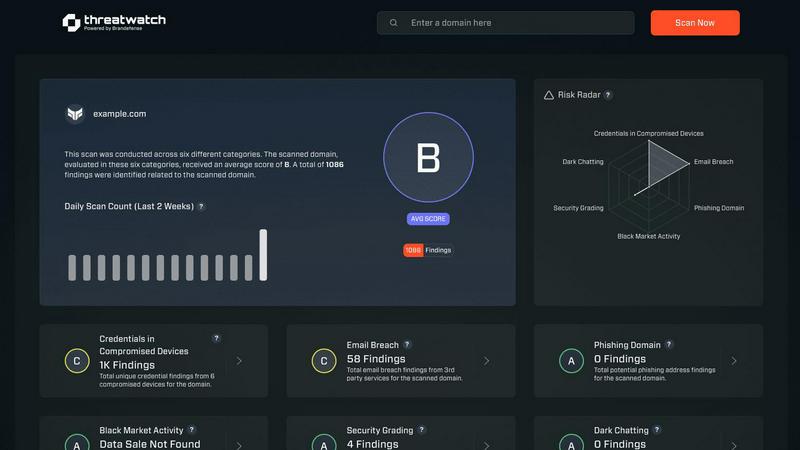
Instantly check your cybersecurity health and get actionable insights to stay protected.
Last updated: March 1, 2026
Visual Comparison
Fusedash

Threat Watch
Feature Comparison
Fusedash
Flexible Views
Build the right dashboard view for every audience within the same platform. Fusedash lets you transform a single dataset into interactive dashboards, standalone charts, detailed maps, or narrative report-style views. Customize layouts, filters, and time ranges for different stakeholders, ensuring each team sees what matters most without any extra back-and-forth or manual duplication of work.
AI Chart Generator
Instantly create clear, AI-powered charts from your CSVs or connected APIs. This feature acts as a fast visualizer, intelligently suggesting the right chart type, applying comparisons, and helping refine labels so your visuals tell the correct story at a glance. Generated charts can be used as standalone assets or seamlessly dropped into broader dashboards and reports for cohesive storytelling.
Unified Dashboard & Reporting Workspace
Go beyond static dashboards by combining real-time KPI monitoring with narrative context. This workspace allows you to embed storytelling sections directly alongside performance charts, making it clear what changed, why it matters, and what the next steps are. This integration reduces conflicting report versions and keeps all teams aligned on insights and actions.
AI-Powered Smart Chat
Accelerate data exploration and dashboard refinement using plain language. Ask questions about your data, request breakdowns by segment or region, and get intelligent suggestions for relevant metrics or chart types. You can then instantly turn these conversational insights into polished, shareable views that your team can use immediately within the platform.
Threat Watch
Unified Mobile Dashboard
Gain instant, panoramic visibility into your cybersecurity health from a single, intuitive dashboard optimized for your phone. This centralized view consolidates alerts, risk scores, and critical insights across all monitored categories, eliminating the need to switch between disparate tools. Designed for quick comprehension on a smaller screen, it allows you to assess your organization's entire risk posture at a glance, anytime and anywhere.
Real-Time Exposure Detection
Continuously scan and analyze multiple threat vectors in real-time, including dark web markets, breach databases, and phishing campaigns. The platform automatically identifies if your corporate credentials, employee emails, or sensitive company data are being traded or discussed by malicious actors. This proactive surveillance turns your mobile device into an early-warning system, alerting you to exposures the moment they are discovered.
Automated Risk Prioritization
Stop wasting time on false positives or low-severity alerts. Threat Watch's intelligent engine automatically analyzes and prioritizes discovered threats based on their contextual relevance to your specific organization. It evaluates the potential impact and likelihood of exploitation, presenting you with a clear, actionable list of what needs immediate attention, so you can focus your efforts where they matter most.
On-the-Go Mitigation Workflow
Execute response actions directly from your mobile device to contain threats at speed. The app provides integrated, one-touch workflows to guide you through mitigation steps, such as forcing password resets for compromised accounts or isolating potentially breached devices. This seamless functionality ensures you can act decisively from a meeting, during a commute, or outside of the office, dramatically reducing your mean time to respond (MTTR).
Use Cases
Fusedash
Executive & Leadership Reporting
Provide leadership with a single, trusted source of truth. Consolidate data from multiple departments into a unified executive dashboard enriched with narrative storytelling. This gives leaders a clear, high-level view of performance against KPIs with the necessary context to understand drivers and make strategic decisions confidently.
Marketing Campaign Analysis
Enable marketing teams to move from data to insight rapidly. Connect campaign data from various APIs, visualize performance trends with AI-generated charts, and drill down into segments to see what's working. Share live dashboards with stakeholders to demonstrate ROI and adjust strategies in real-time without manual report rebuilding.
Operational Performance Monitoring
Give operations teams a real-time interface to monitor key processes and metrics. Create dashboards with maps to visualize geographic performance, set up automatic data refreshes, and use drill-downs to identify bottlenecks or regional issues instantly, ensuring swift, data-driven operational responses.
Cross-Departmental Data Alignment
Eliminate silos and conflicting data stories across an organization. By defining core metrics once in Fusedash and reusing them in dashboards for sales, finance, and customer support, every department operates from the same consistent numbers. This fosters alignment, reduces reconciliation time, and ensures collaborative action based on a shared reality.
Threat Watch
Proactive Security Posture Management for CISOs
Chief Information Security Officers (CISOs) and business leaders can maintain continuous oversight of organizational risk without being tied to a desktop. The mobile-first dashboard provides an executive summary of security health, enabling informed decision-making and board reporting on-the-fly. It empowers leaders to demonstrate proactive risk management and validate security investments with real-time data.
Rapid Incident Response for Security Analysts
Security operations center (SOC) analysts can triage and respond to alerts from anywhere. When a critical alert about stolen credentials surfaces, analysts receive an immediate push notification. They can then use the app to investigate the exposure's context, assess its priority, and initiate containment protocols within minutes, all before even reaching their desk, significantly accelerating incident response.
Third-Party and Supply Chain Risk Monitoring
IT teams can extend their visibility beyond their immediate network to monitor for breaches involving vendors and partners. By tracking third-party domains and email addresses, Threat Watch alerts you if a supplier's compromised credentials could provide a backdoor into your systems. This allows for proactive communication and enforcement of security requirements before an attack chain is completed.
Employee Security Awareness and Training
Use actionable intelligence from Threat Watch to drive targeted security training. When the platform detects that employee credentials have appeared in a phishing list or breach, security teams can immediately notify the affected individuals with specific, contextual guidance. This turns a generic training exercise into a timely, personalized security lesson that has a far greater impact on behavior.
Overview
About Fusedash
Fusedash is an AI-powered data visualization platform designed for teams that need clarity and action from their data, not just more charts. It acts as a unified mobile-first workspace where you can create decision-ready dashboards, interactive charts, detailed maps, and narrative reports without rebuilding the same logic across disconnected tools. The core value is consistency and efficiency: you define your key metrics and KPIs once, and then reuse those trusted definitions across every view and report. This ensures everyone—from leadership to marketing to operations—is aligned on the same numbers. Built for teams tired of manual reporting cycles and conflicting data stories, Fusedash empowers users to not only monitor what's happening through real-time interfaces but also understand why by drilling down into segments or time periods. With integrated AI features like natural language data chat and smart visualization assistance, it makes data exploration faster and more accessible. Simply connect your data via CSV or API, and Fusedash transforms it into a shared source of truth that drives alignment and informed action, all from an intuitive, app-centric interface.
About Threat Watch
Threat Watch is the definitive mobile command center for your organization's cybersecurity health. Built from the ground up for smartphones and tablets, it delivers a unified, real-time view of your digital risk posture directly into the hands of IT teams, security professionals, and business leaders. This platform moves beyond passive monitoring by actively analyzing your assets, vulnerabilities, and exposures across multiple critical fronts, including compromised credentials, breached accounts, phishing addresses, and dark web content. The core value is unparalleled speed and clarity: transform overwhelming data into a clear, actionable picture. Identify lurking threats, prioritize them based on your unique environment, and execute mitigation strategies faster than ever. With its intuitive, app-centric dashboard designed for on-the-go management, Threat Watch enables a decisive shift from reactive alert chasing to proactive, informed risk management, ensuring you're always one step ahead of potential breaches.
Frequently Asked Questions
Fusedash FAQ
What types of data sources can I connect to Fusedash?
Fusedash is built for flexibility. You can start instantly by uploading CSV or Excel files. For live data, you can connect directly to various business APIs and databases. The platform also allows you to combine multiple datasets, including enriching your views with relevant public data, all within a single workspace.
How does the AI Chart Generator work?
The AI Chart Generator simplifies visualization. After you connect your dataset, the AI analyzes your data structure and suggests the most appropriate chart types to effectively communicate trends and comparisons. You maintain full control to refine labels, apply filters, and adjust the design, turning raw data into a clear visual story in minutes.
Can I create different views for different teams from the same data?
Absolutely. This is a core strength of Fusedash. You can build a master dataset with consistent metric definitions and then create multiple, tailored views from it. For example, a detailed, interactive dashboard for analysts, a high-level summary chart for executives, and a geographic map for field operations—all pulling from the same trusted source.
What is Smart Chat and how can it help my team?
Smart Chat is an integrated AI assistant within Fusedash. Instead of navigating complex menus, you can ask questions about your data in plain language, like "What were sales in Q3 by region?" or "Show me a breakdown of website traffic by source." The AI interprets your query, generates the answer visually, and helps you instantly convert that insight into a saved chart or dashboard view.
Threat Watch FAQ
How does Threat Watch discover my company's exposed data?
Threat Watch employs a sophisticated, automated scanning engine that continuously monitors a vast array of sources. This includes underground forums, dark web marketplaces, paste sites, public breach databases, and phishing kit repositories. Our system uses digital fingerprints of your organization (like domain names and key asset identifiers) to find and flag relevant exposures, ensuring you only see alerts that matter to you.
Is the Threat Watch app secure to use on a personal mobile device?
Absolutely. Security is our foundation. The Threat Watch app uses strong, end-to-end encryption for all data in transit and at rest. It also supports robust multi-factor authentication (MFA) and integrates with mobile device management (MDM) solutions. Access is strictly controlled via role-based permissions, ensuring that sensitive findings are only visible to authorized personnel on registered, secure devices.
What kind of threats can Threat Watch actually help me mitigate?
Threat Watch is specifically designed to uncover and help mitigate threats stemming from digital exposure. This includes credential compromise (passwords for sale), account takeovers, phishing campaigns targeting your domain, sensitive corporate data leaked on the dark web, and mentions of your infrastructure in hacker forums. It provides the intelligence and tools to reset credentials, block threats, and secure assets before they are exploited.
Can Threat Watch integrate with our existing security tools?
Yes, Threat Watch is built to fit into your existing security ecosystem. It offers seamless integrations with popular Security Information and Event Management (SIEM) systems, Identity and Access Management (IAM) platforms, and IT service management (ITSM) ticketing systems like ServiceNow. This allows alerts and risk data to flow directly into your central workflows, enabling automated response actions and enriched correlation.
Alternatives
Fusedash Alternatives
Fusedash is an AI-powered data visualization and business intelligence platform. It helps teams unify their data to create consistent dashboards, charts, and reports, turning complex information into a shared source of truth for better decision-making. Users often explore alternatives for various reasons. These can include budget constraints, the need for specific integrations with their existing app stack, or requirements for more advanced or different feature sets. The search for the right tool is highly personal to a team's workflow and goals. When evaluating other options, consider your core needs. Look for a solution that offers the right balance of visualization power, ease of use, and collaborative features for your team's mobile-first, app-centric environment. Prioritize tools that provide consistent data definitions and real-time access to keep everyone aligned.
Threat Watch Alternatives
Threat Watch is a mobile-first cybersecurity health and business intelligence platform. It provides IT and security teams with a real-time, actionable view of their organization's digital risk directly from a smartphone or tablet, moving beyond traditional monitoring to proactive management. Users often explore alternatives for various reasons. These can include budget constraints, the need for specific integrations with existing security tools, or a requirement for a desktop-centric workflow instead of a mobile-first approach. Some organizations may also seek solutions with different reporting structures or more specialized feature sets. When evaluating other options, consider your core needs. Key factors include the platform's primary interface (mobile vs. desktop), the scope of its monitoring capabilities, the speed and clarity of its alerts, and how well it prioritizes risks for your specific environment. The goal is to find a solution that delivers actionable intelligence in a format that fits your team's workflow.