
Hush Touch | Voice-to-Text for MacOS vs Practical AI (Practical AI for SMB)
Side-by-side comparison to help you choose the right AI tool.

Hush Touch | Voice-to-Text for MacOS
Hush Touch is offline voice-to-text software for Mac that learns your vocabulary for smarter, accurate dictation.
Last updated: February 28, 2026

Practical AI (Practical AI for SMB)
Practical AI delivers easy, budget-friendly automation guides to save small businesses time.
Last updated: April 4, 2026
Visual Comparison
Hush Touch | Voice-to-Text for MacOS

Practical AI (Practical AI for SMB)
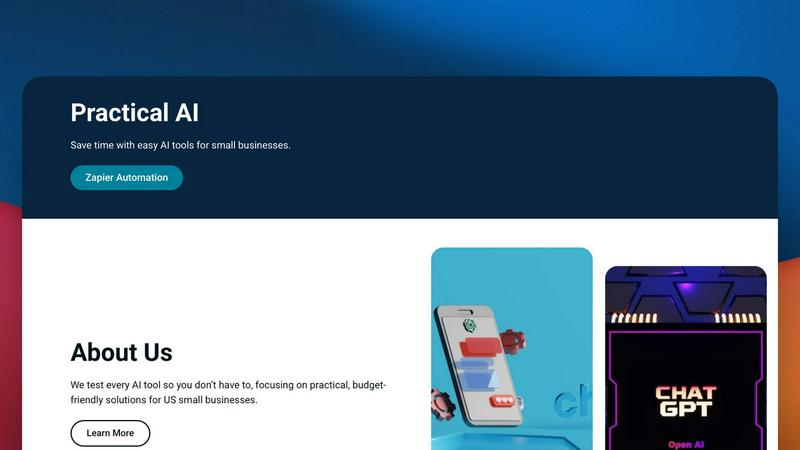
Feature Comparison
Hush Touch | Voice-to-Text for MacOS
Dual-Engine Recognition
Hush Touch employs a dual-engine recognition system that combines DictationTranscriber for natural flow and punctuation with SFSpeechRecognizer for custom vocabulary enhancement. This sophisticated blend ensures that your transcriptions are not only accurate but also reflect the nuances of your unique speech patterns.
Custom Vocabulary
With an impressive capacity for recognizing up to 500 custom terms, Hush Touch learns from your corrections and preferences. This feature is particularly beneficial for professionals in specialized fields—like medicine or technology—ensuring that the software can accurately transcribe complex terminology and jargon that other apps might misinterpret.
Smart Text Processing
The app excels in smart text processing by automatically removing filler words and correcting common mistakes in real time. Features such as voice snippets for repeated phrases and formatted numbered lists enhance the overall dictation experience, helping users to produce polished documents faster and with less effort.
100% On-Device Privacy
Hush Touch guarantees that all processing is conducted on your Mac, ensuring that your voice data is never sent to the cloud. This fully on-device operation not only enhances privacy but also allows the app to function offline, making it a reliable tool regardless of your internet connectivity.
Practical AI (Practical AI for SMB)
Manually Tested, Real-World Guides
Every automation blueprint, tool review, and step-by-step guide published on Practical AI is rigorously tested in actual business scenarios. We don't just theorize; we implement the workflows ourselves to ensure they work as promised, saving you the frustration and time of troubleshooting untested advice. This hands-on validation guarantees you receive reliable, ready-to-deploy solutions.
Industry-Specific Zapier Automation Blueprints
We provide detailed, niche automation strategies tailored for specific local service businesses. Our blueprints, like the "Velocity-First" system for couriers or the "Remote Operator" plan for laundromats, offer complete step-by-step instructions to automate key operations such as dispatch, payment syncing, maintenance alerts, and customer notifications without writing a single line of code.
Honest, Budget-Focused AI Tool Reviews
Navigate the crowded AI tool market with confidence. Our reviews cut through marketing claims to deliver honest assessments of AI software, focusing specifically on value, ease of use, and practical application for SMBs. We highlight budget-friendly solutions that deliver maximum return on investment, so you can spend wisely.
Ready-to-Use Prompts & Workflow Templates
Jumpstart your automation journey with our library of pre-built resources. We provide exact AI prompts for content creation and customer service, along with exportable workflow templates for platforms like Zapier. These plug-and-play assets eliminate the guesswork, allowing you to implement powerful automations in minutes, not hours.
Use Cases
Hush Touch | Voice-to-Text for MacOS
Drafting Emails
Hush Touch simplifies the process of composing emails by allowing users to dictate messages hands-free. Whether you are responding to colleagues or sending quick updates, you can effortlessly convert your thoughts into written text with just your voice.
Taking Notes in Meetings
During meetings or lectures, Hush Touch serves as an invaluable tool for capturing ideas and discussions without the distraction of typing. Users can focus on the conversation while the app transcribes their voice into notes, making it easier to stay engaged.
Writing Content and Articles
For bloggers and content creators, Hush Touch provides a seamless way to brainstorm and draft articles. By dictating their thoughts, users can maintain a natural flow of ideas, enhancing creativity and productivity.
Creating Technical Documentation
Professionals in technical fields can leverage Hush Touch to produce documentation that includes specialized terminology. The custom vocabulary feature ensures that terms related to coding, medical practices, or engineering are accurately captured, saving time and reducing errors.
Practical AI (Practical AI for SMB)
Automating Local Service Business Operations
Owners of businesses like landscaping companies, courier services, and laundromats can use our specific blueprints to automate core tasks. For example, automatically sync remote payments, send machine repair alerts, optimize delivery routes with AI, and dispatch jobs instantly, transforming a hands-on operation into a streamlined, remotely manageable business.
Streamlining Marketing & Content Creation
Marketing managers and small business owners can leverage our tested guides and prompts to automate social media posting, generate SEO-optimized blog content, create email campaigns, and manage customer reviews using AI. This reduces the daily content grind, freeing up time for strategic work while maintaining a consistent online presence.
Enhancing Customer Service & Engagement
Improve response times and customer satisfaction without hiring more staff. Implement our guided automations to instantly acknowledge inquiries, route questions to the right person, send appointment reminders, and follow up on service completion. This creates a professional, responsive experience 24/7.
Boosting Administrative & Operational Efficiency
Office managers and solopreneurs can eliminate repetitive manual work. Our guides show you how to automate data entry between apps, generate reports, manage invoices, schedule appointments, and organize leads. This reduces errors, saves countless hours per week, and allows you to focus on growth-focused activities.
Overview
About Hush Touch | Voice-to-Text for MacOS
Hush Touch is an innovative voice-to-text application designed specifically for macOS, transforming the dictation experience into something that feels both fast and natural. It stands out by ensuring complete privacy with its on-device processing, meaning users can enjoy robust voice recognition without relying on cloud services. This lightweight app, at just 5.5 MB, integrates seamlessly into daily writing workflows, making it ideal for anyone looking to enhance their productivity without the hassle of complicated setups. Whether you are a busy professional drafting emails, a student taking notes, or a creative writer brainstorming ideas, Hush Touch adapts to your needs. Its dual-engine transcription system, combined with advanced learning capabilities, produces cleaner, more accurate text outputs. With a one-time purchase of $20 for a lifetime license, Hush Touch is an affordable solution for those seeking efficiency and privacy in their dictation tasks.
About Practical AI (Practical AI for SMB)
Practical AI is your dedicated, mobile-first command center for implementing artificial intelligence in your small or medium-sized business. We cut through the overwhelming hype and technical jargon to deliver clear, actionable guidance you can use immediately. Our core mission is to empower US-based SMB owners, managers, and operators with the knowledge to automate repetitive tasks, streamline operations, and boost efficiency without requiring a technical background or a large budget. Every tool, tip, and tutorial is manually tested in real-world business scenarios by our team, led by automation specialist Aapt Dubey, who has hands-on experience building over 800 workflows. Think of us as your on-demand automation consultant, providing step-by-step guides for using popular AI tools like ChatGPT and Claude alongside no-code platforms like Zapier. We focus on practical, industry-specific applications—from automating dispatch for local couriers to managing machine alerts for laundromats—ensuring you get solutions that directly impact your bottom line and save you precious time every day.
Frequently Asked Questions
Hush Touch | Voice-to-Text for MacOS FAQ
How does Hush Touch maintain user privacy?
Hush Touch processes all voice data entirely on your Mac, with no reliance on cloud services. This ensures your dictations remain private and secure, protecting sensitive information from potential breaches.
Can I use Hush Touch offline?
Yes, Hush Touch is designed for offline use. Its on-device processing means you can dictate your thoughts and ideas without needing an internet connection, making it highly convenient for users on the go.
What is the cost of Hush Touch?
Hush Touch is available for a one-time fee of $20, providing a lifetime license with no recurring subscription costs. This makes it an affordable choice compared to other voice dictation services that charge monthly fees.
How does the adaptive learning feature work?
Hush Touch’s adaptive learning feature improves accuracy by detecting when you correct a transcription. It automatically adds the corrected terms to your custom vocabulary, enhancing the app’s performance and responsiveness over time.
Practical AI (Practical AI for SMB) FAQ
Who is Practical AI for?
Practical AI is specifically designed for US-based small and medium-sized business owners, operators, and non-technical managers. It's perfect for local service businesses (like couriers, laundromats, landscapers), solopreneurs, marketing teams, and anyone feeling overwhelmed by AI hype who needs clear, actionable steps to improve efficiency without a big budget or IT department.
Do I need technical skills to use your guides?
No technical skills or coding knowledge are required. Our core philosophy is to make automation accessible. Every guide is written as a clear, step-by-step tutorial using intuitive, no-code platforms like Zapier and user-friendly AI tools like ChatGPT. We explain everything in plain language, assuming no prior expertise.
How are your guides different from other online tutorials?
Our guides are uniquely industry-specific and manually validated. While many tutorials offer generic advice, we provide complete "blueprints" tested in real businesses. Founded by an automation specialist with 800+ built workflows, we ensure every solution is practical, reliable, and delivers tangible time savings or revenue impact.
What kind of tools do you cover?
We primarily focus on the most accessible and powerful no-code and AI tools for SMBs. This includes automation platforms like Zapier, AI chatbots like ChatGPT and Claude, and various marketing, CRM, and productivity apps that integrate with them. We constantly test new tools and provide honest reviews on their practical value for business.
Alternatives
Hush Touch | Voice-to-Text for MacOS Alternatives
Hush Touch | Voice-to-Text for MacOS is a cutting-edge dictation application that allows users to convert spoken words into text seamlessly and privately. It falls under the AI Assistants category, focusing on enhancing productivity through offline voice-to-text capabilities. Users often seek alternatives due to various reasons such as pricing, specific feature sets, or platform compatibility. Finding the right alternative involves considering aspects like ease of use, accuracy of transcription, data privacy, and the ability to integrate with existing workflows. When choosing an alternative, assess the software’s performance, especially in terms of transcription accuracy and processing speed. It's essential to consider whether the solution operates offline for privacy and convenience, as well as its compatibility with your MacOS version. Additionally, look for features that cater to your specific dictation needs, such as customizable commands or vocabulary learning, to ensure that the chosen application enhances your everyday writing experience.
Practical AI (Practical AI for SMB) Alternatives
Practical AI (Practical AI for SMB) is a specialized resource hub in the AI Assistants category, designed specifically for US small and medium-sized businesses. It provides clear, tested guides and workflows for using AI tools and no-code automation to save time and streamline operations without technical expertise. Users often explore alternatives for various reasons. They might be seeking different pricing models, specific features not covered, or platforms that integrate more directly with their existing tech stack. Some may also look for resources tailored to different industries or business sizes beyond the core SMB focus. When evaluating other options, prioritize resources that offer genuinely tested, step-by-step guidance you can implement immediately. Look for a focus on practical, real-world application over theory, and ensure the content is created by someone with proven, hands-on experience in business automation. The best alternative will match your specific industry needs and comfort level with technology.