
Hush Touch | Voice-to-Text for MacOS vs Prompt Builder
Side-by-side comparison to help you choose the right AI tool.

Hush Touch | Voice-to-Text for MacOS
Hush Touch is offline voice-to-text software for Mac that learns your vocabulary for smarter, accurate dictation.
Last updated: February 28, 2026

Prompt Builder
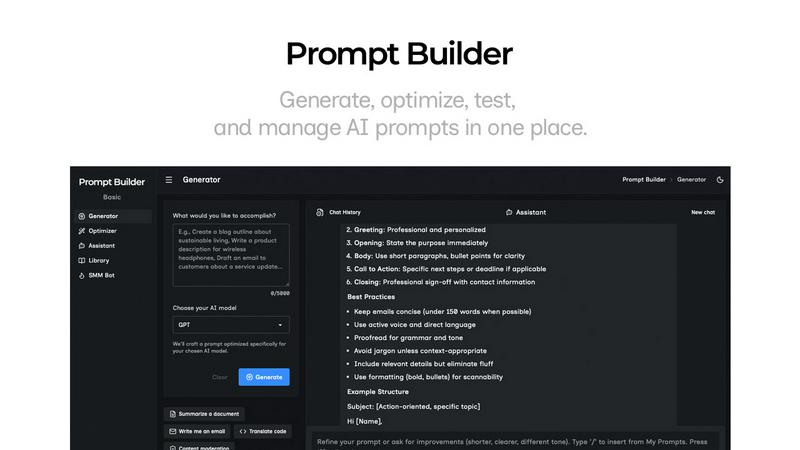
Generate, optimize, test, and manage AI prompts in one place. Turn an idea into a ready-to-use prompt in seconds.
Visual Comparison
Hush Touch | Voice-to-Text for MacOS

Prompt Builder
Overview
About Hush Touch | Voice-to-Text for MacOS
Hush Touch is an innovative voice-to-text application designed specifically for macOS, transforming the dictation experience into something that feels both fast and natural. It stands out by ensuring complete privacy with its on-device processing, meaning users can enjoy robust voice recognition without relying on cloud services. This lightweight app, at just 5.5 MB, integrates seamlessly into daily writing workflows, making it ideal for anyone looking to enhance their productivity without the hassle of complicated setups. Whether you are a busy professional drafting emails, a student taking notes, or a creative writer brainstorming ideas, Hush Touch adapts to your needs. Its dual-engine transcription system, combined with advanced learning capabilities, produces cleaner, more accurate text outputs. With a one-time purchase of $20 for a lifetime license, Hush Touch is an affordable solution for those seeking efficiency and privacy in their dictation tasks.
About Prompt Builder
Prompt Builder is a prompt engineering workspace for writing, testing, and saving prompts. Describe the task in plain English, and it helps you create a prompt that matches the model you choose. Start with a draft, refine it in chat, save or pin versions, then run them when you are ready. It works with GPT, Claude, Gemini, Llama, Mistral, DeepSeek, Grok, Perplexity, and more. You also get an Optimizer, an assistant for quick tests, and a library of reusable prompts and templates from the community. Turn an idea into a ready-to-use prompt in seconds. Refine it in chat, save it to your Library, and run it anytime.