
ImaginePro vs Shrinkpad
Side-by-side comparison to help you choose the right AI tool.

ImaginePro
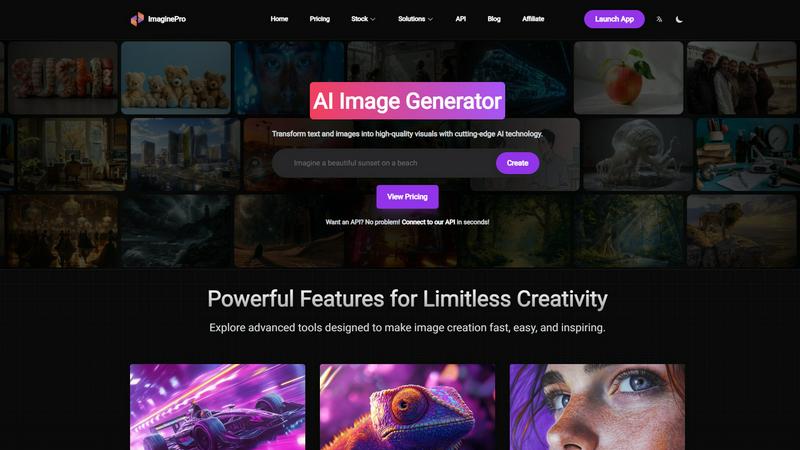
ImaginePro instantly transforms text and images into stunning, high-quality visuals, all from your phone.
Last updated: March 1, 2026

Shrinkpad
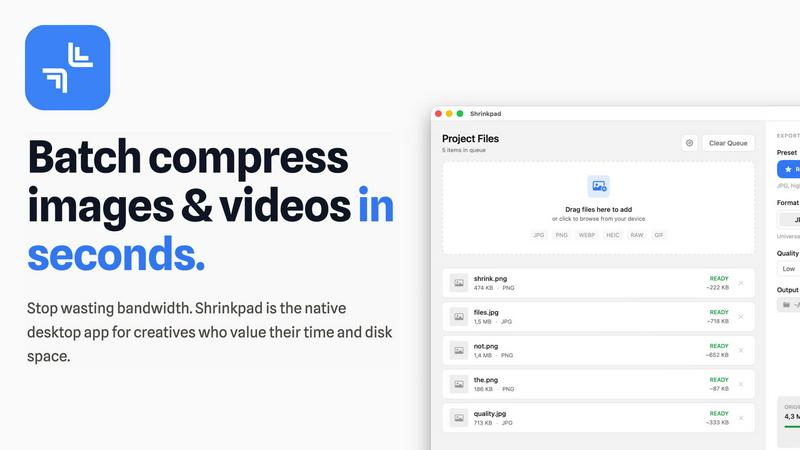
Shrinkpad compresses images and videos in bulk on your Mac to save space and time.
Last updated: February 28, 2026
Visual Comparison
ImaginePro
Shrinkpad
Feature Comparison
ImaginePro
AI Image Generator
ImaginePro’s text-to-image generator allows users to create high-quality visuals in seconds. Leveraging top-tier AI models, you can turn simple text prompts into lifelike images that are ready for immediate use, making it perfect for a variety of applications, from marketing materials to social media content.
Background Removal
Effortlessly eliminate backgrounds from your images using ImaginePro's one-click background removal feature. This tool is essential for e-commerce product images, professional headshots, and dynamic social media posts, enabling users to focus solely on the subject of their visuals.
Text Behind Image
ImaginePro allows users to add text behind objects in their images, creating stunning magazine cover styles. The AI intelligently detects subjects, enabling seamless text placement for enhanced visual storytelling. Customize your message with various fonts, styles, and positioning options to make your designs stand out.
Intuitive Web UI
The user-friendly web interface of ImaginePro simplifies the image creation process. Users can generate images, fine-tune settings, and save their creations with just a few clicks. With no complex prompts required, anyone can describe their vision and see it come to life effortlessly.
Shrinkpad
Lightning-Fast Batch Processing
Shrinkpad is engineered for speed, utilizing multi-threaded compression optimized for Apple Silicon. You can process thousands of images and videos in a single batch within minutes, not hours. Unlike web-based tools that crash under heavy loads, Shrinkpad handles massive queues with ease, turning a previously time-consuming chore into a background task that finishes in seconds.
Privacy-First Local Processing
Your sensitive creative assets never leave the security of your Mac. All compression happens locally on your machine using Apple's native frameworks. There are no cloud uploads, no hidden subscriptions for server processing, and no risk of your unreleased work being exposed. Shrinkpad gives you powerful optimization while guaranteeing complete data privacy.
Intelligent Quality Optimization
Stop guessing compression settings. Shrinkpad automatically analyzes the visual complexity of each image and video to apply the perfect compression ratio. This smart detection ensures maximum file size reduction without introducing noticeable artifacts or quality loss, delivering optimized assets that look as good as the originals.
Comprehensive Format Support
Drag and drop virtually any media file and Shrinkpad is ready to go. It supports over 50 formats natively, including JPG, PNG, WEBP, AVIF, HEIC, RAW camera files, MP4, and MOV. This extensive compatibility means you can process mixed batches of photos and videos together without needing multiple specialized tools.
Use Cases
ImaginePro
Social Media Content Creation
ImaginePro is ideal for social media managers looking to enhance their posts with eye-catching visuals. Quickly generate high-quality images that align with branding, making it easier to capture audience attention and engagement.
E-Commerce Product Photography
E-commerce entrepreneurs can utilize ImaginePro to create professional product images with stunning backgrounds removed. This ensures that products are showcased effectively, leading to better sales conversions and customer satisfaction.
Graphic Design Projects
For graphic designers, ImaginePro serves as a powerful tool to create complex designs quickly. The ability to manipulate images and add text behind subjects allows designers to produce visually compelling graphics that meet client needs.
Automated Content Pipelines
Developers can integrate ImaginePro’s API to automate image generation for content pipelines or chatbots. This feature streamlines workflows and enhances productivity by allowing images to be generated programmatically, saving time and resources.
Shrinkpad
Web Designers & Developers
Quickly optimize entire directories of website assets like hero images, product shots, and icons. Reduce bundle sizes and significantly improve website load times and Core Web Vitals like Largest Contentful Paint (LCP). Simply export assets from Figma or Photoshop at 2x/4x resolution and let Shrinkpad batch-optimize and rename them in one go.
Photographers & Content Creators
Manage massive libraries of high-resolution photos and video clips. Reclaim terabytes of storage by compressing RAW files, HEIC images, and 4K video footage without sacrificing quality for your portfolio or client deliveries. Prepare batches of social media content quickly and efficiently.
App & Software Developers
Reduce the overall size of your application bundles by optimizing all embedded images and video resources. Smaller app sizes lead to faster download times for your users and can help you stay under distribution platform size limits, improving the overall user experience.
General Mac Users
Easily tackle "Storage Full" warnings by finding and compressing large media files scattered across your Downloads, Desktop, and Documents folders. Use Folder Mode to drop any directory and instantly compress all discoverable images and videos, freeing up gigabytes of space with minimal effort.
Overview
About ImaginePro
ImaginePro is a state-of-the-art, AI-driven creative suite that revolutionizes how you bring your ideas to life, transforming them into stunning visuals in mere seconds. Designed with a mobile-first and app-centric approach, ImaginePro prioritizes user experience, ensuring that advanced image generation and editing are accessible to everyone, regardless of their skill level. At its core, ImaginePro features a powerful text-to-image generator that leverages advanced AI models to produce high-resolution, lifelike images from simple text prompts. However, its capabilities extend far beyond basic image generation. ImaginePro integrates essential creative tools such as one-click background removal and a unique "text behind image" feature, facilitating the creation of complex, professional-quality designs akin to magazine covers. This platform caters to a diverse audience, including social media managers, e-commerce entrepreneurs, professional designers, and photographers, all of whom require quick, commercially-ready visuals. With an intuitive web interface, precise style controls, and seamless API integration, ImaginePro embodies limitless creative potential, combining speed, simplicity, and powerful AI into one cohesive application.
About Shrinkpad
Shrinkpad is the ultimate native macOS app for creatives who need to reclaim storage and streamline their workflow. It solves the universal problem of bloated media files by offering fast, private, and intelligent batch compression for both images and videos. Built specifically for Mac, it leverages Apple's frameworks to process everything directly on your device. Your files never leave your computer, ensuring complete privacy and eliminating any dependency on slow internet connections or insecure cloud uploads. Whether you're a photographer managing hundreds of RAW files, a designer optimizing website assets, a content creator editing video clips, or simply someone tired of constant "Storage Full" warnings, Shrinkpad is your dedicated solution. It dramatically reduces file sizes by up to 90% while preserving visual quality, supports over 50 formats out of the box, and handles massive batches of files in seconds. With its intuitive drag-and-drop interface and powerful customization, Shrinkpad transforms the tedious task of file optimization into a simple one-click operation, saving you hours of manual work and gigabytes of precious disk space.
Frequently Asked Questions
ImaginePro FAQ
How does ImaginePro's AI image generator work?
ImaginePro uses advanced AI models to analyze text prompts and generate high-resolution images based on the described concepts. This process enables users to create realistic visuals with minimal effort.
Can I use ImaginePro for commercial projects?
Yes, ImaginePro is designed for both personal and commercial use. The high-quality images generated are suitable for marketing materials, social media, and other commercial applications.
Is there a mobile app for ImaginePro?
ImaginePro is a mobile-first platform, ensuring that users can access its features and tools through a mobile-friendly web interface, making it convenient to create visuals on the go.
How can I integrate ImaginePro with my existing systems?
ImaginePro offers an API that allows easy integration with other applications and workflows. This means you can seamlessly utilize its image generation capabilities within your existing systems and processes.
Shrinkpad FAQ
Can I use Shrinkpad for free?
Yes, Shrinkpad offers a Free Starter tier that includes standard compression for common formats like JPG and PNG. It allows you to process up to 10 files per batch with a maximum file size of 1GB, perfect for trying out the app's core functionality before upgrading.
What file formats does Shrinkpad support?
Shrinkpad supports a wide range of over 50 image and video formats. This includes common types like JPG, PNG, MP4, and MOV, as well as professional formats like WEBP, AVIF, HEIC, and RAW files from various camera manufacturers. A full list is available on the website.
Does Shrinkpad support video compression?
Absolutely. Shrinkpad provides powerful video compression alongside image optimization. You can compress MP4, MOV, and other video formats, often reducing file sizes by 65% or more. This makes it ideal for content creators needing to manage large video project files or clips.
How many files can I process at once?
With the paid Personal or Team plans, you can process an unlimited number of files in a single batch. The app is built to handle massive queues of thousands of assets without crashing, leveraging your Mac's full processing power to work through them efficiently.
Alternatives
ImaginePro Alternatives
ImaginePro is a state-of-the-art mobile application designed to create high-quality AI-generated images and streamline the editing process with features like background removal. As a versatile creative suite, it caters to a wide range of users, including social media managers, e-commerce entrepreneurs, and professional designers, all seeking polished visuals quickly and effortlessly. Users often seek alternatives to ImaginePro due to factors such as pricing, specific feature sets, or platform compatibility. When exploring alternatives, it's essential to consider the capabilities offered, ease of use, integration options, and overall value for your creative needs. Prioritizing these aspects can help ensure you select a solution that aligns with your workflow and enhances your image creation process.
Shrinkpad Alternatives
Shrinkpad is a native macOS application for batch compression of images and videos. It helps users reclaim storage space by intelligently reducing file sizes directly on their Mac, ensuring privacy and speed. This places it in the media optimization and file management category for creative professionals and everyday users alike. Users often explore alternatives for various reasons. Some may need a solution for Windows or a cross-platform tool, while others might seek different pricing models, specific advanced features, or a different user interface. The search for the right tool is highly personal and depends on individual workflow needs. When evaluating alternatives, key considerations include the platform compatibility, privacy policy regarding file processing, support for your specific file formats, and the efficiency of batch handling. The goal is to find a tool that integrates seamlessly into your routine, saving time and space without compromising on the quality you need.