

Shrinkpad
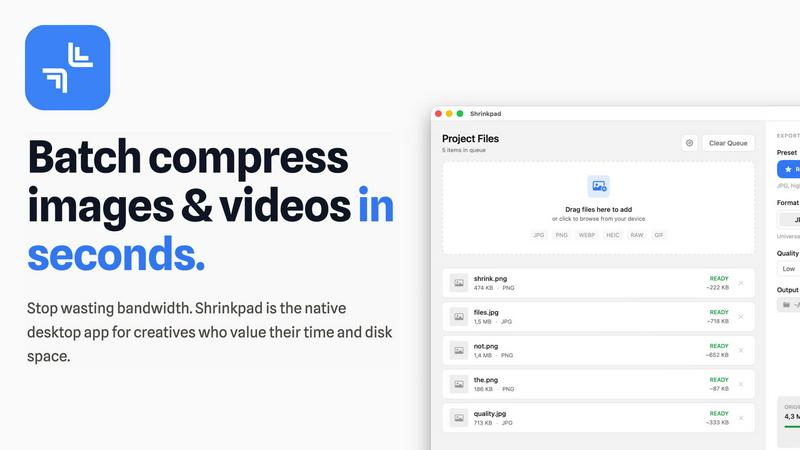
Shrinkpad compresses images and videos in bulk on your Mac to save space and time.
About Shrinkpad
Shrinkpad is the ultimate native macOS app for creatives who need to reclaim storage and streamline their workflow. It solves the universal problem of bloated media files by offering fast, private, and intelligent batch compression for both images and videos. Built specifically for Mac, it leverages Apple's frameworks to process everything directly on your device. Your files never leave your computer, ensuring complete privacy and eliminating any dependency on slow internet connections or insecure cloud uploads. Whether you're a photographer managing hundreds of RAW files, a designer optimizing website assets, a content creator editing video clips, or simply someone tired of constant "Storage Full" warnings, Shrinkpad is your dedicated solution. It dramatically reduces file sizes by up to 90% while preserving visual quality, supports over 50 formats out of the box, and handles massive batches of files in seconds. With its intuitive drag-and-drop interface and powerful customization, Shrinkpad transforms the tedious task of file optimization into a simple one-click operation, saving you hours of manual work and gigabytes of precious disk space.
Features
Lightning-Fast Batch Processing
Shrinkpad is engineered for speed, utilizing multi-threaded compression optimized for Apple Silicon. You can process thousands of images and videos in a single batch within minutes, not hours. Unlike web-based tools that crash under heavy loads, Shrinkpad handles massive queues with ease, turning a previously time-consuming chore into a background task that finishes in seconds.
Privacy-First Local Processing
Your sensitive creative assets never leave the security of your Mac. All compression happens locally on your machine using Apple's native frameworks. There are no cloud uploads, no hidden subscriptions for server processing, and no risk of your unreleased work being exposed. Shrinkpad gives you powerful optimization while guaranteeing complete data privacy.
Intelligent Quality Optimization
Stop guessing compression settings. Shrinkpad automatically analyzes the visual complexity of each image and video to apply the perfect compression ratio. This smart detection ensures maximum file size reduction without introducing noticeable artifacts or quality loss, delivering optimized assets that look as good as the originals.
Comprehensive Format Support
Drag and drop virtually any media file and Shrinkpad is ready to go. It supports over 50 formats natively, including JPG, PNG, WEBP, AVIF, HEIC, RAW camera files, MP4, and MOV. This extensive compatibility means you can process mixed batches of photos and videos together without needing multiple specialized tools.
Use Cases
Web Designers & Developers
Quickly optimize entire directories of website assets like hero images, product shots, and icons. Reduce bundle sizes and significantly improve website load times and Core Web Vitals like Largest Contentful Paint (LCP). Simply export assets from Figma or Photoshop at 2x/4x resolution and let Shrinkpad batch-optimize and rename them in one go.
Photographers & Content Creators
Manage massive libraries of high-resolution photos and video clips. Reclaim terabytes of storage by compressing RAW files, HEIC images, and 4K video footage without sacrificing quality for your portfolio or client deliveries. Prepare batches of social media content quickly and efficiently.
App & Software Developers
Reduce the overall size of your application bundles by optimizing all embedded images and video resources. Smaller app sizes lead to faster download times for your users and can help you stay under distribution platform size limits, improving the overall user experience.
General Mac Users
Easily tackle "Storage Full" warnings by finding and compressing large media files scattered across your Downloads, Desktop, and Documents folders. Use Folder Mode to drop any directory and instantly compress all discoverable images and videos, freeing up gigabytes of space with minimal effort.
Pricing
Shrinkpad offers simple, one-time payment pricing with no subscriptions. The Free Starter plan provides essential tools for casual use with a 10-file per batch limit. The Personal plan, at a one-time cost of $14, is the best value for individual creators, unlocking unlimited batch processing, all file formats (including RAW and video), no file size limits, and a license for 1 device. For teams, the Team plan costs a one-time payment of $35 and includes everything in the Personal plan plus licenses for up to 10 devices and priority support.
Frequently Asked Questions
Can I use Shrinkpad for free?
Yes, Shrinkpad offers a Free Starter tier that includes standard compression for common formats like JPG and PNG. It allows you to process up to 10 files per batch with a maximum file size of 1GB, perfect for trying out the app's core functionality before upgrading.
What file formats does Shrinkpad support?
Shrinkpad supports a wide range of over 50 image and video formats. This includes common types like JPG, PNG, MP4, and MOV, as well as professional formats like WEBP, AVIF, HEIC, and RAW files from various camera manufacturers. A full list is available on the website.
Does Shrinkpad support video compression?
Absolutely. Shrinkpad provides powerful video compression alongside image optimization. You can compress MP4, MOV, and other video formats, often reducing file sizes by 65% or more. This makes it ideal for content creators needing to manage large video project files or clips.
How many files can I process at once?
With the paid Personal or Team plans, you can process an unlimited number of files in a single batch. The app is built to handle massive queues of thousands of assets without crashing, leveraging your Mac's full processing power to work through them efficiently.
Similar to Shrinkpad

IsThisAIImage
Free AI image checker: upload a photo for AI-generated and deepfake scores, a clear verdict, and optional generator hints.

StopScroll
StopScroll is an AI thumbnail maker that generates YouTube thumbnail concepts from a URL, title, or prompt.

Best Face Swap
Swap faces in videos and photos instantly with AI, from free trials to NSFW and API-ready workflows.
HypeShare
HypeShare lets you send and receive large files securely with end-to-end encryption, no signup required, and up to 10GB free.
ComicsMaker
Turn one scene into a storyboard-ready comic strip with AI, then add dialogue and arrange panels in your browser.

Art & See Custom Oil Painting Portraits
Transform cherished memories into stunning custom oil paintings, perfect for honoring loved ones with timeless artistry.

Nano Banana
Transform your ideas into stunning images effortlessly with Nano Banana's chat-driven AI editing tools, now at 50% off for a limited time.