
FilexHost vs MeetingMind
Side-by-side comparison to help you choose the right AI tool.

FilexHost
Effortlessly host and share any file with a simple drag and drop, getting a shareable link in seconds.
Last updated: February 27, 2026

MeetingMind
MeetingMind captures, transcribes, and summarizes your Zoom meetings automatically, ensuring you never miss a detail.
Last updated: March 1, 2026
Visual Comparison
FilexHost

MeetingMind
Feature Comparison
FilexHost
Instant Subdomains
FileXhost generates instant subdomains for every file you upload, such as your-file.filex.host, with zero setup required. This feature allows you to share files quickly and seamlessly, without worrying about complicated configurations.
Free SSL Encryption
Every link generated by FileXhost comes with free SSL encryption, ensuring the security of your shared files. This feature protects sensitive information from unauthorized access, providing peace of mind when sharing important documents.
Smart View Modes
FileXhost offers smart view modes that allow users to choose between direct rendering or a download page. This flexibility enhances the user experience, as viewers can either preview files directly in their browser or download them based on their preferences.
Optional Password Protection
With FileXhost, you can safeguard your files with optional password protection and expiry settings. This means you can set access restrictions to your files, choosing from expiry options ranging from 24 hours to forever, ensuring that only authorized users can access your content.
MeetingMind
Automatic Detection
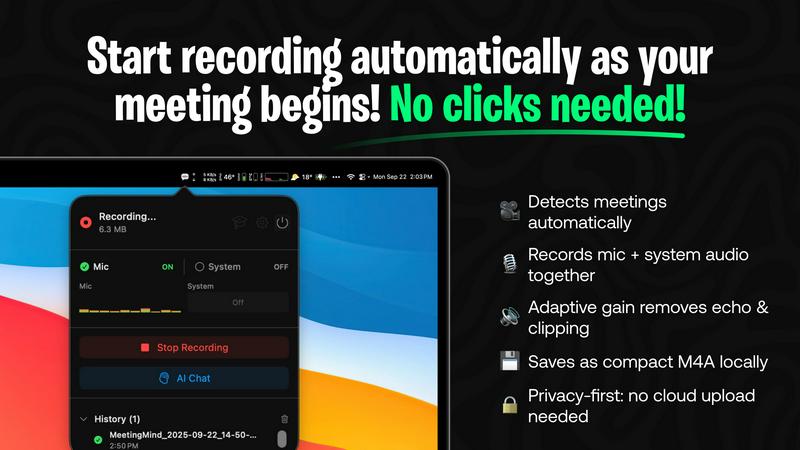
MeetingMind automatically detects Zoom meetings without requiring any clicks from the user. This feature ensures that your meetings are recorded effortlessly, allowing you to stay focused on the discussion rather than managing recording settings.
Comprehensive Recording
The tool captures both microphone and system audio, delivering a complete record of what was discussed during your meetings. This adaptive gain feature ensures that all voices are heard clearly, providing a faithful representation of the meeting dialogue.
AI Assistant Integration
With MeetingMind, you have the option to choose between a local AI assistant or a cloud-based service for generating summaries and insights. This flexibility allows users to customize their experience based on their preferences for speed and data privacy.
Markdown Export
Once your meeting concludes, MeetingMind generates AI-driven summaries and transcripts that are saved in a clean, formatted markdown file. This makes it easy to reference, share, or integrate into other documents, enhancing accessibility and collaboration.
Use Cases
FilexHost
Professional Reports
Professionals can leverage FileXhost to share client reports quickly and efficiently. By using the platform's drag-and-drop feature, they can upload documents, receive a secure link, and share it with clients without any unnecessary delays.
Developer Projects
Developers can utilize FileXhost to host landing pages or mock APIs. The platform supports various file types, allowing developers to share their work with clients or team members effortlessly, ensuring that the project is viewed as intended.
Digital Product Distribution
Creators can distribute digital products like eBooks or software through FileXhost. By uploading files and generating secure links, creators can share their products without worrying about attachment limits or complicated sharing processes.
Frictionless File Delivery
Anyone needing a simple and effective way to deliver files can benefit from FileXhost. The platform’s user-friendly design eliminates the need for "request access" emails, making it perfect for quick file sharing in both personal and professional contexts.
MeetingMind
Efficient Team Meetings
Teams can use MeetingMind to streamline their meetings by automatically capturing discussions and action items. This ensures everyone stays on the same page, enhancing accountability and follow-up on tasks.
Remote Work Collaboration
For remote teams, MeetingMind serves as a vital tool to bridge communication gaps. It allows team members to revisit conversations and decisions, fostering a collaborative environment even when working from different locations.
Client Consultations
Consultants and freelancers can leverage MeetingMind during client meetings to ensure no detail is missed. The ability to access transcripts and summaries allows for better follow-up and client management, ultimately improving service delivery.
Academic Discussions
Researchers and educators can utilize MeetingMind to record lectures, seminars, or academic discussions. The searchable transcripts make it easy to reference specific points, aiding in study and research efforts.
Overview
About FilexHost
FileXhost is an intuitive file hosting and sharing platform designed for seamless and efficient file management. Ideal for professionals, developers, and creators alike, FileXhost enables users to effortlessly upload and share any file type, from documents to entire websites, without the hassle of traditional file-sharing methods. With its unique "Drop & Share" workflow, you can simply drag files into the platform, receive an instant secure URL, and share it with anyone, eliminating the need for complex setups or logins. The service prioritizes the viewer experience, ensuring that recipients see files as intended, beautifully rendered without the need for downloads or plugins. Whether you are collaborating on client reports, hosting landing pages, or distributing digital products, FileXhost streamlines the process, making file sharing frictionless and efficient.
About MeetingMind
MeetingMind is an innovative intelligent meeting assistant crafted specifically for individuals and teams who seek to maximize productivity during meetings. Designed to seamlessly integrate with Zoom, MeetingMind automatically detects and records meetings without the need for manual intervention, allowing users to concentrate on what truly matters: the conversation. This powerful tool excels at transforming spoken dialogue into searchable and interactive notes, delivering real-time, speaker-attributed transcripts in a clean markdown format. MeetingMind is ideal for professionals, teams, and organizations aiming to enhance meeting efficiency and accountability. With its on-device AI technology, users can fully engage in discussions while benefiting from instant AI-generated summaries, action items, and the ability to query the conversation live. Prioritizing privacy and security, MeetingMind processes all data locally on your Mac, ensuring that sensitive information remains confidential and secure.
Frequently Asked Questions
FilexHost FAQ
What is FileXhost?
FileXhost is a file hosting and sharing platform that allows users to upload and share any file type easily. With features like instant secure links and smart rendering, it simplifies the process of file distribution.
Is it really free?
Yes, FileXhost offers a free plan that allows users to host up to 1,000 files with a maximum size of 25MB each, along with a 7-day expiry for shared links. The free plan is ad-supported.
What file types are supported?
FileXhost supports a wide range of file types, including documents (PDF, TXT), spreadsheets (XLSX, CSV), images (JPG, PNG), media (MP4, MP3), and archives (ZIP), among others, ensuring versatility for users.
How do I update my site?
To update your hosted site on FileXhost, simply drag and drop your updated file or website ZIP into the platform. The service will automatically generate a new secure link for sharing, ensuring your content is always up to date.
MeetingMind FAQ
How does MeetingMind ensure my data privacy?
MeetingMind processes all data locally on your Mac, meaning that your meetings and sensitive information never leave your device, ensuring maximum privacy and security.
Can I use MeetingMind for meetings other than Zoom?
Currently, MeetingMind is designed to work specifically with Zoom meetings. Future updates may include support for additional platforms, but as of now, Zoom integration is its primary focus.
What is the benefit of using the local AI assistant vs. the cloud option?
Choosing the local AI assistant means your data stays on your device, enhancing privacy. The cloud option may offer faster processing times but involves sending data to external servers, which some users may prefer to avoid.
Is there a limit to the free version of MeetingMind?
Yes, the free version of MeetingMind allows for 60 minutes of recording per day. This is perfect for short meetings or daily standups, with the option to upgrade for unlimited recording capabilities.
Alternatives
FilexHost Alternatives
FilexHost is a user-friendly file hosting and sharing platform designed for seamless file management. It enables users to quickly upload files, generating shareable URLs with just a simple drag and drop, making it ideal for professionals, developers, and creators. As users explore their options, they often seek alternatives to FilexHost for various reasons, including pricing structures, feature sets, and specific platform requirements that meet their unique needs. When searching for an alternative, it's essential to consider factors such as ease of use, file type support, security features, and any additional functionalities like analytics or user permissions. Evaluating these aspects will help users find a solution that aligns perfectly with their file hosting and sharing needs while ensuring a smooth experience for both senders and recipients.
MeetingMind Alternatives
MeetingMind is an intelligent meeting assistant that specializes in enhancing productivity by automatically capturing every detail of your Zoom meetings. This innovative tool falls under the productivity and management category, providing seamless recording, transcription, and AI-generated summaries to ensure that users can engage fully in discussions without worrying about taking notes. Users often seek alternatives to MeetingMind for various reasons, such as pricing, specific features, or compatibility with different platforms. When choosing an alternative, it is essential to consider factors like automatic recording capabilities, transcription accuracy, ease of use, and the level of privacy and security offered to safeguard sensitive meeting information. A well-rounded alternative should cater to the unique needs of your team while enhancing overall meeting efficiency.