
MeetingMind vs Prompt Builder
Side-by-side comparison to help you choose the right AI tool.

MeetingMind
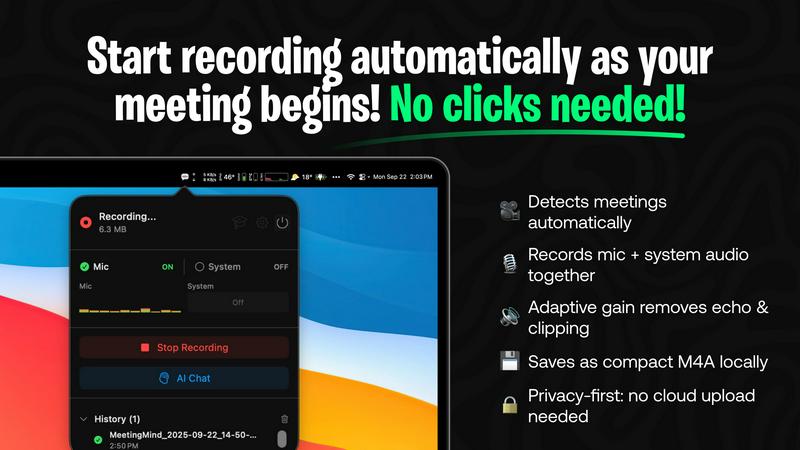
MeetingMind captures, transcribes, and summarizes your Zoom meetings automatically, ensuring you never miss a detail.
Last updated: March 1, 2026

Prompt Builder
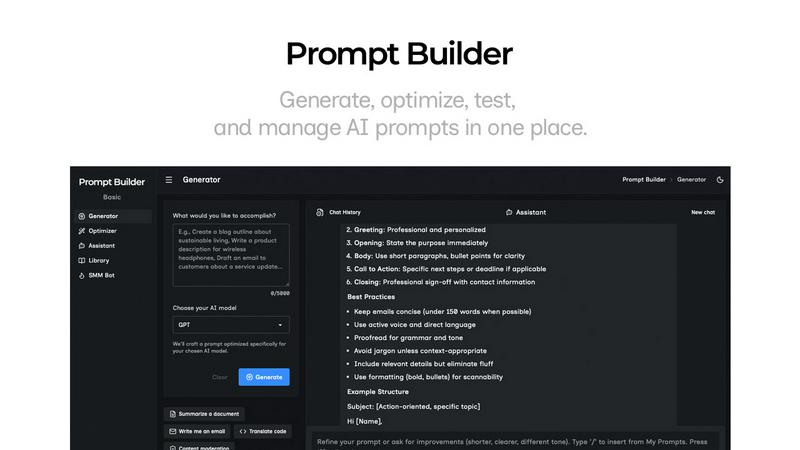
Generate, optimize, test, and manage AI prompts in one place. Turn an idea into a ready-to-use prompt in seconds.
Visual Comparison
MeetingMind
Prompt Builder
Overview
About MeetingMind
MeetingMind is an innovative intelligent meeting assistant crafted specifically for individuals and teams who seek to maximize productivity during meetings. Designed to seamlessly integrate with Zoom, MeetingMind automatically detects and records meetings without the need for manual intervention, allowing users to concentrate on what truly matters: the conversation. This powerful tool excels at transforming spoken dialogue into searchable and interactive notes, delivering real-time, speaker-attributed transcripts in a clean markdown format. MeetingMind is ideal for professionals, teams, and organizations aiming to enhance meeting efficiency and accountability. With its on-device AI technology, users can fully engage in discussions while benefiting from instant AI-generated summaries, action items, and the ability to query the conversation live. Prioritizing privacy and security, MeetingMind processes all data locally on your Mac, ensuring that sensitive information remains confidential and secure.
About Prompt Builder
Prompt Builder is a prompt engineering workspace for writing, testing, and saving prompts. Describe the task in plain English, and it helps you create a prompt that matches the model you choose. Start with a draft, refine it in chat, save or pin versions, then run them when you are ready. It works with GPT, Claude, Gemini, Llama, Mistral, DeepSeek, Grok, Perplexity, and more. You also get an Optimizer, an assistant for quick tests, and a library of reusable prompts and templates from the community. Turn an idea into a ready-to-use prompt in seconds. Refine it in chat, save it to your Library, and run it anytime.