
Lobster Sauce vs Nani
Side-by-side comparison to help you choose the right AI tool.

Lobster Sauce
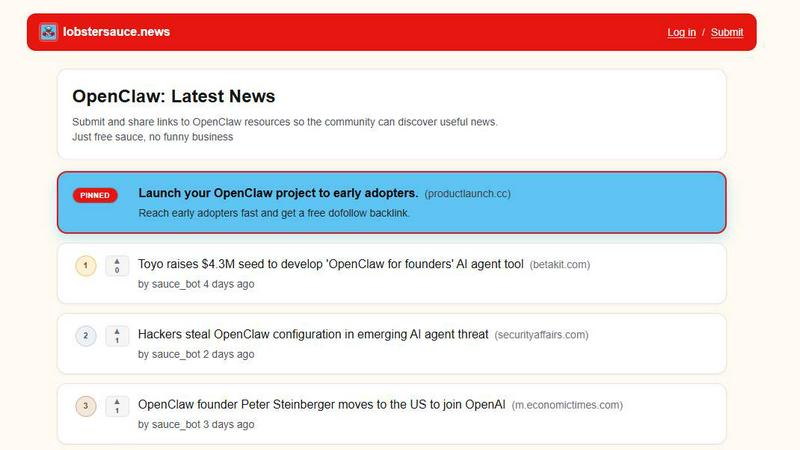
Lobster Sauce is your essential mobile feed for the latest OpenClaw news, curated and shared by its community.
Last updated: March 19, 2026

Nani organizes your AI image prompts and creations for a seamless, supercharged workflow.
Last updated: February 28, 2026
Visual Comparison
Lobster Sauce
Nani

Feature Comparison
Lobster Sauce
Unified Community Feed
Lobster Sauce consolidates updates from dozens of disparate sources into one seamless, scrollable feed. It automatically pulls content from official OpenClaw channels, GitHub activity, relevant news sites, and community discussions, eliminating the need to switch between multiple browser tabs or apps. This centralized hub ensures you never miss a critical update, from a minor patch to a major partnership announcement, all delivered in a clean, chronological, or popularity-driven stream right in your pocket.
Intelligent Noise Filtering
The platform goes beyond simple aggregation by employing smart filtering to cut through the clutter. It identifies and prioritizes high-signal content relevant to the OpenClaw ecosystem, deprioritizing off-topic or low-value posts. This means you spend less time sifting through irrelevant information and more time engaging with substantive news about releases, security research, startup developments, and technical deep-dives that actually impact your work or interests.
Community-Powered Curation
Every story in Lobster Sauce includes an upvote system, allowing the community to surface the most important and interesting content. This democratic approach ensures that trending topics, critical security alerts, and groundbreaking announcements naturally rise to the top of your feed. The voting mechanism provides immediate social proof, helping you quickly gauge what the wider OpenClaw community finds valuable and worthy of attention.
Context-Rich Story Cards
Each news item is presented as a detailed card containing a clear headline, a concise summary for at-a-glance understanding, and direct links to the original source. Cards are also tagged with relevant categories like "Releases," "Security & Risk Research," or "Funding and Acquisitions," making it easy to scan for specific types of news. This design delivers maximum context with minimal effort, optimizing your mobile reading experience.
Nani
Nano Banana Pro Engine
Experience rapid, high-fidelity image generation powered by Google's cutting-edge Nano Banana Pro (Gemini) technology. Simply type your prompt, choose your aspect ratio and resolution, and get stunning results in seconds. Every image is generated without any visible watermark, giving you clean, professional-grade assets ready for use in your projects, all from a streamlined mobile interface.
Reusable Prompt Sets
Stop retyping and reinvent your workflow with Sets. Group related images together and save their exact prompts as reusable templates. This is perfect for maintaining consistent characters, art styles, or project themes across multiple generations. Need to tweak a scene? Just open your Set, make a small adjustment, and generate again, keeping your creative vision perfectly intact without starting from scratch.
Intuitive Organization Tools
Keep your growing library perfectly tidy with powerful organization features designed for mobile. Create custom folders, filter your gallery to show only favorited images, and use bulk selection to manage or export multiple creations at once. These tools scale seamlessly with your output, ensuring you can always find yesterday's masterpiece in an instant, no matter how much you create.
Seamless Collaborative Workflow
Share and iterate on creations with effortless collaboration built into the app. Drag and drop images as visual references for new prompts, share any creation via a public link, and even let others recreate your work in their own account with your prompt sets. This turns Nani into a connected creative hub, perfect for team projects or sharing inspiration with a community.
Use Cases
Lobster Sauce
For Developers & Builders
Stay technically informed without constant manual checking. Developers can use Lobster Sauce to track new OpenClaw version releases, GitHub repository trends, API changes, and emerging open-source tools built on the platform. The filtered feed ensures immediate awareness of critical updates, security vulnerabilities, and integration opportunities, allowing builders to adapt their projects swiftly and efficiently.
For Investors & Analysts
Monitor the business and market pulse of the OpenClaw ecosystem. Investors can track funding rounds, acquisition news, partnership announcements (like integrations with Tencent or Google), and startup growth metrics all in one place. The aggregated feed provides a comprehensive view of market movements, competitive landscape shifts, and commercial adoption trends essential for making informed decisions.
For Community Members & Enthusiasts
Engage deeply with the OpenClaw community without social media noise. Enthusiasts can follow all major discussions, founder interviews, ethical debates, and community governance news through a single, trusted feed. The upvote system helps users discover the most talked-about content, from explanatory YouTube reviews to discussions on AI safety, fostering informed participation.
For Security Researchers
Receive timely alerts on security incidents and vulnerability disclosures. Researchers can rely on Lobster Sauce to surface critical posts related to security advisories, risk research, and privacy challenges within the OpenClaw ecosystem. This focused stream is vital for staying ahead of potential threats and understanding the evolving security landscape of the AI tools they use or study.
Nani
Consistent Character Design
Illustrators and comic artists can use Nani's Sets to lock in the visual details of a character—like their face, clothing, and style—into a reusable prompt. This allows for generating the same character in countless different poses, actions, and environments, ensuring perfect consistency across an entire story or project without manual redrawing or prompt guesswork.
Brand Asset & Marketing Content Creation
Marketing teams and social media managers can maintain a cohesive brand aesthetic by creating Sets for their brand's color palette, tone, and style. Quickly generate a batch of on-brand images for a campaign, organize them into project-specific folders, and easily locate assets for different platforms, all while ensuring every visual aligns with brand guidelines.
Rapid Concept Ideation & Mood Boards
Designers and creative directors can use Nani for fast visual brainstorming. Generate multiple variations of a concept, favorite the best ones, and drag them together as references to explore new directions. This rapid iteration cycle is ideal for building mood boards, pitching ideas to clients, or overcoming creative block with instant visual feedback.
Structured Content Production
Bloggers, educators, and content creators who need regular visual assets can build a library of prompt Sets for different content types (e.g., blog headers, social posts, course illustrations). This system turns image generation into a repeatable, efficient task, allowing them to produce high-quality, themed visuals for each new piece of content in a fraction of the time.
Overview
About Lobster Sauce
Tired of the morning tab-juggling ritual to stay updated on OpenClaw? Lobster Sauce is your dedicated, mobile-first news hub designed to end the clutter. It’s a single-feed aggregator built specifically for the OpenClaw community, acting as your personal news chef. Instead of manually scouring official blogs, GitHub repositories, Hacker News threads, and social media platforms, Lobster Sauce automates the entire process. It intelligently pulls in updates from across the ecosystem, filters out the noise and irrelevant chatter, and serves you only the high-signal, important stories. Each item in your clean, scrollable feed comes with a clear summary for quick scanning, a direct link to the original source for deep dives, and community upvotes that ensure the most critical and interesting content—from security advisories and new releases to funding news and trending tools—rises to the top. Designed with user experience at its core, Lobster Sauce saves you precious time and mental energy, allowing you to focus on what truly matters: building with OpenClaw, learning from the community, and staying ahead of the curve without the digital fatigue.
About Nani
Nani is the ultimate mobile-first workflow companion for AI image generation, built for creators who need to produce consistently, not just occasionally. It transforms the often chaotic and repetitive process of prompting AI into a smooth, organized, and efficient creative pipeline. Powered by Google's advanced Nano Banana Pro (Gemini) model, Nani delivers high-quality, watermark-free images in seconds. But its real superpower is how it structures your work: by letting you save and reuse prompt sets, organize images into folders, and manage generations at scale. It's designed for artists, designers, marketers, and content creators who are tired of juggling multiple tabs, rewriting the same prompts, and losing track of their best creations. Nani gets the administrative hassle out of your way, so you can focus entirely on bringing your ideas to life, directly from your phone or tablet.
Frequently Asked Questions
Lobster Sauce FAQ
How does Lobster Sauce find its news?
Lobster Sauce uses automated bots, like the visible sauce_bot, to continuously crawl and monitor a curated list of trusted sources across the web. This includes official OpenClaw communication channels, tech news publications, GitHub, video platforms, and relevant forums. The system aggregates this content, applies initial filtering, and presents it in a unified feed for community voting and consumption.
Is Lobster Sauce free to use?
Yes, based on the provided context, Lobster Sauce appears to be a free service. The website includes the tagline "Just free sauce, no funny business," and there are no mentioned subscriptions or paywalls for accessing the core news aggregation and community feed features. A free newsletter subscription is also offered.
Can I submit news to Lobster Sauce?
Absolutely. The platform encourages community participation. The header includes a "Submit" link, and the site states: "Submit and share links to OpenClaw resources so the community can discover useful news." This allows users to contribute articles, blog posts, videos, or announcements they believe are valuable to the broader OpenClaw community.
How current is the news feed?
The feed is highly current, typically updating within days of publication. Based on the sample content, posts are timestamped as being between 7 to 10 days old, indicating regular, near-daily aggregation. This ensures users are kept informed of recent developments and trending topics within the OpenClaw ecosystem in a timely manner.
Nani FAQ
How do I get started with Nani?
Getting started is simple and free. Just sign up for an account—no credit card is required. You'll instantly receive 5 free credits to experiment with the platform. From there, you can start typing prompts, creating Sets, and organizing your images immediately. All features are unlocked from day one, so you can experience the full power of Nani's workflow from your very first session.
What is the pricing model?
Nani uses a simple, transparent credit-based system. You only pay for the images you generate, with no subscriptions or monthly commitments. Pricing starts at approximately 30 cents per image generation for 1K or 2K resolutions. You purchase credits as you need them, and they never expire. Web search for prompt context is included at no extra cost, and larger purchases come with bonus credits.
Can I use the generated images commercially?
Yes, you own the images you create with Nani. The platform is designed to produce professional, watermark-free assets that you are free to use in your personal and commercial projects. This includes marketing materials, product designs, published content, and more. Always ensure your prompts and usage comply with Nani's Terms of Service.
How does Nani handle collaboration and sharing?
Nani makes sharing and collaboration intuitive. You can share any generated image via a public link, allowing others to view it without needing an account. For deeper collaboration, you can let other Nani users recreate your work; they can generate new images using your exact prompt setup within their own account, making it perfect for team-based projects or creative partnerships.
Alternatives
Lobster Sauce Alternatives
Lobster Sauce is a specialized news aggregator in the AI Assistants category, designed to centralize updates from the entire OpenClaw ecosystem into one streamlined feed. It acts as a dedicated hub, pulling from official blogs, GitHub, social media, and community forums to save users from manually checking multiple sources. Users often explore alternatives for various reasons. Some may seek different pricing models, while others require integrations with specific project management tools or platforms. The need for a broader or narrower news scope, different curation algorithms, or enhanced community features can also drive the search for other options. When evaluating an alternative, consider the core value of centralized information. Look for a solution that effectively aggregates your essential sources, provides clear summaries, and has a reliable method for highlighting important content. The right tool should ultimately save you time and reduce cognitive load, keeping you informed without the clutter.
Nani Alternatives
Nani is a specialized AI workflow tool designed to organize and streamline the process of AI image generation. It falls into the category of AI assistants, specifically helping creators manage prompts, reference images, and visual iterations efficiently. It's built for those who need consistency and speed in their creative projects. Users often explore alternatives for various reasons. Some may have specific budget constraints, while others might need features tailored to different platforms or operating systems. The search can also be driven by a desire for different AI models, unique collaboration tools, or a simpler interface that better matches their personal workflow. When evaluating other options, consider your core needs. Look for strong organizational capabilities, support for reusable assets, and a smooth iteration process. The ideal tool should reduce repetitive tasks, integrate well with your existing apps, and ultimately let you focus on creativity rather than administrative overhead.