
Nano Banana Pro vs SimpleDraw
Side-by-side comparison to help you choose the right AI tool.

Nano Banana Pro
Nano Banana Pro creates stunning, consistent 4K AI images and edits photos with advanced professional tools.
Last updated: February 28, 2026
SimpleDraw
Create precise scale drawings and floor plans instantly online with SimpleDraw, no experience or downloads needed.
Last updated: March 1, 2026
Visual Comparison
Nano Banana Pro

SimpleDraw
Feature Comparison
Nano Banana Pro
Professional Character Consistency
Nano Banana Pro excels at maintaining perfect character continuity across multiple images, a game-changer for serialized content. Built on advanced multi-image understanding technology, it ensures your character's features, style, and essence remain stable. This is ideal for creating consistent character sheets, storyboards for comics or animation, and cohesive visual stories across a social media campaign, all from your mobile device.
Lightning-Fast Image Generation
Experience a significant 15% speed boost in generation times compared to previous models. Powered by an optimized architecture and advanced technology previews, this means you get your high-quality 4K-ready images faster. This enhanced speed transforms your workflow, allowing for rapid iteration, quicker concept testing, and meeting tight deadlines without sacrificing the professional quality of your final visuals.
Advanced Image-to-Image Editing (Nano Banana Edit)
Go beyond text prompts with powerful photo transformation. Upload up to 10 of your existing images directly into the app and use AI prompts to reimagine them. Turn a simple photo into a masterpiece of art, add or remove elements, change styles, or completely alter the scene while intelligently preserving key features. This feature puts immense creative control and editing power into a streamlined, mobile-friendly interface.
11 Flexible Aspect Ratios & Crystal Text Rendering
Nano Banana Pro adapts to your needs with support for 11 different aspect ratios, from a square 1:1 for Instagram to an ultrawide 21:9 for cinematic banners. Furthermore, it solves a common AI pain point by delivering high-fidelity text rendering within images. Create posters, logos, memes, and social media graphics with clear, readable letters and typography, making it a truly versatile tool for any visual task.
SimpleDraw
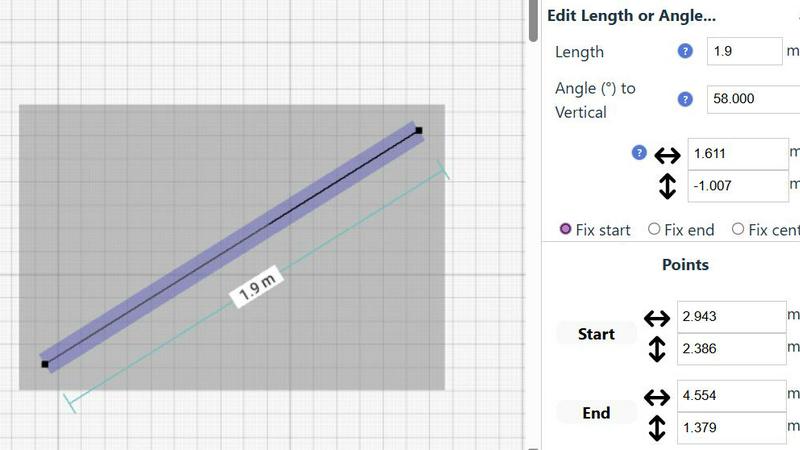
Accurate Measurements & Scale Drawing
SimpleDraw excels in providing precise measurements and scale drawing capabilities. With smart alignment features, users can ensure that their drawings are not only accurate but also perfectly to scale, allowing for professional-quality results without the need for specialized training.
Specialized Floor Plan Creator
The dedicated Floor Plan Mode allows users to create detailed layouts with walls, doors, and furniture in just a few clicks. This feature streamlines the design process, making it easy to visualize spaces before embarking on any renovation or decoration project.
Smart Alignment System
This intelligent system assists users in placing points and lines exactly where they want them. By providing visual indicators and contextual help, it enhances precision and control, making it easier to achieve the desired layout without frustration.
Comprehensive Measurement System
SimpleDraw includes a robust measurement system that allows users to choose between metric and standard US units. Dynamic contextual measurements display as you work, ensuring that your drawings are as accurate as possible and tailored to your specifications.
Use Cases
Nano Banana Pro
Social Media Content Creation
Craft stunning, platform-optimized visuals in seconds. Generate eye-catching posts, stories, and ads tailored for Instagram (square), TikTok (vertical), or YouTube (wide). Use character consistency for recurring brand mascots and the text rendering feature to add perfect captions or quotes directly onto your images, streamlining your entire content creation workflow from a single app.
Game Development & Character Design
Rapidly visualize and iterate on character concepts, environmental assets, and promotional artwork. The character consistency feature is invaluable for developing a stable visual identity for game characters across different poses and scenes. Generate mood boards, item icons, and concept art directly on your tablet or phone during meetings or on the go.
Digital Art & Illustration
Use Nano Banana Pro as a powerful brainstorming and sketching partner. Generate unique concepts and compositions from text descriptions, then refine them using the Image-to-Image editor. Experiment with different artistic styles, from hyper-realistic to anime, and overcome creative blocks by letting the AI provide a starting point that you can then edit and make your own.
Marketing & Advertising Design
Produce high-quality marketing materials quickly and cost-effectively. Create cohesive campaign visuals with consistent branded elements, design product mockups, and generate engaging banner ads in any required aspect ratio. The ability to edit existing product photos or create entirely new scenes accelerates the production of ads, email graphics, and website assets.
SimpleDraw
Kitchen & Bathroom Planning
Users can plan their kitchen and bathroom renovations with accurate measurements to visualize layouts before beginning any work. This practical use of SimpleDraw allows for better decision-making and efficient design.
Room Layouts & Furniture Planning
Designing room layouts becomes effortless with SimpleDraw. Users can experiment with different furniture arrangements in bedrooms, living rooms, or offices, ensuring that everything fits perfectly before making any purchases.
House & Apartment Plans
Create complete floor plans for various home projects, whether for personal use or rental listings. SimpleDraw provides the tools necessary to generate comprehensive layouts, aiding in effective space planning.
DIY and Home Renovation Projects
For DIY enthusiasts, SimpleDraw offers a platform to sketch out home improvement ideas. From initial layouts to detailed designs, users can refine their concepts and visualize the final outcome without needing extensive drafting skills.
Overview
About Nano Banana Pro
Nano Banana Pro is the professional-grade AI image generator that lives on your phone, putting studio-quality visual creation directly in your pocket. Designed for the modern creator who needs speed, quality, and control without being tied to a desktop, it transforms simple text descriptions into stunning, high-resolution 4K-ready images. But it's more than just text-to-image; it's a complete visual toolkit. With its powerful Image-to-Image editing suite, you can upload and intelligently transform your existing photos, reimagining scenes or adding new elements with a simple prompt. Whether you're a social media manager crafting the perfect post, a game developer visualizing characters, a digital artist exploring concepts, or a marketer designing campaign assets, Nano Banana Pro delivers. Its core value is delivering professional, reliable results with an intuitive, mobile-first experience. Experience 15% faster generation powered by advanced technology, achieve perfect character consistency for serialized content, and generate images with clear, readable text. With flexible aspect ratios for every platform and a suite of advanced tools, it's the all-in-one solution to bring your ideas to life instantly, wherever you are.
About SimpleDraw
SimpleDraw is an innovative, free online tool that democratizes the art of scale drawing, making it accessible for everyone from DIY enthusiasts to casual users. With its intuitive interface, SimpleDraw simplifies the complexities of technical drafting, allowing users to create precise floor plans and architectural drawings directly from their web browser. No installation or login is required, making it easy to dive right into your projects without any prior CAD experience. Whether you are sketching a layout for your new kitchen or planning a detailed renovation, SimpleDraw offers professional-grade precision in a user-friendly package. The platform is designed to empower users with features like real-time measurements and smart alignment, ensuring that your drawings are both accurate and visually appealing. With SimpleDraw, you can effortlessly bring your ideas to life, creating clear visual plans that cater to any project, whether it be home improvement, rental listings, or interior design.
Frequently Asked Questions
Nano Banana Pro FAQ
What is the difference between Nano Banana Pro and Nano Banana Flash?
Nano Banana Pro is our professional-tier model focused on the highest quality, advanced features like character consistency and image editing, and 4K resolution. Nano Banana Flash is a soon-to-be-released model optimized for maximum speed and lower cost per image, perfect for rapid prototyping and high-volume generation where ultimate speed is the priority.
How does the character consistency feature work?
The feature uses advanced multi-image understanding technology. When you generate a character, the AI learns its distinct features. In subsequent generations using similar prompts or reference images, it applies this understanding to maintain the character's likeness, style, and key attributes across different poses, outfits, and settings, ensuring visual continuity.
Can I really generate images with readable text?
Yes! Nano Banana Pro features an enhanced text rendering engine specifically designed to overcome the common AI challenge of garbled text. By understanding letterforms and typography, it can generate clear, legible text within images, making it highly effective for creating posters, logos, social media graphics with quotes, and any design requiring incorporated wording.
What are credits and how do I get them?
Credits are the currency used to generate images on Nano Banana Pro. Each image generation costs a certain number of credits, which can be as low as $0.035 per image. New users receive 8 free credits to start experimenting. You can purchase more credits through various subscription plans or top-ups, with annual plans often offering significant discounts.
SimpleDraw FAQ
Is SimpleDraw free to use?
Yes, SimpleDraw is completely free to use. There are no hidden fees, and you do not need to sign up or download any software to start drawing.
Do I need any prior CAD experience to use SimpleDraw?
No, SimpleDraw is designed for everyone, including those with no prior CAD experience. Its intuitive interface makes it easy for beginners to create professional-quality drawings.
Can I access SimpleDraw on my mobile device?
Yes, SimpleDraw works directly in your web browser, making it accessible on various devices, including smartphones and tablets, for a seamless drawing experience on the go.
How can I provide feedback or request new features?
Users are encouraged to join the SimpleDraw Discord community, where they can share feedback and suggest new features. The team actively listens to user input to continuously improve the platform.
Alternatives
Nano Banana Pro Alternatives
Nano Banana Pro is a professional-grade AI image generator and editor in the mobile app space. It's designed for creators who need to produce high-quality, 4K visuals and maintain perfect character consistency directly from their devices, blending advanced AI with a user-friendly, on-the-go experience. Users often explore alternatives for various reasons. Some may seek different pricing models or subscription plans that better fit their budget. Others might need specific features not covered, prefer a desktop or web-based platform over a mobile-centric one, or simply want to compare the overall value and output quality before committing. When evaluating other options, consider your primary needs. Look at the core AI capabilities for image generation and editing, the quality and resolution of outputs, and tools for visual consistency. Also, assess the platform's accessibility, speed, and how its pricing structure aligns with your usage frequency and professional requirements.
SimpleDraw Alternatives
SimpleDraw is an innovative online design tool that enables users to create accurate scale drawings and detailed floor plans directly in their web browser, all for free. As a part of the design tools category, it caters to casual users, DIY enthusiasts, and anyone looking to visualize their space without the need for complex software. However, many users may seek alternatives for various reasons, including the need for additional features, specific platform compatibility, or different pricing structures. When searching for an alternative, consider the ease of use, the range of functionalities offered, and whether it meets your specific project requirements. Choosing the right alternative also involves evaluating how well the tool can adapt to your workflow and whether it offers robust support for the types of projects you undertake. Look for features that enhance your design process, such as smart alignment systems, flexibility in zooming, and precision control. Ultimately, the goal is to find a tool that not only meets your technical needs but also enhances your overall user experience.