
Patrivox vs Tool.Video
Side-by-side comparison to help you choose the right AI tool.

Patrivox
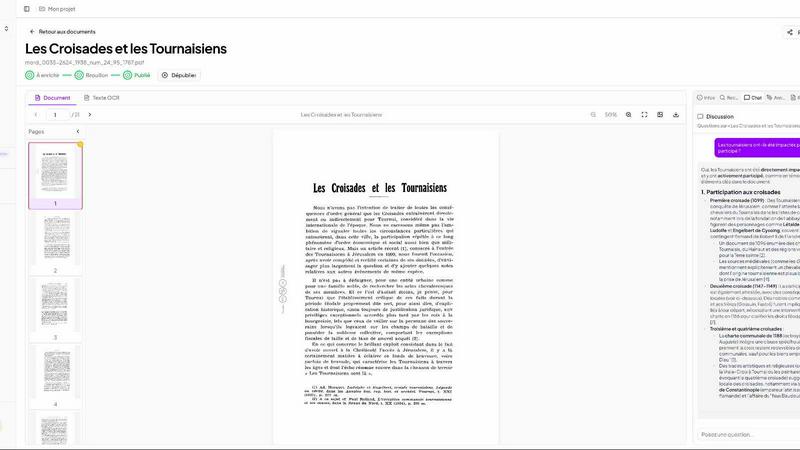
Patrivox transforms your archives into fully searchable documents in minutes, making knowledge accessible and organized.
Last updated: March 4, 2026

Tool.Video
Tool.Video is your all-in-one AI toolkit for effortlessly creating stunning videos, music, and thumbnails.
Last updated: March 1, 2026
Visual Comparison
Patrivox
Tool.Video

Feature Comparison
Patrivox
Next-Gen OCR Technology
Patrivox utilizes Mistral AI’s advanced optical character recognition to read and analyze your documents automatically. This feature allows users to digitize content quickly, ensuring that every word is extracted and made searchable without manual effort.
Automatic Entity Extraction
The platform identifies and extracts important entities such as names, places, and dates from your documents. This automatic entity recognition not only enhances searchability but also enriches the overall understanding of the content by linking related information within the knowledge base.
Interactive Knowledge Graph
Patrivox offers an interactive knowledge graph that visually represents connections between identified entities. Users can navigate from one node to another, discovering hidden links and relationships within their archives, which were previously overlooked.
Instant Search Capabilities
With Patrivox, users can perform lightning-fast full-text searches across their entire document collection. The search functionality includes typo tolerance and allows filtering by date, author, or type, making it easier to find relevant information quickly.
Tool.Video
Sora 2 Video Generation
Sora 2 is Tool.Video's advanced text-to-video AI model that creates stunning videos directly from text prompts. It excels in producing natural motion and striking visuals, making it perfect for storytelling, marketing content, and more.
Nano Banana Pro
This feature offers high-quality AI image generation capabilities, allowing users to create unique visuals in seconds. With both text-to-image and image-to-image modes, Nano Banana Pro is ideal for generating creative content for various applications.
AI Music Generation with Suno 5
Suno 5 is a professional AI music generator that enables users to compose music with lyrics, melodies, and full arrangements across any genre. This feature is perfect for adding custom soundtracks to videos, enhancing the overall media experience.
Video Thumbnail Generator
The Video Thumbnail Generator automatically creates eye-catching thumbnails from selected video frames. This feature is designed to boost engagement and click-through rates by providing visually appealing representations of video content.
Use Cases
Patrivox
Municipal Archives
Municipalities can use Patrivox to digitize and catalog their deliberations, registers, and correspondence. By making these documents searchable, they enhance transparency and public access to important civic information.
Historical Societies
Historical societies benefit from Patrivox by transforming their bulletins and documentary collections into searchable formats. This accessibility allows researchers and the public to delve into historical records with ease.
Heritage Libraries
Heritage libraries can utilize Patrivox to open their special collections to research and public inquiry. By digitizing rare documents, they not only preserve history but also make it readily available for educational purposes.
Dioceses and Parishes
Dioceses and parishes can preserve their ecclesiastical archives and parish registers using Patrivox. The platform ensures that these vital records are indexed and easily searchable, facilitating historical research and community engagement.
Tool.Video
Content Creation for Social Media
Content creators can leverage Tool.Video to generate engaging videos and visuals tailored for platforms like Instagram, TikTok, and YouTube. The ability to create professional-quality content quickly saves time and enhances viewer engagement.
Marketing Campaigns
Marketers can utilize the platform to produce captivating promotional videos and advertisements. With tools designed for creating TV commercials and tailored content, Tool.Video helps businesses stand out in a crowded market.
Educational Video Production
Educators can transform their teaching materials into dynamic video presentations. By using text prompts to generate educational content, they can create informative videos that enhance learning experiences for students.
Personal Projects and Creative Exploration
Individuals looking to explore their creativity can use Tool.Video for personal projects, such as creating short films, music videos, or visual art. The intuitive interface allows for experimentation without the need for extensive technical skills.
Overview
About Patrivox
Patrivox is an innovative European SaaS platform designed to revolutionize the way organizations manage and access their vast collections of scanned documents. Tailored for heritage institutions, municipal services, associations, and enterprises, Patrivox transforms previously inaccessible archives into a fully searchable knowledge base. Users can effortlessly drag and drop their PDF documents, and within minutes, Mistral AI employs advanced optical character recognition (OCR) technology to extract every word, making information retrieval a breeze. The platform automatically identifies key entities such as people, places, and organizations, creating an interactive knowledge graph that allows for deeper exploration of connections. Patrivox is your solution for quick access to critical information, ensuring that users can perform searches with typo tolerance or pose questions in natural language, receiving sourced answers in real time. The value proposition of Patrivox lies in its ability to make knowledge easily searchable and shareable, fostering research and enhancing public access to important information.
About Tool.Video
Tool.Video is a state-of-the-art AI video generation platform that is tailored to meet the needs of content creators, marketers, and developers. With the integration of advanced AI technologies like Sora 2, Nano Banana Pro, and Suno 5, it offers a comprehensive suite of utilities for video, image, and music generation. This all-in-one solution allows users to translate text prompts into realistic videos, create stunning visuals, and compose professional-quality music seamlessly. The user-friendly interface simplifies the creative process, enabling users to concentrate on their storytelling without getting bogged down by technical complexities. Tool.Video enhances productivity and creative output by providing API integration and a cohesive environment for multi-model generation, making it an indispensable tool for anyone looking to elevate their media production quality.
Frequently Asked Questions
Patrivox FAQ
What types of documents can I upload to Patrivox?
You can upload a variety of documents in PDF format, including historical texts, archives, registers, and correspondence. Patrivox is designed to handle both individual files and bulk uploads efficiently.
How does Patrivox ensure data security?
Patrivox is 100% hosted in Europe and is GDPR-native, ensuring your data is secure and compliant with European privacy regulations. The platform also provides an audit log for tracking access and changes.
Can I integrate Patrivox with other tools or systems?
Currently, Patrivox focuses on providing a robust standalone solution for document digitization and searching. However, users are encouraged to reach out to the support team for any specific integration needs or future feature requests.
What support options are available for Patrivox users?
Patrivox offers a range of support options depending on your subscription plan. All users have access to email support, with priority support available for higher-tier plans. This ensures that you have assistance whenever needed.
Tool.Video FAQ
What types of media can I create with Tool.Video?
Tool.Video allows you to create videos, images, and music, all from a single platform. You can generate realistic videos from text, stunning images, and professional-quality music compositions.
Is Tool.Video user-friendly for beginners?
Yes, Tool.Video is designed with a user-friendly interface that simplifies the creative process. This makes it accessible for both beginners and experienced users, allowing anyone to easily produce high-quality media.
Can I integrate Tool.Video with other applications?
Absolutely! Tool.Video provides API integration, allowing you to connect it with other applications and tools to enhance your media production workflow.
What kind of support is available for Tool.Video users?
Tool.Video offers a range of support options, including tutorials, FAQs, and customer service to assist users in navigating the platform and optimizing their creative projects.
Alternatives
Patrivox Alternatives
Patrivox is an innovative European SaaS platform designed to help organizations like heritage institutions, municipal services, and enterprises digitize and categorize their vast collections of scanned documents. By using advanced AI technologies, including optical character recognition (OCR), Patrivox transforms documents into a fully searchable knowledge base, making it easier for users to access crucial information. Users often seek alternatives to Patrivox for various reasons, such as pricing, unique features, or specific platform requirements that better suit their operational needs. When exploring alternatives, it's essential to consider factors like ease of use, the accuracy of information extraction, integration capabilities with existing systems, and the overall user experience to ensure a seamless transition and enhanced productivity.
Tool.Video Alternatives
Tool.Video is an innovative AI video generation platform that caters to content creators, marketers, and developers seeking to streamline their creative processes. As an all-in-one toolkit, it combines advanced features for video, image, and music creation, enabling users to produce high-quality media effortlessly. However, users may often seek alternatives due to factors like pricing, specific feature sets, or platform compatibility that better aligns with their unique needs. When exploring alternatives, consider what aspects are most important to you, such as usability, integration with existing tools, or specific functionalities that can enhance your workflow. It's also essential to evaluate the cost-effectiveness of alternatives while ensuring they maintain a user-friendly experience that allows for seamless creativity without overwhelming technical challenges.