
Facejam vs poseup
Side-by-side comparison to help you choose the right AI tool.

Facejam
Get professional AI headshots from your selfies in minutes, no photoshoot needed.
Last updated: February 28, 2026

poseup
PoseUp uses AI to instantly improve your posture and composition in any photo with one click.
Last updated: March 1, 2026
Visual Comparison
Facejam

poseup
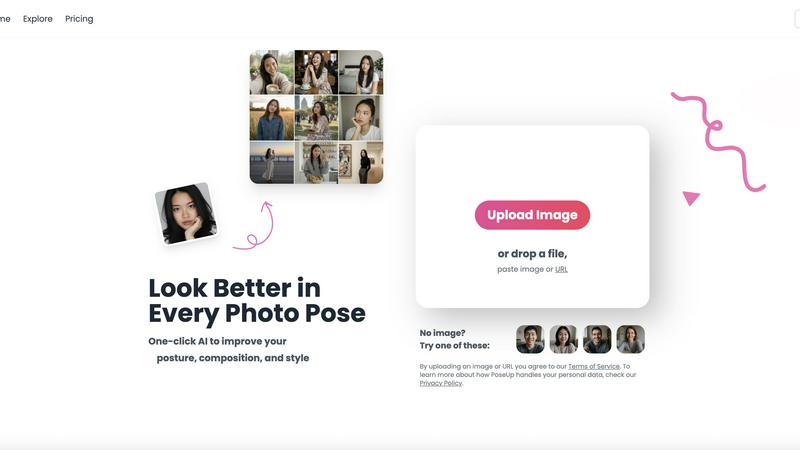
Feature Comparison
Facejam
100+ Professional Style Templates
FaceJam offers an extensive and constantly updated library of over 100 professionally designed style templates. These aren't generic filters; they are curated looks tailored for specific industries like law, real estate, tech startups, and creative fields. Browse categories like "Corporate," "Studio," or "Monochrome" to find the perfect backdrop, lighting, and aesthetic that matches your professional vibe, all selectable with a simple tap on your mobile device.
Realistic, Studio-Quality AI Generation
The AI is engineered to produce headshots that look authentically photographed, not artificially generated. It intelligently adapts your facial features, expression, and posture to fit the chosen template while maintaining a natural, believable result. This avoids the common "AI weirdness" and delivers photos you can confidently use on professional platforms where credibility is paramount, all processed directly on your app.
Simple Two-Step Mobile Workflow
The entire process is optimized for a seamless mobile experience. First, upload a handful of clear selfies from your phone's gallery. Second, scroll through and select your desired style templates. There are no complex prompts to write, no technical settings to adjust. Just tap "Generate" and your high-resolution headshots are ready to download to your device in minutes, with no watermarks or ads.
Private and Secure Photo Handling
Your privacy is a top priority. The photos you upload are used solely to teach the AI model your likeness for that specific session. They are never used to train or improve the general AI model, nor are they shared or used to create photos for anyone else. You maintain complete ownership and control over your original uploads and the generated AI headshots.
poseup
One-Click AI Enhancement
The cornerstone of the PoseUp experience is its powerful one-tap enhancement. Simply upload your photo, and the app's AI instantly gets to work. It analyzes multiple elements like body posture, limb positioning, and overall composition to suggest and apply the most flattering corrections. This eliminates the need for manual tweaking or any technical skill, delivering professional-looking results in seconds, right from your mobile device.
Advanced Posture & Pose Correction
This intelligent feature specifically targets the human form in your photos. The AI detects subtle issues like slouching, uneven shoulders, or awkward arm placement. It then intelligently adjusts the pose to appear more natural, confident, and aesthetically pleasing. It can help straighten a back, refine a stance, or suggest a more dynamic posture, ensuring the subject always looks their best.
Intelligent Composition Optimization
Great photos are about more than just the subject. PoseUp's AI examines the entire frame to optimize composition. It can suggest cropping to improve the rule of thirds, adjust the framing to better highlight the subject, or correct minor alignment issues. This ensures your final image is balanced, engaging, and meets professional photographic standards, all automated within the app.
Multi-Scene Mode Support
PoseUp is versatile enough to handle any photo scenario you encounter in daily life. The app is optimized for a wide range of scenes including casual lifestyle shots, outdoor adventures, professional headshots, fitness photos, and even coffee shop work pictures. This means you get tailored enhancements that understand the context of your photo, providing appropriate adjustments whether you're in a gym or at a professional networking event.
Use Cases
Facejam
LinkedIn Profile & Resume Enhancement
Instantly create a polished, trustworthy profile picture that makes a strong first impression on recruiters and professional connections. A high-quality headshot is crucial for LinkedIn profiles, resumes, and online job applications. FaceJam provides a variety of business-appropriate styles that convey competence and approachability, helping you stand out in a competitive market without a photoshoot.
Corporate Team Page & Directory Photos
Ensure brand consistency across your entire organization's digital presence. FaceJam allows companies to provide employees with an easy, standardized way to get uniform, professional headshots for the company website, internal directory, or "About Us" page. This creates a cohesive and professional team image, ideal for pitch decks and investor materials.
Personal Branding for Entrepreneurs & Coaches
Build a recognizable and professional personal brand across your website, social media, and promotional materials. Consultants, coaches, founders, and content creators can use FaceJam to generate a suite of consistent, high-quality portraits that reflect their industry niche and personal style, establishing authority and trust with their audience.
Industry-Specific Professional Portraits
Tailor your image to meet the unspoken expectations of your field. Whether you need the polished conservatism for a legal profile, the approachable warmth for real estate, or the creative edge for a design portfolio, FaceJam's categorized styles (like "Professional," "Startup," or "Magazine Shoot") help you instantly adopt the visual language of your industry.
poseup
Elevating Social Media Content
For influencers, bloggers, and everyday social media users, PoseUp is a game-changer. It ensures every selfie, outfit photo, or lifestyle shot posted to Instagram, TikTok, or Facebook looks polished and professional. The AI can fix unflattering angles from selfie sticks, improve posture in full-body shots, and optimize composition to make your feed visually cohesive and attractive, helping you grow your audience with high-quality content.
Perfecting Professional Portraits & Headshots
Job seekers, freelancers, and professionals can use PoseUp to enhance their LinkedIn profile pictures, portfolio headshots, or team website photos. The app corrects posture to convey confidence, ensures a straight and professional stance, and optimizes framing for a clean, corporate look. This allows anyone to achieve a photographer-quality headshot without the cost of a studio session, making a strong first impression.
Improving Group & Family Photos
Family gatherings, weddings, and outings with friends often result in photos where not everyone looks their best at the same time. PoseUp can analyze group photos and make subtle corrections to multiple individuals—straightening one person's posture, adjusting another's pose—to create a harmonious and flattering image where everyone looks great, preserving precious memories in the best light.
Enhancing Fitness & Wellness Photography
Fitness enthusiasts, athletes, and wellness coaches can use PoseUp to improve their action shots or progress photos. The AI can enhance muscle definition by optimizing lighting and shadows on the body, correct form in a workout pose to highlight technique, and improve the overall composition of outdoor running or yoga shots, making fitness content more inspiring and professional for social sharing or coaching portfolios.
Overview
About Facejam
FaceJam is your mobile-first, on-demand studio for creating professional-grade headshots directly from your phone. It transforms everyday selfies into polished, industry-appropriate portraits in minutes, eliminating the need for expensive photographers, awkward photoshoots, and lengthy editing waits. Designed for the modern professional on the go, FaceJam serves entrepreneurs, job seekers, corporate teams, freelancers, and creatives who need to present a consistent, credible image across digital platforms. Its core value proposition is delivering realistic, studio-quality results with unprecedented speed, convenience, and privacy. Simply upload a few photos, browse an extensive and ever-growing library of 100+ curated styles, and tap to generate. You retain full ownership of your AI photos, granting you a commercial license to use them anywhere from LinkedIn and resumes to company websites and marketing materials. FaceJam puts a professional visual identity in your pocket, ensuring you always put your best face forward.
About poseup
PoseUp is a revolutionary mobile app that puts professional-grade photo enhancement in your pocket. It solves a universal problem: the frustration of taking a photo where something about the pose, posture, or composition just doesn't look right. Whether it's a selfie with an awkward angle, a group photo where someone is slouching, or a portrait with unflattering framing, PoseUp uses advanced artificial intelligence to analyze and correct these elements instantly. Built for mobile-first convenience, the app is designed for anyone who takes photos—from social media enthusiasts and content creators to professionals and families. Its core mission is to democratize high-quality photo editing. You don't need to learn complex software or hire a photographer. Simply upload your photo directly in the app, and PoseUp's sophisticated AI handles the intricate work of posture correction, pose refinement, and compositional optimization with a single tap. It transforms your ordinary, flawed snapshots into polished, stunning, and share-worthy images, empowering everyone to look their best in every photo.
Frequently Asked Questions
Facejam FAQ
How does your AI headshot generator work?
FaceJam works in two simple steps optimized for mobile use. First, you upload a few clear selfies from your phone. Second, you browse and select from our library of professional style templates. Our AI then uses your photos to learn your likeness and generates new, original headshots of you in the chosen styles. The entire process is automated and completes in just minutes.
What do you do with my uploaded photos?
Your uploaded photos are used exclusively to teach the AI what you look like for the purpose of generating your headshots in that session. We do not use your photos to train or improve our general AI model, and they are never used to contribute to another person's photos. Your images remain private and secure.
How many good photos can I expect?
While results can vary, FaceJam guarantees at least one high-quality image per generation pack. Users who follow the upload guidelines closely—providing clear, well-lit selfies—often receive 5 to 10 or more excellent, usable photos. The quality of your input photos significantly influences the quality and quantity of your final outputs.
Who owns my AI photos?
You own your AI-generated photos completely. FaceJam grants you a full commercial license and ownership rights over the headshots you create. This means you can use them anywhere—for LinkedIn, your company website, marketing materials, or resumes—without any restrictions or additional fees.
poseup FAQ
How does PoseUp's AI work?
PoseUp uses advanced computer vision and machine learning models trained on vast datasets of photographic principles. When you upload a photo, the AI analyzes key points on the human body, assesses the composition against aesthetic rules, and identifies areas for improvement like slouching or poor framing. It then applies subtle, realistic adjustments to correct posture and optimize the pose, all while keeping the edit natural and true to your original image.
What image formats and sizes does PoseUp support?
The PoseUp app supports common image formats including JPG, PNG, WEBP, and HEIC for maximum compatibility with photos from both Android and iOS devices. You can upload images up to 5MB in size. This ensures that high-quality photos from your smartphone camera can be processed quickly and efficiently within the app for instant enhancement.
Is my privacy protected when I upload photos?
Yes. PoseUp takes your privacy seriously. As stated in their Privacy Policy, uploaded images are processed securely to provide the enhancement service. The company has measures in place to handle your personal data responsibly. For specific details on data handling, storage, and usage, you should review the full Privacy Policy available on the PoseUp website or within the app.
Are there any free credits to try PoseUp?
Yes, new users can get started with free credits. The website mentions an offer to "Get 50 free credits," allowing you to try the core AI enhancement features on your own photos without any initial cost. This lets you experience the transformation firsthand and see the quality of results before deciding to purchase additional credits or a subscription plan.
Alternatives
Facejam Alternatives
Facejam is an AI-powered photo app that transforms selfies into professional, studio-quality headshots. It belongs to the growing category of AI headshot generators and photo enhancement tools, designed to create polished portraits for business and personal branding without a photoshoot. Users often explore alternatives for various reasons. Some may seek different pricing models or subscription plans, while others look for specific features, like more style variety or integration with other platforms. The need for a different user experience, output quality, or platform availability (like a desktop version versus mobile-only) also drives the search for other options. When choosing an alternative, consider the realism and quality of the AI-generated photos, the range of styles offered, and the overall ease of use. It's also important to review the privacy policy to understand how your uploaded photos are handled, and to compare the value based on cost and the number of headshots you receive.
poseup Alternatives
PoseUp is an AI-powered app in the photo enhancement category that instantly improves poses and posture with a single click. It transforms awkward or unflattering snapshots into polished, share-worthy images by automatically analyzing and correcting human subjects. Users often explore alternatives for various reasons. Some may seek different pricing models, like a one-time purchase versus a subscription. Others might need specific features PoseUp doesn't offer, require a desktop application, or simply want to compare the AI results and user experience of similar tools on the market. When choosing an alternative, consider the core functionality: reliable AI pose and posture correction. Evaluate the app's ease of use, output quality, and whether it works on your preferred platform (iOS, Android, or web). Also, review the cost structure and privacy policy to ensure it fits your budget and comfort level with data handling.