
Sketch To vs SparkPix
Side-by-side comparison to help you choose the right AI tool.
Sketch To
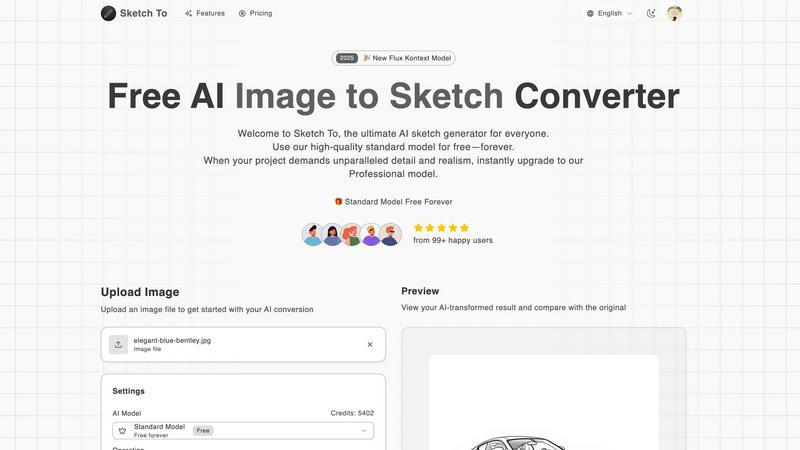
Sketch To instantly transforms your photos into AI sketches and sketches back into images.
Last updated: February 28, 2026

SparkPix
Transform your photos effortlessly with SparkPix, the AI photo editor that enhances, restores, and styles images by simply typing your requests.
Last updated: March 11, 2026
Visual Comparison
Sketch To
SparkPix

Feature Comparison
Sketch To
Dual-Direction AI Conversion
Sketch To's core power lies in its two-way conversion engine. Not only can you transform any uploaded photo into a variety of artistic sketches, but you can also take a simple line drawing or sketch and use AI to generate a fully realized, photorealistic image from it. This unique functionality serves as both a fantastic artistic filter and a powerful ideation tool, bridging the gap between initial concept and final visual.
Mobile-First, Web-Based Platform
Access powerful AI conversion without ever downloading an app. Sketch To is built for the modern creator, offering a fully responsive, browser-based experience that works flawlessly on smartphones, tablets, and desktops. This eliminates software installation hurdles and device compatibility issues, putting professional-grade artistic tools directly in your pocket for creativity on the go.
Tiered AI Model System (Standard & Pro)
The platform caters to every need with its two-tier model system. The Standard Model is a powerful, free-to-use option perfect for social media content, hobbies, and personal projects. For projects demanding the highest fidelity, the Professional Model unlocks superior detail, texture, and realism, making it suitable for commercial work and professional portfolios, all managed through a simple credit system.
Extensive Artistic Style Library
Go beyond a simple pencil filter. Sketch To offers a wide array of pre-configured artistic styles to choose from, including Pencil Sketch, Charcoal, Ink, Colored Pencil, Comic, Concept Art, and Watercolor simulations. This allows users to match the output to their specific creative vision, whether they're aiming for a classic drawing look or a specific illustrative aesthetic.
SparkPix
AI Photo Editor
The AI Photo Editor transforms your images based on simple text commands. Just type your desired edits such as "remove background" or "enhance colors," and watch as the AI applies the changes in under 30 seconds. This feature allows for instant editing without the need for complex software skills.
Background Remover
With the one-click Background Remover, you can effortlessly eliminate backgrounds from portraits, product photos, and even complex scenes. This feature is particularly useful for creating transparent backgrounds for e-commerce, social media, and presentations, saving you time and effort.
Unblur Image
Say goodbye to blurry images with the Unblur Image feature. It intelligently fixes motion blur, out-of-focus shots, and compression artifacts, allowing you to salvage those otherwise unusable photos. This feature ensures your images look sharp and clear, enhancing their overall quality.
Photo Restoration
The Photo Restoration tool is perfect for those looking to revive old, damaged, or faded photos. It repairs scratches, tears, and discoloration, making it ideal for preserving family archives and historical images. With just one click, you can restore precious memories to their former glory.
Use Cases
Sketch To
Social Media Content Enhancement
Creators and influencers can instantly generate eye-catching, artistic versions of their photos for Instagram, TikTok, or Pinterest. Transforming a standard portrait or landscape into a pencil sketch or digital art piece adds a unique, engaging aesthetic that helps content stand out in a crowded feed, all done quickly from a phone.
Professional Concept Art & Storyboarding
Artists and designers can rapidly visualize concepts. By starting with a rough sketch and using the 'Sketch to Image' Pro model, they can generate detailed, realistic mock-ups to present ideas to clients or teams. Conversely, turning reference photos into clean figure or concept sketches aids in the initial drafting and storyboarding process.
Educational & Hobbyist Projects
Students and hobbyists can explore art and design without needing advanced drawing skills. The tool is perfect for school art projects, creating custom illustrations for personal blogs, or simply experimenting with different artistic styles on personal photographs, fostering creativity in a fun, accessible way.
Commercial Design & Marketing Assets
Marketing professionals and small businesses can create unique branded assets. Convert product photos into sketch-style illustrations for website banners, promotional materials, or merchandise. The high-resolution output from the Pro model ensures the quality is suitable for print and professional digital campaigns.
SparkPix
Social Media Content Creation
SparkPix is a game-changer for social media managers and influencers. You can quickly edit images for posts, ads, and stories by removing backgrounds or applying artistic styles, ensuring your content stands out. The user-friendly interface allows for fast edits, perfect for tight deadlines.
E-commerce Product Photography
For online retailers, SparkPix provides an efficient way to create professional product images. Use the Background Remover to isolate products and enhance their appeal, or generate mockups with stunning backgrounds. This enhances product visibility and can lead to increased sales.
Family Photo Restoration
Families often have cherished old photographs that need restoration. SparkPix’s Photo Restoration feature allows users to repair and colorize vintage images, preserving family history. This feature is invaluable for creating beautiful prints and digital keepsakes.
Creative Art Transformations
Artists and hobbyists can take advantage of SparkPix’s Style Transfer capability. Transform your photos into various artistic styles such as watercolor or anime, allowing for unique art creations. This feature is great for personal projects or gifts, adding a creative flair to your photos.
Overview
About Sketch To
Sketch To is a revolutionary, web-based AI creative suite designed to transform your artistic workflow instantly, right from your mobile device or computer browser. It breaks down the barrier between photography and hand-drawn art with its powerful dual functionality. You can effortlessly convert any photo into a stunning, detailed sketch in styles ranging from pencil and charcoal to watercolor. Uniquely, you can also perform the reverse, breathing life into a simple sketch by transforming it into a photorealistic image with incredible detail. Built with a mobile-first philosophy, the platform requires no software installation, offering a seamless, app-like experience accessible anywhere. It empowers a vast community, from social media hobbyists and students to professional artists and commercial designers. At its core, Sketch To democratizes advanced AI artistry by offering a robust, always-free Standard Model to get started, complemented by a premium Professional Model that delivers world-class realism for critical projects. With instant processing, trial credits for new users, and a flexible credit system, Sketch To makes high-end creative transformation accessible to everyone.
About SparkPix
SparkPix is an innovative AI-powered photo editing tool designed for users of all skill levels. Whether you are a casual user looking to enhance personal photos or a professional needing quick edits, SparkPix simplifies the editing process with its intuitive interface. You can edit photos by simply typing what you want to change, eliminating the need for traditional software skills like those required for Photoshop. With a generous offering of free credits to start, SparkPix allows you to explore its features without any upfront cost. Its advanced AI capabilities enable stunning transformations in seconds, making it a versatile solution for anyone looking to improve their images effortlessly. From background removal to photo restoration, SparkPix is tailored for creatives, marketers, and everyday users alike, ensuring everyone can achieve professional-quality results with ease.
Frequently Asked Questions
Sketch To FAQ
Is Sketch To really free to use?
Yes, Sketch To offers a powerful always-free Standard Model. New users receive trial credits to explore the platform's capabilities immediately. Ongoing use of the Standard Model operates on a credit system, with options to earn or purchase credits. For the highest quality Professional Model, credits are required, which can be purchased via various plans.
What image formats and sizes does Sketch To support?
You can upload common image file formats to get started. The platform specifies a maximum file size of 5MB for uploads. For output, Sketch To provides high-resolution downloads suitable for both digital use and print, ensuring your creations maintain quality whether for social media or professional portfolios.
How does the 'Sketch to Image' feature work?
This feature uses advanced generative AI models. You upload a sketch or line drawing, and the AI intelligently interprets the lines, shapes, and implied forms to create a detailed, textured, and photorealistic image. For the best results, using the Professional Model is recommended as it provides world-class detail and accuracy.
What is the difference between the Standard and Pro model?
The Standard Model is optimized for speed and accessibility, delivering great results for everyday creativity. The Professional Model uses more advanced, computationally intensive AI to achieve significantly higher levels of detail, texture, lighting accuracy, and realism, making it the choice for commercial work and projects where quality is paramount.
SparkPix FAQ
How does SparkPix work?
SparkPix utilizes advanced AI algorithms to process images based on user instructions. You simply type what you want to change, and the AI applies the edits automatically, making photo editing accessible to everyone.
Is SparkPix free to use?
Yes, SparkPix offers a free plan that includes 5 credits to start editing photos. You can also receive 1 credit daily. There are paid plans available for users who need more credits.
What types of images can I edit with SparkPix?
You can edit a wide variety of images with SparkPix, including portraits, product photos, and historical images. The tool is versatile and caters to both casual users and professionals.
Can I use SparkPix on mobile devices?
Absolutely! SparkPix is a web-based tool that works seamlessly on desktop, iPhone, and Android devices, allowing you to edit photos anytime and anywhere without the need for downloads.
Alternatives
Sketch To Alternatives
Sketch To is a web-based AI tool in the image and photo category that instantly transforms photos into sketches and sketches into realistic images. It's designed for mobile and desktop browsers, making creative AI art accessible without downloads. Users often explore alternatives for various reasons. Some may need different pricing structures, specific artistic styles not offered, or a tool integrated into a larger creative suite. Others might prioritize offline functionality or have unique workflow requirements that demand a different feature set. When choosing an alternative, consider your primary goal. Look at the quality and style of the AI output, the cost and subscription model, and whether the platform fits your device preference, like a dedicated mobile app versus a web tool. Ease of use and the ability to handle your specific creative projects are key.
SparkPix Alternatives
SparkPix is an innovative online AI photo editor that allows users to enhance and modify images through simple text commands. It falls under the category of image editing software, specifically designed for those who may lack advanced Photoshop skills. Users commonly seek alternatives to SparkPix for various reasons, such as pricing structures, additional features, or compatibility with specific platforms. Some may require more comprehensive editing capabilities, while others could be looking for different pricing tiers to fit their budget. When searching for an alternative to SparkPix, consider the key features that matter most to you, such as ease of use, the range of editing tools available, and the quality of results. Additionally, evaluate the platform's accessibility—whether it works seamlessly on mobile devices or desktop computers without requiring downloads. Finding a solution that aligns with your specific editing needs and budget will help ensure a satisfying user experience.