
SparkPix vs TinyFast
Side-by-side comparison to help you choose the right AI tool.

SparkPix
Transform your photos effortlessly with SparkPix, the AI photo editor that enhances, restores, and styles images by simply typing your requests.
Last updated: March 11, 2026

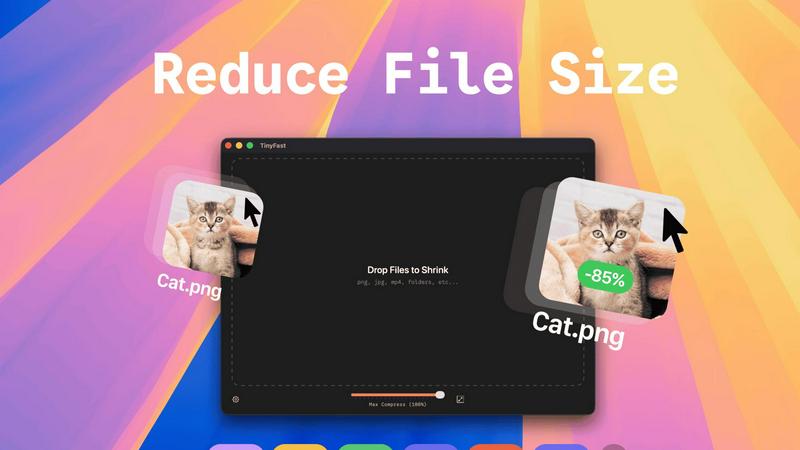
TinyFast instantly compresses images and videos privately on your Mac with simple drag and drop.
Last updated: February 28, 2026
Visual Comparison
SparkPix

TinyFast
Feature Comparison
SparkPix
AI Photo Editor
The AI Photo Editor transforms your images based on simple text commands. Just type your desired edits such as "remove background" or "enhance colors," and watch as the AI applies the changes in under 30 seconds. This feature allows for instant editing without the need for complex software skills.
Background Remover
With the one-click Background Remover, you can effortlessly eliminate backgrounds from portraits, product photos, and even complex scenes. This feature is particularly useful for creating transparent backgrounds for e-commerce, social media, and presentations, saving you time and effort.
Unblur Image
Say goodbye to blurry images with the Unblur Image feature. It intelligently fixes motion blur, out-of-focus shots, and compression artifacts, allowing you to salvage those otherwise unusable photos. This feature ensures your images look sharp and clear, enhancing their overall quality.
Photo Restoration
The Photo Restoration tool is perfect for those looking to revive old, damaged, or faded photos. It repairs scratches, tears, and discoloration, making it ideal for preserving family archives and historical images. With just one click, you can restore precious memories to their former glory.
TinyFast
100% Local & Private Compression
Your files never leave your Mac. TinyFast processes everything directly on your device, ensuring total privacy by design. This is crucial for handling sensitive documents, proprietary designs, or any work covered by non-disclosure agreements, as there are no uploads to cloud servers and no risk of third-party data storage.
Blazing-Fast Drag & Drop Workflow
Experience compression at the speed of your workflow. Just drag your files or entire folders into the TinyFast app and get optimized output in seconds. The app uses optimized native engines built for macOS to shrink large files quickly, eliminating the long wait times associated with uploading and downloading from online tools.
Universal File Format Support
TinyFast supports a wide range of common file types used by creators and professionals. This includes images (PNG, JPG, WEBP, SVG, GIF), videos (MP4, MOV), documents (PDF), audio (MP3), and even code files (JS, CSS, JSON). This versatility means you can consolidate your compression tasks into one simple, always-available Mac app.
Batch Processing & Resolution Control
Boost your productivity by compressing multiple files at once. Drop an entire folder of images or videos, and TinyFast will process them all in a single batch. Additionally, for images and videos, you have the option to automatically resize the resolution during compression, giving you precise control over the final output size and quality.
Use Cases
SparkPix
Social Media Content Creation
SparkPix is a game-changer for social media managers and influencers. You can quickly edit images for posts, ads, and stories by removing backgrounds or applying artistic styles, ensuring your content stands out. The user-friendly interface allows for fast edits, perfect for tight deadlines.
E-commerce Product Photography
For online retailers, SparkPix provides an efficient way to create professional product images. Use the Background Remover to isolate products and enhance their appeal, or generate mockups with stunning backgrounds. This enhances product visibility and can lead to increased sales.
Family Photo Restoration
Families often have cherished old photographs that need restoration. SparkPix’s Photo Restoration feature allows users to repair and colorize vintage images, preserving family history. This feature is invaluable for creating beautiful prints and digital keepsakes.
Creative Art Transformations
Artists and hobbyists can take advantage of SparkPix’s Style Transfer capability. Transform your photos into various artistic styles such as watercolor or anime, allowing for unique art creations. This feature is great for personal projects or gifts, adding a creative flair to your photos.
TinyFast
Developers Preparing Assets for Deployment
Developers can use TinyFast to quickly optimize application assets like icons, screenshots, and UI graphics directly on their Mac before bundling or deployment. This ensures faster app load times and smaller download sizes while keeping proprietary code and assets completely secure and local throughout the process.
Designers Sharing Portfolios or Client Work
Graphic and UX designers often need to send high-quality proofs or portfolio pieces via email or messaging apps with file size limits. TinyFast allows them to compress images and videos locally without sacrificing critical detail, enabling fast, professional sharing while protecting unreleased client work.
Content Creators Managing Media Libraries
Video editors, bloggers, and social media managers dealing with large libraries of photos and videos can use TinyFast to free up significant storage space on their Mac. Compressing footage for edits or archiving projects becomes a quick, drag-and-drop task that doesn't require a slow internet connection or compromise original files.
Professionals Working Under Confidentiality
Lawyers, consultants, and engineers working with sensitive documents, schematics, or confidential reports can safely reduce file sizes for email or secure transfer. Since TinyFast operates entirely offline, there is zero risk of exposing private information to online compression services, ensuring compliance with strict privacy protocols.
Overview
About SparkPix
SparkPix is an innovative AI-powered photo editing tool designed for users of all skill levels. Whether you are a casual user looking to enhance personal photos or a professional needing quick edits, SparkPix simplifies the editing process with its intuitive interface. You can edit photos by simply typing what you want to change, eliminating the need for traditional software skills like those required for Photoshop. With a generous offering of free credits to start, SparkPix allows you to explore its features without any upfront cost. Its advanced AI capabilities enable stunning transformations in seconds, making it a versatile solution for anyone looking to improve their images effortlessly. From background removal to photo restoration, SparkPix is tailored for creatives, marketers, and everyday users alike, ensuring everyone can achieve professional-quality results with ease.
About TinyFast
TinyFast is the ultimate, privacy-first file compression app built exclusively for macOS. It's designed for developers, designers, and creators who need to shrink files instantly and securely, right on their Mac. Forget slow, unreliable online tools that require uploading sensitive assets to unknown servers. With TinyFast, your entire workflow stays local and private. Simply drag and drop your files—including PNG, JPEG, MP4, MOV, PDF, SVG, WebP, MP3, or GIF—into the app and get optimized versions in seconds. Born from a developer's need to handle confidential files safely, TinyFast ensures your assets never leave your machine, making it perfect for anyone working under NDAs or with proprietary content. Engineered for speed with native compression engines, it handles large files without the lag of internet transfers. It's more than a compressor; it's a seamless extension of your creative suite that respects your privacy and turbocharges your productivity by keeping everything fast, simple, and on your device.
Frequently Asked Questions
SparkPix FAQ
How does SparkPix work?
SparkPix utilizes advanced AI algorithms to process images based on user instructions. You simply type what you want to change, and the AI applies the edits automatically, making photo editing accessible to everyone.
Is SparkPix free to use?
Yes, SparkPix offers a free plan that includes 5 credits to start editing photos. You can also receive 1 credit daily. There are paid plans available for users who need more credits.
What types of images can I edit with SparkPix?
You can edit a wide variety of images with SparkPix, including portraits, product photos, and historical images. The tool is versatile and caters to both casual users and professionals.
Can I use SparkPix on mobile devices?
Absolutely! SparkPix is a web-based tool that works seamlessly on desktop, iPhone, and Android devices, allowing you to edit photos anytime and anywhere without the need for downloads.
TinyFast FAQ
Is TinyFast really free to use?
Yes, TinyFast offers a free forever plan that allows you to compress up to 5 files per day with access to all core features. This is perfect for testing the app or for users with light compression needs. For unlimited use, you can upgrade to a monthly subscription or a one-time lifetime purchase.
What happens to my original files after compression?
TinyFast is non-destructive. The app creates a new, optimized version of your file. Your original, full-quality file remains untouched and saved in its original location on your Mac. You are always in complete control of your source assets.
How does TinyFast compare to online compression tools?
Unlike online tools, TinyFast works 100% locally on your Mac. This means your files are never uploaded to unknown servers, your privacy is guaranteed, and compression is instant—no waiting for uploads, processing queues, or downloads. It's faster, more reliable, and completely secure.
Can I compress an entire folder of files at once?
Absolutely. TinyFast supports batch processing. You can simply drag and drop an entire folder containing supported file types into the app, and it will automatically compress all the compatible files within it, saving you considerable time and effort compared to processing files one by one.
Alternatives
SparkPix Alternatives
SparkPix is an innovative online AI photo editor that allows users to enhance and modify images through simple text commands. It falls under the category of image editing software, specifically designed for those who may lack advanced Photoshop skills. Users commonly seek alternatives to SparkPix for various reasons, such as pricing structures, additional features, or compatibility with specific platforms. Some may require more comprehensive editing capabilities, while others could be looking for different pricing tiers to fit their budget. When searching for an alternative to SparkPix, consider the key features that matter most to you, such as ease of use, the range of editing tools available, and the quality of results. Additionally, evaluate the platform's accessibility—whether it works seamlessly on mobile devices or desktop computers without requiring downloads. Finding a solution that aligns with your specific editing needs and budget will help ensure a satisfying user experience.
TinyFast Alternatives
TinyFast is a privacy-first, Mac-exclusive app that instantly compresses images, videos, and documents locally on your device. It belongs to the category of desktop utility and productivity tools, designed for creators and professionals who prioritize security and a streamlined workflow. Users often explore alternatives for various reasons. Some may need a cross-platform solution for Windows or web use, while others might seek different pricing models or more advanced, format-specific tuning options. The need for a tool that integrates with specific cloud services or offers different feature balances is also common. When evaluating other options, key considerations include the compression engine's privacy policy (local vs. cloud), supported file formats, processing speed, and overall ease of use. The ideal tool should fit seamlessly into your existing creative or development process without compromising on your core requirements.