
Dubvid vs StatPecker
Side-by-side comparison to help you choose the right AI tool.

Dubvid
Dubvid quickly dubs your audio and video into multiple languages using natural voices and optional lip-sync for global.
Last updated: February 27, 2026

StatPecker
StatPecker turns your data into instant AI insights and stunning visuals for free.
Last updated: March 1, 2026
Visual Comparison
Dubvid
StatPecker
Feature Comparison
Dubvid
AI Voice Dubbing
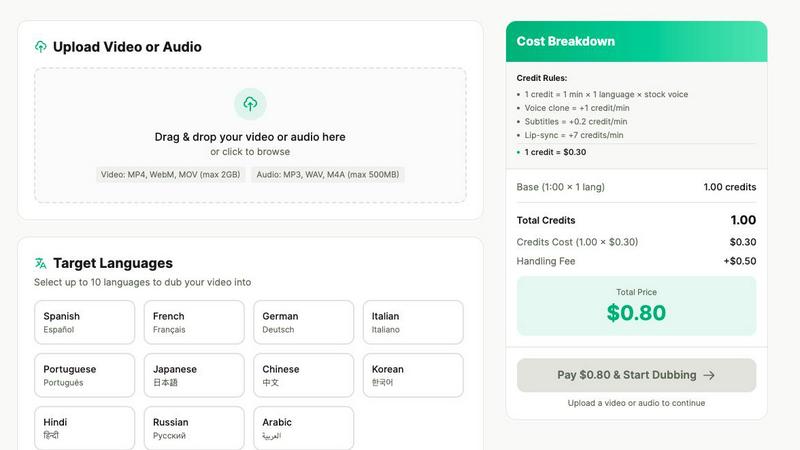
Dubvid offers advanced AI voice dubbing, allowing users to select from natural-sounding voices or even clone their own. This feature ensures that the emotional nuances and pacing of the original video are preserved, resulting in a high-quality dubbing experience.
Multi-Language Support
With support for over 10 languages, Dubvid allows creators to reach a vast audience. You can easily select target languages and cater to global viewers, ensuring that your content resonates with people from different backgrounds.
Simple Upload Process
The upload process is designed to be user-friendly. Users can drag and drop their video files or click to browse, supporting multiple formats such as MP4, MOV, and WebM. This simplicity makes it easy for anyone to get started without technical hurdles.
Customization Options
Dubvid provides various customization options, including the ability to add subtitles and lip-syncing features. These enhancements improve the viewing experience, making the dubbed content more engaging and realistic, perfect for professional settings.
StatPecker
Ask Your Query
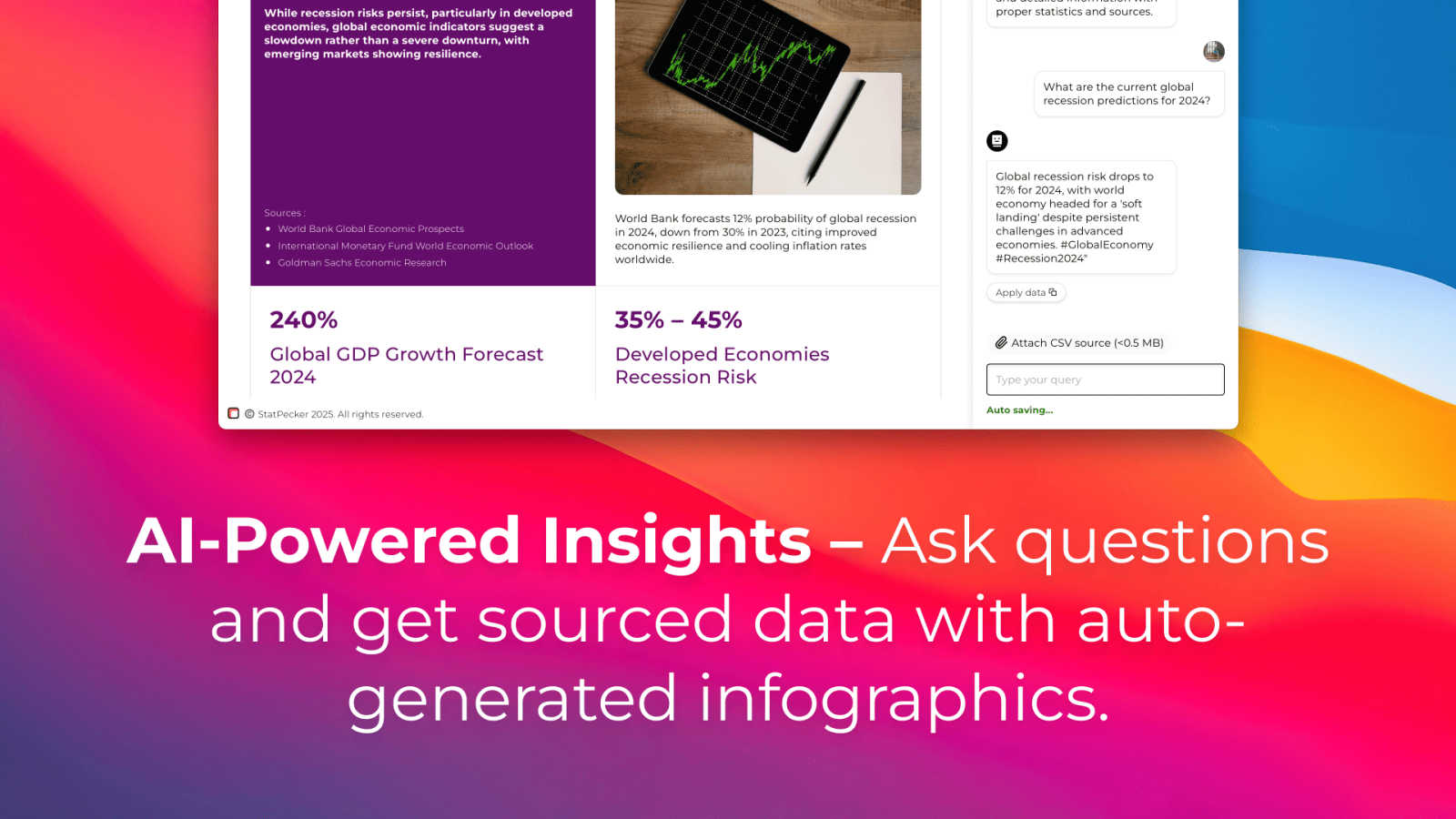
Get instant, credible insights without complex tools. Simply type your question in plain English, and StatPecker's AI queries validated data sources to generate the answer. This feature turns curiosity into clear visuals in seconds, perfect for quick research or validating a hypothesis on the go, directly from your phone or tablet.
Upload & Analyze CSVs
Go beyond public data by analyzing your private information securely. Upload a CSV file directly from your device, and StatPecker's local SQL Agent processes everything on-device. Your data never leaves your phone or computer, ensuring complete privacy while you explore trends, summarize figures, and extract key insights without spreadsheet hassle.
Publish & Embed
Seamlessly integrate your created visuals into your digital content. StatPecker generates interactive charts and infographics with embed codes, making it easy to add them directly to blogs, articles, websites, or internal wikis. This creates a dynamic, engaging experience for your audience without requiring any coding or design software.
Download & Use Anywhere
Export your finished infographics as high-quality image files with a single tap. This allows for maximum flexibility, letting you instantly use your visuals in reports, slide presentations, social media posts, or printed materials. Your data stories are ready to share anywhere, in any format you need.
Use Cases
Dubvid
Content Creators
Short-form creators can utilize Dubvid to dub their YouTube Shorts, Instagram Reels, and TikTok videos into multiple languages, significantly expanding their reach and engagement with international audiences.
Educational Institutions
Educators can translate lessons and tutorials in minutes, enabling global learners to access valuable educational content. This feature is particularly useful for online courses and webinars, enhancing learning opportunities worldwide.
Customer Support Teams
Customer support teams can reduce ticket volumes by localizing walkthroughs and help videos for various regions. This proactive approach helps users find solutions quickly, improving overall customer satisfaction.
Podcasters
Podcasters can dub their audio or video episodes into new languages without the hassle of additional production work. This allows them to release their content in multiple languages, attracting a broader listener base and fostering community growth.
StatPecker
Content Creation & Blogging
Bloggers and digital writers use StatPecker to quickly find supporting data and create custom infographics that boost article credibility and engagement. Instead of searching for generic charts, they can generate unique visuals that perfectly match their narrative, making complex topics accessible and shareable for their readers.
Business Reporting & Analysis
Analysts and managers leverage the CSV upload feature to turn internal sales, marketing, or operational data into clear charts for weekly reports or team meetings. They can ask specific questions like "Which product line had the highest growth last quarter?" and get a visual answer ready for a presentation in minutes.
Educational Material Development
Educators and trainers use StatPecker to simplify complex statistical or historical data for students. By transforming datasets into easy-to-understand infographics, they can create more engaging lesson plans, handouts, and presentation slides that help students grasp difficult concepts visually.
Marketing & Social Media
Marketing professionals create eye-catching data-driven content for social media campaigns and reports. They can visualize market research, campaign performance metrics, or industry comparisons to tell a compelling brand story, drive engagement, and present results to stakeholders with professional clarity.
Overview
About Dubvid
Dubvid is an innovative AI-powered platform that revolutionizes the way creators, businesses, and brands approach video and audio dubbing. Designed for seamless integration into any workflow, Dubvid empowers users to connect with global audiences effortlessly. By simply uploading your original video, selecting from multiple target languages, and letting Dubvid automatically translate and recreate your voice, you can maintain the natural tone, pacing, and emotion of the original content. This eliminates the need for traditional studios, voice actors, or complex editing workflows, making it accessible to anyone, regardless of technical expertise. Whether you're a YouTuber aiming to expand your reach, an educator looking to share lessons globally, or a marketing team that needs rapid localization, Dubvid enables you to scale your content internationally in just minutes. With support for over 10 languages, Dubvid bridges language barriers and fosters engagement with diverse audiences, making it an essential tool in today's interconnected world.
About StatPecker
StatPecker is an AI-powered data visualization tool that transforms the complex task of data storytelling into a simple, fast, and intuitive experience on any device. Designed for the modern creator and analyst, it instantly converts raw data and simple questions into stunning, publication-ready infographics. The core value proposition is clear: democratize data visualization. You don't need to be a data scientist or a graphic designer to create impactful visuals. StatPecker is built for a diverse mobile-first audience, including content creators looking to enrich blogs, marketers crafting compelling reports, educators simplifying complex topics, and business analysts needing quick, credible insights. It bridges the gap between data and narrative, allowing users to extract trends, visualize comparisons, and share insights without ever leaving their workflow. By offering features like a local SQL agent for private CSV analysis, StatPecker ensures both power and privacy, making it an essential app for anyone who needs to communicate with data effectively and beautifully.
Frequently Asked Questions
Dubvid FAQ
How long does it take to dub a video?
The dubbing process with Dubvid is incredibly fast. Once you upload your video and select your desired languages, the AI works efficiently to produce the dubbed version, often within minutes.
Can I try Dubvid for free?
Yes! Dubvid offers a free trial that includes 2 credits, allowing you to dub up to 60 seconds of audio or video without requiring a credit card. This gives you the chance to experience the quality before committing.
What file formats does Dubvid support?
Dubvid supports a variety of file formats including MP4, MOV, WebM, MP3, and WAV, making it easy for users to upload their content regardless of the format.
Is there a limit to the number of languages I can dub into?
While Dubvid supports over 10 languages, you can choose multiple target languages for your project. The platform is designed to cater to diverse audience needs, helping you reach as many people as possible.
StatPecker FAQ
Is my data private when I upload a CSV?
Yes, absolutely. When you use the Local SQL Agent feature to upload a CSV, all data processing and analysis happen directly on your device. Your file is not sent to StatPecker's servers. This ensures complete privacy and security for your sensitive business or personal information.
Do I need design or coding skills to use StatPecker?
No, you do not. StatPecker is designed to be intuitive and user-friendly. The AI handles the complex parts of data querying and visual design. You simply ask a question or upload a file, and the tool generates a professional infographic for you to use, publish, or download immediately.
What are the limits of the Free Tier?
The Free Tier is a great way to start. It includes unlimited projects and embeds, 25 AI queries to ask questions, and 10 CSV uploads for private analysis. This allows you to fully explore the app's core functionality and create a significant amount of content at no cost.
Can I edit the infographics after they are created?
Yes, you can. While StatPecker AI generates the initial visual, the platform provides options for manual edits on your embeds. You can adjust colors, and text, and sometimes chart types to better fit your brand or presentation needs before publishing or downloading the final graphic.
Alternatives
Dubvid Alternatives
Dubvid is an AI-driven platform that specializes in dubbing audio and video content into multiple languages, allowing creators and businesses to engage with diverse audiences worldwide. By simplifying the dubbing process through seamless uploads and automatic translations, Dubvid eliminates the need for traditional voice actors and complex editing, making it a popular choice in the content creation category. Users often seek alternatives to Dubvid due to varying needs such as pricing, feature sets, or specific platform requirements. When considering an alternative, it's essential to evaluate its ease of use, language support, voice quality, and any additional features that might enhance your content creation process.
StatPecker Alternatives
StatPecker is an AI-powered data visualization tool that transforms raw data into engaging infographics in seconds. It's designed for anyone who needs to tell a story with data quickly, from marketers to educators. Users often explore alternatives for various reasons. These can include budget constraints, the need for more advanced or specific features, compatibility with different operating systems or mobile apps, or simply a preference for a different user interface and workflow. When evaluating other options, consider your core needs. Look at the ease of use, especially on mobile devices, the types of visualizations offered, how well it integrates AI for analysis, and the flexibility to share or embed your final creations. The right tool should fit seamlessly into your existing process.