
echoloc vs StatPecker
Side-by-side comparison to help you choose the right AI tool.

Echoloc finds companies ready to buy by turning job posts into actionable sales signals.
Last updated: February 28, 2026

StatPecker
StatPecker turns your data into instant AI insights and stunning visuals for free.
Last updated: March 1, 2026
Visual Comparison
echoloc
StatPecker

Feature Comparison
echoloc
Natural Language Search
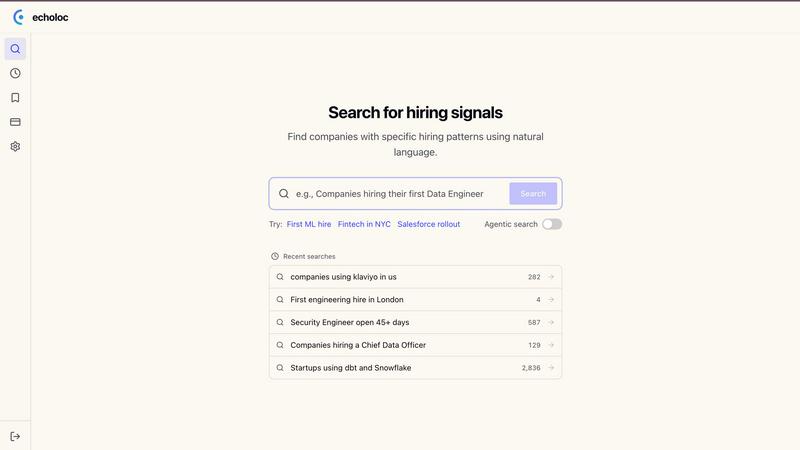
Describe the exact buying signal you're looking for in plain English, just like you're thinking. There's no need for complex Boolean strings or filter training. Simply type queries like "companies hiring their first VP of Sales" or "startups using dbt and Snowflake" to instantly surface relevant, live results. The app-centric design makes this intuitive search the core of the user experience, putting powerful discovery at your fingertips.
Evidence-Based Results
Every company match in your results includes direct snippets from the actual job postings that triggered the signal. This eliminates guesswork and provides the concrete proof needed to craft highly personalized outreach. You see the exact language about building a data platform from scratch or migrating from HubSpot to Salesforce, turning every lead into a contextualized conversation starter.
Real-Time Signal Database
Echoloc's platform monitors over 30 million companies and analyzes more than 10 million job posts, updating in real-time. This ensures you are working with the freshest possible signals, not stale lists. The mobile-first interface is built to deliver these timely alerts, so you can act on new opportunities the moment they emerge, keeping you ahead of competitors who rely on slower, aggregated data sources.
Curated Signal Templates
Jumpstart your search with pre-built, high-intent query templates based on proven buying signals. Templates like "First Hire," "Hiring Spike," "Tech Stack," and "Geo Expansion" instantly filter the database to show companies in key, actionable phases. This feature helps users quickly leverage best practices and discover valuable segments without having to build every search from scratch.
StatPecker
Ask Your Query
Get instant, credible insights without complex tools. Simply type your question in plain English, and StatPecker's AI queries validated data sources to generate the answer. This feature turns curiosity into clear visuals in seconds, perfect for quick research or validating a hypothesis on the go, directly from your phone or tablet.
Upload & Analyze CSVs
Go beyond public data by analyzing your private information securely. Upload a CSV file directly from your device, and StatPecker's local SQL Agent processes everything on-device. Your data never leaves your phone or computer, ensuring complete privacy while you explore trends, summarize figures, and extract key insights without spreadsheet hassle.
Publish & Embed
Seamlessly integrate your created visuals into your digital content. StatPecker generates interactive charts and infographics with embed codes, making it easy to add them directly to blogs, articles, websites, or internal wikis. This creates a dynamic, engaging experience for your audience without requiring any coding or design software.
Download & Use Anywhere
Export your finished infographics as high-quality image files with a single tap. This allows for maximum flexibility, letting you instantly use your visuals in reports, slide presentations, social media posts, or printed materials. Your data stories are ready to share anywhere, in any format you need.
Use Cases
echoloc
Prospecting for Greenfield Opportunities
Identify companies making their first-ever hire in a critical role, such as a "first ML engineer" or "first data engineer." These greenfield signals indicate a company is investing in a new capability for the first time, meaning budgets are being created, technology stacks are being decided, and there are no incumbent vendors. This allows sales teams to engage as trusted advisors at the very beginning of a buying process.
Capitalizing on Rapid Scaling
Track companies exhibiting a "hiring spike," like a fintech startup hiring 5+ engineers in a month. This rapid scaling is a clear indicator of growth, new funding, or product expansion, which directly correlates with increased spending on infrastructure, tooling, and SaaS services. Targeting these companies allows you to align your solution with their urgent, scaling needs.
Targeting Specific Tech Stack Investments
Find companies that mention specific technologies in their job descriptions, such as "using dbt and Snowflake." This signal reveals active investment and commitment to a particular data stack, creating a perfect opening for sales reps selling complementary analytics tools, data governance solutions, or adjacent services that integrate seamlessly.
Engaging During Leadership Transitions
Discover organizations hiring for new C-level or VP roles, like a "Chief Data Officer." A new leader signifies a reorganization of priorities, budgets, and vendor relationships. They often seek to make an impact quickly, making them highly receptive to new solutions that can help them achieve their fresh objectives and build their new tech stack.
StatPecker
Content Creation & Blogging
Bloggers and digital writers use StatPecker to quickly find supporting data and create custom infographics that boost article credibility and engagement. Instead of searching for generic charts, they can generate unique visuals that perfectly match their narrative, making complex topics accessible and shareable for their readers.
Business Reporting & Analysis
Analysts and managers leverage the CSV upload feature to turn internal sales, marketing, or operational data into clear charts for weekly reports or team meetings. They can ask specific questions like "Which product line had the highest growth last quarter?" and get a visual answer ready for a presentation in minutes.
Educational Material Development
Educators and trainers use StatPecker to simplify complex statistical or historical data for students. By transforming datasets into easy-to-understand infographics, they can create more engaging lesson plans, handouts, and presentation slides that help students grasp difficult concepts visually.
Marketing & Social Media
Marketing professionals create eye-catching data-driven content for social media campaigns and reports. They can visualize market research, campaign performance metrics, or industry comparisons to tell a compelling brand story, drive engagement, and present results to stakeholders with professional clarity.
Overview
About echoloc
Echoloc is a cutting-edge hiring signals platform designed for the modern revenue team. It transforms the way sales professionals identify and engage potential buyers by turning public job postings into a powerful, predictive sales intelligence engine. While traditional intent data tells you what a company is already researching, Echoloc reveals what they are planning to do by analyzing the strategic hires they are making right now. A job post for a first data engineer, a spike in sales hires, or a new leadership role isn't just HR noise—it's leaked intent signaling growth, new projects, and imminent budget allocation. The platform tracks over 30 million companies and analyzes millions of job descriptions in real-time, enabling sales development representatives (SDRs), account executives (AEs), and go-to-market leaders to discover and act on opportunities weeks or months before they appear on review sites or intent data platforms. With Echoloc, outreach is no longer a guess; it's an informed, timely conversation based on concrete evidence, giving teams a decisive edge in a competitive market.
About StatPecker
StatPecker is an AI-powered data visualization tool that transforms the complex task of data storytelling into a simple, fast, and intuitive experience on any device. Designed for the modern creator and analyst, it instantly converts raw data and simple questions into stunning, publication-ready infographics. The core value proposition is clear: democratize data visualization. You don't need to be a data scientist or a graphic designer to create impactful visuals. StatPecker is built for a diverse mobile-first audience, including content creators looking to enrich blogs, marketers crafting compelling reports, educators simplifying complex topics, and business analysts needing quick, credible insights. It bridges the gap between data and narrative, allowing users to extract trends, visualize comparisons, and share insights without ever leaving their workflow. By offering features like a local SQL agent for private CSV analysis, StatPecker ensures both power and privacy, making it an essential app for anyone who needs to communicate with data effectively and beautifully.
Frequently Asked Questions
echoloc FAQ
What kind of signals does echoloc track?
Echoloc specializes in identifying strategic hiring signals from job postings that indicate buying intent. This includes companies making a first hire in a key function (signaling new budget), experiencing hiring spikes (signaling growth), mentioning specific tech stacks (signaling investment), hiring new executives (signaling new initiatives), having roles open for extended periods (signaling urgent pain), and expanding into new geographies (signaling new regional budgets).
How current is the data in echoloc?
The data in Echoloc is updated in real-time. The platform continuously monitors and analyzes job posts from over 30 million companies. Results are timestamped (e.g., "updated 6h ago"), and the interface is designed to surface the most recent signals first, ensuring you are always working with the latest information to time your outreach perfectly.
Do I need special training to use the search?
No special training is required. Echoloc is built with a user experience focus, featuring a natural language search that works like a conversation. You can type plain English questions about the buying signals you want to find. Additionally, curated signal templates allow you to get started instantly with one click, making powerful prospecting accessible immediately.
Can I export the companies I find?
Yes, Echoloc allows you to export your search results. This enables you to seamlessly integrate the high-intent leads you discover into your existing CRM or sales engagement workflow. The export functionality is a key part of turning insights from the app into actionable pipeline in your core sales tools.
StatPecker FAQ
Is my data private when I upload a CSV?
Yes, absolutely. When you use the Local SQL Agent feature to upload a CSV, all data processing and analysis happen directly on your device. Your file is not sent to StatPecker's servers. This ensures complete privacy and security for your sensitive business or personal information.
Do I need design or coding skills to use StatPecker?
No, you do not. StatPecker is designed to be intuitive and user-friendly. The AI handles the complex parts of data querying and visual design. You simply ask a question or upload a file, and the tool generates a professional infographic for you to use, publish, or download immediately.
What are the limits of the Free Tier?
The Free Tier is a great way to start. It includes unlimited projects and embeds, 25 AI queries to ask questions, and 10 CSV uploads for private analysis. This allows you to fully explore the app's core functionality and create a significant amount of content at no cost.
Can I edit the infographics after they are created?
Yes, you can. While StatPecker AI generates the initial visual, the platform provides options for manual edits on your embeds. You can adjust colors, and text, and sometimes chart types to better fit your brand or presentation needs before publishing or downloading the final graphic.
Alternatives
echoloc Alternatives
Echoloc is a sales intelligence platform in the business and finance category. It helps sales teams find new opportunities by analyzing job postings for concrete buying signals, like a company hiring its first data scientist or scaling a sales team. Users often explore alternatives for various reasons. These can include budget constraints, needing a different set of features, or requiring integration with their existing tech stack. Some may also look for platforms that use different data sources beyond job postings. When evaluating other options, consider the core data source and its freshness. Look for platforms that provide actionable, timely signals that align with your sales cycle. Also, assess the user experience, especially on mobile, and how easily insights can be turned into qualified outreach.
StatPecker Alternatives
StatPecker is an AI-powered data visualization tool that transforms raw data into engaging infographics in seconds. It's designed for anyone who needs to tell a story with data quickly, from marketers to educators. Users often explore alternatives for various reasons. These can include budget constraints, the need for more advanced or specific features, compatibility with different operating systems or mobile apps, or simply a preference for a different user interface and workflow. When evaluating other options, consider your core needs. Look at the ease of use, especially on mobile devices, the types of visualizations offered, how well it integrates AI for analysis, and the flexibility to share or embed your final creations. The right tool should fit seamlessly into your existing process.