

Caesura
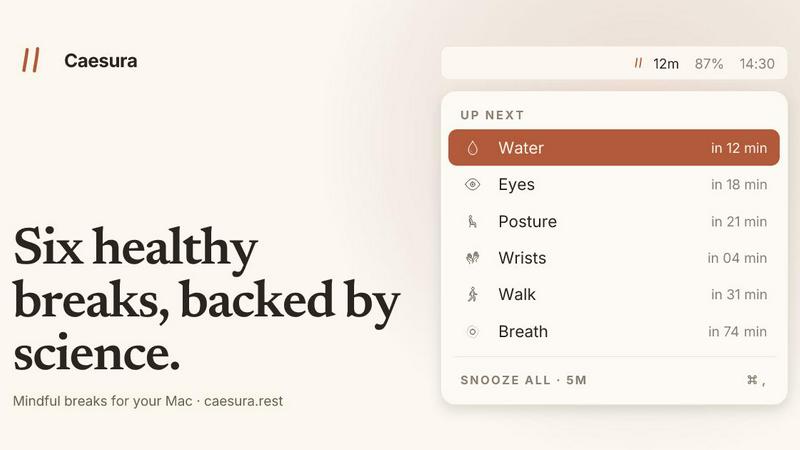
Caesura is a macOS menu-bar app that guides you through six science-backed breaks for water, movement, and focus, pausing automatically during calls.
AI tool Details
About Caesura
Caesura is a calm, minimalist macOS menu-bar break manager designed for people who spend long hours at a desk. It quietly watches over six essential health habits: drinking water, walking, stretching your wrists, resting your eyes, checking your posture, and breathing. Each reminder runs on its own independent schedule, backed by scientific research rather than arbitrary round numbers. What makes Caesura different is its respect for your flow. It intelligently pauses whenever you are on a video call, sharing your screen, using a fullscreen app, or in a Focus mode. When two reminders fall close together, Caesura coalesces them into one gentle break so you are never interrupted twice in a row. The app requires no accounts, no telemetry, and no subscriptions. It is a one-time purchase for $15 that gives you lifetime access. Caesura is for anyone who wants to stay healthy at their desk without breaking their concentration or dealing with cluttered, noisy productivity tools. It is built for MacOS 14 and later, and you can try it free for 14 days before buying.
Features
Six Science-Backed Breaks
Caesura reminds you to drink water every 45 minutes, walk every 60 minutes, stretch your wrists every 30 minutes, rest your eyes every 20 minutes, check your posture every 30 minutes, and breathe every 90 minutes. Each interval comes directly from peer-reviewed studies, not guesses. You can turn any break off or adjust its interval to suit your preferences.
Intelligent Coalescing
When two reminders are due within a minute of each other, Caesura merges them into a single gentle prompt. This means you never get interrupted twice in a row. Your flow stays intact, and you still get the health nudges you need. The coalescing logic is automatic and works across all six break types.
Automatic Pause During Activity
Caesura watches your camera, screen sharing, calendar events, fullscreen apps, Do Not Disturb mode, and FaceTime activity. When any of these are active, every timer freezes instantly. When you finish, the timers pick up exactly where they left off. If you had 12 minutes until your water break, you still have 12 minutes after the call ends.
Three Prompt Styles
Each break can appear as an overlay, a banner, or a notification. Overlays take over your screen until you press Return, perfect for breaks you might otherwise ignore. Banners slide in from under the menu bar and auto-dismiss in 30 seconds. Notifications are the lightest touch, appearing as standard macOS alerts. You choose which style fits each habit.
Use Cases
Remote Workers in Back-to-Back Meetings
If you spend your day in video calls, Caesura automatically pauses all timers during meetings. When the call ends, your break countdown resumes exactly where it stopped. You never get a water reminder while presenting, and you never miss a stretch break because you were on a call. This keeps you healthy without forcing you to ignore your work.
Developers and Writers in Deep Focus
When you are coding or writing in fullscreen mode, Caesura waits. It respects your concentration state and only nudges you when you are between tasks. The coalescing feature ensures that if a water break and an eye break fall close together, you get one combined prompt instead of two separate interruptions. Your flow stays uninterrupted.
Freelancers and Creatives on Flexible Schedules
You can adjust every break interval to match your personal rhythm. Maybe you want water every 30 minutes and eyes every 15 minutes. Caesura lets you tune each habit independently. The three prompt styles let you choose how intrusive each reminder feels. Overlays for the breaks you ignore, banners for the ones you need gently, and notifications for the lightest touch.
People Recovering from Desk-Related Strain
If you have wrist pain, eye strain, or posture issues, Caesura provides targeted reminders at intervals backed by research. The wrist break shows four illustrated stretches. The eye break includes a 20-second cursor countdown. The breathing break paces your inhale and exhale with a visual guide. These guided breaks help you build healthier habits without needing a separate app or subscription.
Pricing
Caesura is a one-time purchase for $15. There are no subscriptions, no recurring fees, and no hidden costs. You can try the app free for 14 days before buying. The purchase includes lifetime access with no account required and no credit card on file. Caesura works on macOS 14 and later.
Frequently Asked Questions
How does Caesura know when I am on a call?
Caesura watches your camera, screen sharing, FaceTime activity, and calendar events. It also detects when you are in a fullscreen app or Do Not Disturb mode. When any of these are active, all timers freeze automatically. You do not need to manually pause anything.
Can I turn off specific breaks I do not want?
Yes, you can turn off any of the six breaks individually. You can also adjust each interval to your preferred timing. The app is fully customizable so you only get reminders for the habits you want to build.
Does Caesura require an account or subscription?
No. Caesura is a one-time purchase for $15. There is no account creation, no credit card on file, and no telemetry. You own the app forever once you buy it. You can also try it free for 14 days before deciding.
What happens if two breaks are due at the same time?
Caesura coalesces them into one gentle break. If your water break and eye break are due within a minute of each other, you get a single prompt covering both. This prevents double interruptions and keeps your focus intact.
Similar to Caesura

Forms Plugin
The #1 Native Form Builder Plugin for Framer - No Code, No Embeds, No External Platforms.

AIdorable
Adopt a virtual baby who grows, learns, and remembers you.




PerPageFax
PerPageFax lets you send a fax online from any browser for a flat $0.50 per page — no account, no subscription, no fax machine.