

Picture Enhancer
Picture Enhancer uses AI to deblur, upscale, and restore photos in your browser with no software install.
AI tool Details
Explore More
Alternatives
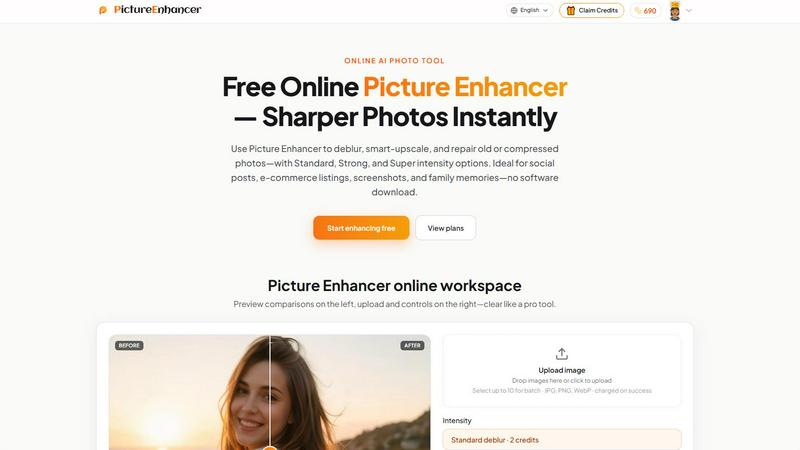
About Picture Enhancer
Picture Enhancer is a free online AI photo enhancement tool designed for creators, sellers, and everyday users who need sharper, clearer images in seconds. At its core, Picture Enhancer combines three powerful AI-driven modes — Deblur, Upscale, and Restore — with adjustable intensity levels (Standard, Strong, and Super) to handle a wide range of image quality issues. Whether you are dealing with camera shake, soft focus, low-resolution files, or old damaged scans, this tool rebuilds edges, textures, and details to produce professional-looking results without requiring any software download or installation. The user experience is mobile-first and app-centric, featuring a clean workspace where you upload a JPG, PNG, or WebP photo, select your mode and intensity, and instantly preview the before-and-after result using a slider. Picture Enhancer is ideal for social media posts, e-commerce product listings, screenshots, UI captures, and family photo restoration. It offers a generous free tier for guests — three lifetime tries per IP with no signup required — and a credit-based system for signed-in users. Credits are only charged on successful enhancements, ensuring you never pay for failed attempts. Paid users unlock Super intensity tiers and batch processing up to 10 images, with monthly subscriptions or permanent credit packs available. The entire process is private, secure, and fast, delivering watermark-free downloads every time.
Features
AI Deblur Mode
Picture Enhancer’s AI Deblur mode intelligently rebuilds edges and texture from common issues like camera shake, soft focus, and mild motion blur. You can choose from three intensity levels — Standard, Strong, or Super — to match the severity of the blur. This mode is especially effective for making faces, text, and fine details read clearly again, whether you are fixing a candid portrait or a blurry screenshot. The AI analyzes the image and applies targeted sharpening without introducing artifacts, delivering natural-looking results that preserve the original character of the photo.
Smart Upscale Mode
The Smart Upscale mode lets you enlarge images by 2x or 4x while adding realistic detail rather than simply stretching pixels. This is a game-changer for creators working with small source files who need high-resolution output for social media covers, product hero shots, or print previews. The AI fills in missing information based on context, so upscaled images maintain sharpness and clarity. Standard intensity handles minor enlargements, while Strong and Super provide progressively more detail enhancement for larger scaling needs.
Old Photo and Damage Restore Mode
Picture Enhancer’s Restore mode is designed to breathe new life into old, damaged, or heavily compressed photos. It reduces scratches, fade, dust spots, and compression artifacts that accumulate over time. Strong and Super restore intensity levels are specifically built to handle heavier damage on scanned family prints, making them ready to share digitally or print again. The AI preserves important facial features and textures while smoothing out imperfections, so restored photos look authentic rather than over-processed.
Credit-Based Billing with Success Guarantee
Picture Enhancer uses a transparent credit system where you only pay for successful enhancements. Standard intensity costs 2 credits, Strong costs 4 credits, and Super costs 6 credits. Guests receive three free lifetime tries per IP without any signup. New signed-in accounts receive starter credits to get started immediately. Monthly subscription plans grant fresh credits each billing cycle, while permanent credit packs never expire, giving you flexibility depending on your usage frequency. This model ensures you never waste credits on failed or unsatisfactory results.
Use Cases
Social Media and Personal Portraits
If you regularly post photos to Instagram, Facebook, or your personal portfolio, Picture Enhancer helps reduce mild blur so faces, clothing, and backgrounds look cleaner and more professional. The Deblur mode with Standard or Strong intensity is perfect for fixing candid shots taken in low light or with slight camera shake. You can quickly enhance multiple images in batch mode (paid users) to maintain a consistent, polished look across your feed without spending hours in desktop editing software.
E-Commerce and Product Photography
Sellers on platforms like Shopify, Amazon, or Etsy can use Picture Enhancer to upscale product detail and tame compression noise so their listings stand out. The Smart Upscale mode is ideal for turning small product photos into crisp, high-resolution hero shots that attract buyers. Restore mode can also clean up images that have been compressed multiple times during upload and download cycles. The result is a more professional storefront that builds trust and increases conversion rates.
Screenshots and UI Documentation
For content creators, support staff, and technical writers, Picture Enhancer sharpens text edges in screenshots and UI captures. This is especially useful for tutorials, help articles, bug reports, and documentation archives where readability is critical. The Deblur mode with Standard intensity can fix slightly blurry captures from screen recording software, while Upscale mode can enlarge small UI elements without losing legibility. The before-and-after slider lets you verify quality before downloading.
Old Photo and Family Memory Restoration
Picture Enhancer is an excellent tool for preserving family history. You can scan old printed photos and use the Restore mode to reduce scratches, fade, and dust spots. Strong and Super intensity levels are designed to handle the heaviest damage, making it possible to share cherished memories on social media or in digital photo albums. The AI carefully preserves facial features and important details while cleaning the image, so restored photos look natural and authentic rather than artificially smoothed.
Pricing
Picture Enhancer offers a flexible pricing model based on credits. Guests receive three free lifetime tries per IP without signing in. Signed-in users receive starter credits upon account creation. Standard intensity enhancements cost 2 credits, Strong costs 4 credits, and Super costs 6 credits. Credits are only charged on successful results. For regular users, monthly subscription plans grant fresh credits each billing cycle. For occasional users, permanent credit packs are available that never expire. Paid subscribers and pack buyers also unlock Super intensity tiers and batch processing for up to 10 images at once. Visit the Pricing page on the Picture Enhancer website for current plan details and credit pack pricing.
Frequently Asked Questions
What is Picture Enhancer?
Picture Enhancer is a free online AI photo enhancement tool that lets you deblur, upscale, and restore images. It is designed for creators, sellers, and everyday users who need sharper photos quickly without downloading software. You upload a JPG, PNG, or WebP image, choose a mode and intensity level, preview the result with a before-and-after slider, and download a watermark-free file. The tool uses AI to rebuild edges, textures, and details for professional-looking results.
Can I try Picture Enhancer without signing in?
Yes, guests can use Picture Enhancer for free with three lifetime tries per IP address. No signup or account creation is required. You simply upload your image, select a mode and intensity, and enhance it. This is a great way to test the tool’s quality and see if it meets your needs before committing to a paid plan. After using your three guest tries, you will need to sign in and use credits to continue enhancing.
How does billing work after sign-in?
After signing in, you use credits to enhance images. Credits are only charged when an enhancement succeeds. Standard intensity costs 2 credits, Strong costs 4 credits, and Super costs 6 credits. New accounts receive starter credits to try the service. You can purchase monthly subscription plans that grant fresh credits each billing cycle, or buy permanent credit packs that never expire. Paid users also unlock Super intensity tiers and batch processing for up to 10 images at once.
Which modes does Picture Enhancer support?
Picture Enhancer supports three main AI modes: Deblur, which sharpens images affected by camera shake, soft focus, or motion blur; Upscale, which enlarges images by 2x or 4x while adding realistic detail; and Restore, which reduces scratches, fade, dust, and compression artifacts on old or damaged photos. Each mode has three intensity levels — Standard, Strong, and Super — so you can match the processing power to the severity of the issue.
Similar to Picture Enhancer

ImageGenerator
Create and edit AI images online with multiple models, text-to-image, image-to-image, background removal, and upscaling.

ColorBestie
AI color previews and marker color suggestions for coloring pages.
AIPetGen
AIPetGen turns a photo of your dog, cat, or other pet, or a written description, into a new picture or a short animation.

Remove Text
Remove text from images online with AI

Image to Layers AI
Turn any image into editable transparent PNG/PSD layers with AI

EditTextPhoto
AI-powered image text editor to edit, replace, fix, or translate text in images while preserving the original font, color, size, and style.
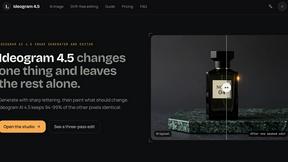
ideogram-45
Ideogram AI 4.5 creates precise, high-quality images with sharp typography, native 2K output, and localized edits.

Nano Banana 2.1
A fast, simple image studio powered by Nano Banana 2.1. Create and edit high-quality images with accurate details, readable text, consistent character