
Avif2Png vs Shrinkpad
Side-by-side comparison to help you choose the right AI tool.
Avif2Png
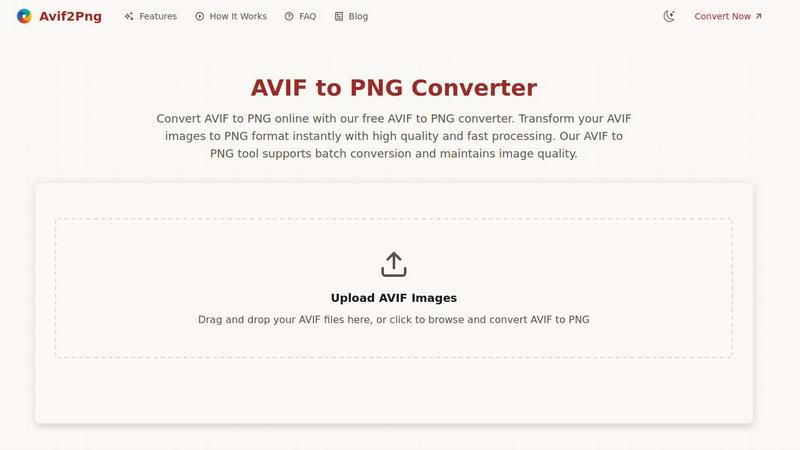
Convert your AVIF images to widely compatible PNG instantly on your device.
Last updated: March 1, 2026

Shrinkpad
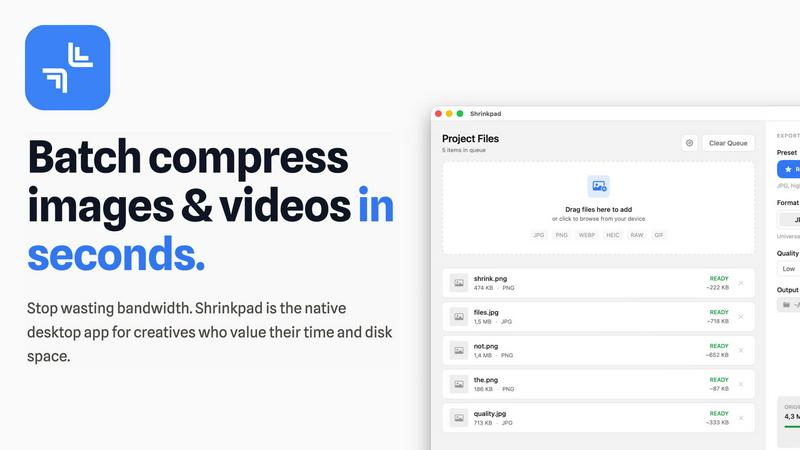
Shrinkpad compresses images and videos in bulk on your Mac to save space and time.
Last updated: February 28, 2026
Visual Comparison
Avif2Png
Shrinkpad
Feature Comparison
Avif2Png
True Lossless Mobile Conversion
Avif2Png is engineered to preserve the absolute integrity of your images during conversion. When you transform an AVIF file to PNG on your phone, the process maintains every pixel, color gradient, and detail without any quality degradation. This ensures that graphics, logos, and high-fidelity photos remain crisp and professional, ready for any use case directly from your mobile device.
Batch Processing On-The-Go
Maximize your productivity no matter where you are. Our mobile-optimized interface allows you to upload and convert multiple AVIF images to PNG format simultaneously in just a few taps. This batch conversion feature saves significant time and effort, making it effortless to prepare entire galleries or project assets for universal compatibility without needing a desktop computer.
Zero-Registration & Instant Access
We prioritize a frictionless user experience. You can start converting your images immediately without any barriers—no sign-ups, no account creation, and no subscriptions required. Simply open the tool on your mobile browser, upload your files, and get your PNGs. This instant access model is built for speed and convenience, mirroring the simplicity of a native app.
Automated Security & Privacy
Your data security is paramount. All files you upload for conversion are processed on secure servers and are automatically and permanently deleted once the conversion is complete and you've downloaded your PNGs. We do not store, share, or analyze your images, giving you complete peace of mind when handling sensitive or professional work directly from your personal devices.
Shrinkpad
Lightning-Fast Batch Processing
Shrinkpad is engineered for speed, utilizing multi-threaded compression optimized for Apple Silicon. You can process thousands of images and videos in a single batch within minutes, not hours. Unlike web-based tools that crash under heavy loads, Shrinkpad handles massive queues with ease, turning a previously time-consuming chore into a background task that finishes in seconds.
Privacy-First Local Processing
Your sensitive creative assets never leave the security of your Mac. All compression happens locally on your machine using Apple's native frameworks. There are no cloud uploads, no hidden subscriptions for server processing, and no risk of your unreleased work being exposed. Shrinkpad gives you powerful optimization while guaranteeing complete data privacy.
Intelligent Quality Optimization
Stop guessing compression settings. Shrinkpad automatically analyzes the visual complexity of each image and video to apply the perfect compression ratio. This smart detection ensures maximum file size reduction without introducing noticeable artifacts or quality loss, delivering optimized assets that look as good as the originals.
Comprehensive Format Support
Drag and drop virtually any media file and Shrinkpad is ready to go. It supports over 50 formats natively, including JPG, PNG, WEBP, AVIF, HEIC, RAW camera files, MP4, and MOV. This extensive compatibility means you can process mixed batches of photos and videos together without needing multiple specialized tools.
Use Cases
Avif2Png
Web Developer Cross-Browser Testing
Web developers and designers can quickly convert AVIF assets to PNG directly from a mobile device to ensure flawless display across all browsers during testing phases. This is crucial for checking compatibility on older browsers or specific content management systems that may not yet support AVIF, guaranteeing a consistent user experience for every site visitor without needing to be at a desk.
Content Creator Platform Sharing
Social media managers, bloggers, and digital marketers often source or create images in AVIF for quality. However, some social platforms and publishing tools have limited format support. Converting these images to PNG on a phone or tablet ensures they can be uploaded and displayed correctly anywhere, preventing upload errors and maintaining visual integrity for audience engagement.
Professional Presentation Preparation
When pulling last-minute assets for a client presentation or team meeting from a cloud drive on a tablet, encountering an incompatible AVIF file can be a crisis. Avif2Png allows professionals to instantly convert these files to a reliable PNG format, ensuring slides and documents open perfectly on any conference room computer or shared screen without compatibility hiccups.
Graphic Designer Asset Handoff
Designers collaborating with clients or printers often need to provide universally accepted file formats. Using Avif2Png on an iPad or phone, a designer can convert AVIF mock-ups or graphics to PNG during a client call or site visit. This provides a lossless, widely compatible file that preserves transparency and sharp edges, facilitating smooth feedback and production workflows.
Shrinkpad
Web Designers & Developers
Quickly optimize entire directories of website assets like hero images, product shots, and icons. Reduce bundle sizes and significantly improve website load times and Core Web Vitals like Largest Contentful Paint (LCP). Simply export assets from Figma or Photoshop at 2x/4x resolution and let Shrinkpad batch-optimize and rename them in one go.
Photographers & Content Creators
Manage massive libraries of high-resolution photos and video clips. Reclaim terabytes of storage by compressing RAW files, HEIC images, and 4K video footage without sacrificing quality for your portfolio or client deliveries. Prepare batches of social media content quickly and efficiently.
App & Software Developers
Reduce the overall size of your application bundles by optimizing all embedded images and video resources. Smaller app sizes lead to faster download times for your users and can help you stay under distribution platform size limits, improving the overall user experience.
General Mac Users
Easily tackle "Storage Full" warnings by finding and compressing large media files scattered across your Downloads, Desktop, and Documents folders. Use Folder Mode to drop any directory and instantly compress all discoverable images and videos, freeing up gigabytes of space with minimal effort.
Overview
About Avif2Png
Avif2Png is the essential, mobile-first solution designed for the modern creator who is always on the move. It solves a critical digital workflow problem by instantly converting cutting-edge AVIF image files into the universally compatible PNG format. While AVIF offers superior compression for faster web performance and smaller file sizes, its support across all browsers, apps, and legacy devices is not yet complete. This gap can disrupt your creative process, whether you're finalizing a design, preparing a presentation, or sharing work with a client. Avif2Png bridges this compatibility gap seamlessly from your smartphone or tablet. Built with an app-centric, intuitive user experience, it allows you to upload AVIF files directly from your mobile device and receive high-quality PNGs in seconds. The tool guarantees a lossless conversion, preserving every detail, color, and nuance of your original image. With no registration required, support for multiple file conversions at once, and a strict privacy policy that automatically deletes your data after processing, Avif2Png is the secure, efficient, and reliable tool that ensures your visuals look perfect and work everywhere, right from the palm of your hand.
About Shrinkpad
Shrinkpad is the ultimate native macOS app for creatives who need to reclaim storage and streamline their workflow. It solves the universal problem of bloated media files by offering fast, private, and intelligent batch compression for both images and videos. Built specifically for Mac, it leverages Apple's frameworks to process everything directly on your device. Your files never leave your computer, ensuring complete privacy and eliminating any dependency on slow internet connections or insecure cloud uploads. Whether you're a photographer managing hundreds of RAW files, a designer optimizing website assets, a content creator editing video clips, or simply someone tired of constant "Storage Full" warnings, Shrinkpad is your dedicated solution. It dramatically reduces file sizes by up to 90% while preserving visual quality, supports over 50 formats out of the box, and handles massive batches of files in seconds. With its intuitive drag-and-drop interface and powerful customization, Shrinkpad transforms the tedious task of file optimization into a simple one-click operation, saving you hours of manual work and gigabytes of precious disk space.
Frequently Asked Questions
Avif2Png FAQ
Is Avif2Png really free to use?
Yes, absolutely. Avif2Png is a completely free online tool. You can convert an unlimited number of AVIF images to PNG format without any cost, registration, or hidden fees. We believe in providing accessible solutions for digital compatibility challenges.
How does Avif2Png ensure my images are secure?
Security is a core principle. All uploaded files are processed over a secure connection. Most importantly, our system is designed to automatically and permanently delete your original AVIF files and the converted PNG files from our servers shortly after the conversion process is complete and you have downloaded your results. We do not keep copies.
Will converting AVIF to PNG reduce my image quality?
No. Avif2Png performs a lossless conversion. The PNG format supports lossless compression, meaning the conversion process re-encodes the image data without discarding any visual information. Your converted PNG will retain the exact same pixel-by-pixel quality as your original AVIF file.
Can I convert multiple files at once on my phone?
Yes, you can. Avif2Png features a fully mobile-optimized batch conversion tool. You can select and upload multiple AVIF files simultaneously from your phone's gallery or cloud storage. The tool will process them all in one go and provide a download link for all the converted PNG files, saving you considerable time.
Shrinkpad FAQ
Can I use Shrinkpad for free?
Yes, Shrinkpad offers a Free Starter tier that includes standard compression for common formats like JPG and PNG. It allows you to process up to 10 files per batch with a maximum file size of 1GB, perfect for trying out the app's core functionality before upgrading.
What file formats does Shrinkpad support?
Shrinkpad supports a wide range of over 50 image and video formats. This includes common types like JPG, PNG, MP4, and MOV, as well as professional formats like WEBP, AVIF, HEIC, and RAW files from various camera manufacturers. A full list is available on the website.
Does Shrinkpad support video compression?
Absolutely. Shrinkpad provides powerful video compression alongside image optimization. You can compress MP4, MOV, and other video formats, often reducing file sizes by 65% or more. This makes it ideal for content creators needing to manage large video project files or clips.
How many files can I process at once?
With the paid Personal or Team plans, you can process an unlimited number of files in a single batch. The app is built to handle massive queues of thousands of assets without crashing, leveraging your Mac's full processing power to work through them efficiently.
Alternatives
Avif2Png Alternatives
Avif2Png is a mobile-first image converter app designed to solve a key compatibility issue for creators and professionals. It transforms modern AVIF files into the widely supported PNG format directly from your phone or tablet, ensuring your visuals work everywhere. Users often explore alternatives for various reasons. Some may need a tool for a different platform, like a desktop application or a web-based service. Others might prioritize specific features, such as support for additional formats, advanced editing capabilities, or different pricing models that fit their budget. When evaluating other options, consider your core needs. Look for a tool that maintains high-quality, lossless conversion to preserve your image details. A secure, user-friendly interface that handles batch processing efficiently is crucial for a smooth mobile workflow, ensuring your projects stay on track no matter where you are.
Shrinkpad Alternatives
Shrinkpad is a native macOS application for batch compression of images and videos. It helps users reclaim storage space by intelligently reducing file sizes directly on their Mac, ensuring privacy and speed. This places it in the media optimization and file management category for creative professionals and everyday users alike. Users often explore alternatives for various reasons. Some may need a solution for Windows or a cross-platform tool, while others might seek different pricing models, specific advanced features, or a different user interface. The search for the right tool is highly personal and depends on individual workflow needs. When evaluating alternatives, key considerations include the platform compatibility, privacy policy regarding file processing, support for your specific file formats, and the efficiency of batch handling. The goal is to find a tool that integrates seamlessly into your routine, saving time and space without compromising on the quality you need.