
Blueberry vs Lovalingo
Side-by-side comparison to help you choose the right AI tool.

Blueberry
Blueberry is an all-in-one Mac app that streamlines web app development by integrating your editor, terminal, and.
Last updated: February 27, 2026

Lovalingo
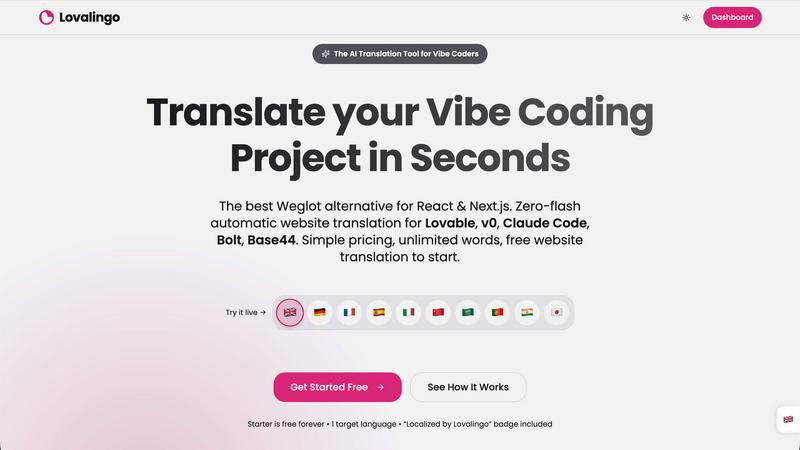
Translate your React apps in 60 seconds with zero-flash, native rendering, and automated SEO for global reach.
Last updated: February 28, 2026
Visual Comparison
Blueberry

Lovalingo
Feature Comparison
Blueberry
Integrated Workspace
Blueberry provides an all-in-one workspace that combines a code editor, terminal, and live preview browser. This integration eliminates the need to switch between multiple applications, allowing developers to focus on building and shipping their products efficiently.
AI Contextual Awareness
With Blueberry’s MCP server, AI models like Claude and Codex gain full context of your project. They can see your code, browser previews, and terminal outputs, enabling them to provide more relevant and precise assistance during development.
Visual Context Tools
Developers can enhance their AI interactions by using tools that capture screenshots and select elements directly from the preview browser. This visual context allows for a more intuitive understanding of the project and fosters better communication with the AI.
Pinned Apps Integration
Blueberry allows users to dock essential applications such as GitHub, Linear, Figma, and PostHog within the workspace. These pinned apps load with the project and share real-time context, creating a collaborative environment that enhances productivity.
Lovalingo
Native SEO
Lovalingo automatically generates multilingual sitemaps, hreflang tags, and meta descriptions, ensuring that your site is indexed globally from day one. This feature is crucial for businesses looking to improve their search engine visibility across different markets.
Zero-Flash UI
Unlike traditional translation tools that manipulate the DOM after the page loads, Lovalingo translates content during the React rendering process. This eliminates flickering and layout shifts, providing users with a smooth and seamless browsing experience.
Vibe-Coding Ready
Lovalingo is fully compatible with Vibe coding tools such as Lovable, Bolt, and v0. By simply adding one script, developers can scale their applications to support multiple languages instantly, making it easier to reach a broader audience.
Zero Maintenance
With Lovalingo, there are no JSON files to manage or maintain. The tool automatically detects routes and updates content in real-time, freeing developers from the burden of manual string management and allowing them to focus on building their applications.
Use Cases
Blueberry
Streamlined Development Process
Developers can use Blueberry to build web applications from start to finish within a single workspace. By having access to the editor, terminal, and live preview, they can quickly iterate on their designs and code without losing context.
Collaborative Project Management
Teams can leverage Blueberry’s pinned apps feature to collaborate efficiently. Designers and developers can work side by side in the same environment, making it easier to discuss changes and implement feedback in real time.
AI-Assisted Coding
With the integration of AI models, developers can ask questions about their code and receive instant feedback. This feature significantly reduces the time spent searching for solutions or debugging, allowing for a smoother coding experience.
User-Centric Testing
Blueberry’s live preview capabilities enable developers to test their applications across various devices, including desktop, tablet, and mobile views. This feature ensures that the final product meets user expectations and functions correctly on all platforms.
Lovalingo
SaaS Founders Scaling Internationally
SaaS founders can utilize Lovalingo to expand their services to international markets without the headache of traditional translation methods. The automated setup and real-time updates allow them to focus on growth.
Agencies Building on Lovable
Agencies using Lovable can benefit from Lovalingo's seamless integration for multilingual support. This tool enables them to deliver localized content quickly and efficiently for their clients, enhancing their service offerings.
Developers Who Dread Manual i18n
For developers frustrated with the manual processes of internationalization, Lovalingo offers a simple solution. The one-prompt setup and automatic translation capabilities reduce development time and effort significantly.
Global Brands Reaching Diverse Markets
Global brands can leverage Lovalingo to ensure consistent and accurate translations across various languages. The tool’s robust features enable them to maintain a strong online presence in multiple regions without compromising on content quality.
Overview
About Blueberry
Blueberry is a revolutionary macOS application designed for modern product builders who seek to streamline their development processes. It combines an editor, terminal, and browser into a single focused workspace, eliminating the hassle of juggling multiple windows and applications. By integrating AI capabilities, Blueberry allows developers to connect with models like Claude, Gemini, and Codex through its built-in MCP (Multi-Context Protocol) server. This unique feature enables real-time interaction with project files, terminal output, and live previews, ensuring that context is always at hand. Blueberry is perfect for developers, designers, and product managers who want to enhance their productivity and collaboration. By providing a seamless environment for coding, testing, and previewing, Blueberry empowers teams to build and ship web applications that not only function well but also delight users. Best of all, Blueberry is currently available for free during its beta phase, inviting users to experience its comprehensive capabilities without any cost.
About Lovalingo
Lovalingo is a revolutionary translation tool designed specifically for the modern AI era, eliminating the complexities of internationalization (i18n) maintenance. It addresses the common pitfalls of traditional translation methods, such as manual JSON strings and layout inconsistencies, which can hinder global growth. By leveraging advanced automation, Lovalingo provides seamless, render-native translations that integrate naturally into your web applications. This tool is perfect for SaaS founders looking to scale internationally, agencies building on platforms like Lovable, and developers who are tired of the manual i18n processes. With Lovalingo, users can enjoy native SEO benefits from the start, zero-flash user interfaces, and automatic content updates, significantly enhancing the user experience and streamlining global operations.
Frequently Asked Questions
Blueberry FAQ
What is Blueberry?
Blueberry is a macOS application that integrates a code editor, terminal, and browser into a single workspace, designed specifically for modern product builders to enhance their development workflow.
How does Blueberry improve productivity?
By combining essential tools into one environment, Blueberry minimizes the time developers spend switching between applications, allowing them to focus on coding, testing, and shipping their products more efficiently.
Is Blueberry free to use?
Yes, Blueberry is currently in a beta phase and is 100% free to download and use on macOS. Users can experience all its features without any cost during this period.
Which AI models can I connect to Blueberry?
Blueberry supports connections with several AI models, including Claude, Gemini, and Codex. This integration enables real-time contextual assistance tailored to your project needs.
Lovalingo FAQ
What makes Lovalingo different from traditional translation tools?
Lovalingo stands out by automating the translation process during the React rendering phase, eliminating manual JSON management and ensuring a zero-flash user interface. This leads to a smoother user experience and faster deployment.
How does Lovalingo handle SEO for multilingual sites?
Lovalingo automatically creates multilingual sitemaps, hreflang tags, and meta descriptions. This ensures that your content is indexed by search engines in different languages, enhancing your visibility and reach across global markets.
Is there a limit to the number of languages I can use with Lovalingo?
Lovalingo offers a tiered approach, starting with free access for one target language. Users can upgrade to the Global plan for unlimited languages, allowing businesses to grow as they expand into new markets.
How quickly can I set up Lovalingo for my project?
Setting up Lovalingo is incredibly quick. With just one prompt, you can integrate the translation capabilities into your project within 60 seconds, making it one of the fastest solutions available for multilingual support.
Alternatives
Blueberry Alternatives
Blueberry is a macOS app designed for developers, providing a cohesive workspace that integrates your editor, terminal, and browser into one streamlined interface. This powerful tool allows users to connect with various AI models, enhancing productivity by eliminating the need to switch between multiple windows and applications. Users can access files, terminal outputs, and live previews all in one place, making it easier to manage complex workflows. However, many users seek alternatives to Blueberry due to various reasons such as pricing, specific feature requirements, or compatibility with different platforms. When considering alternatives, it’s crucial to evaluate factors like user experience, integrations with other tools, and the overall efficiency of the workspace. A good alternative should offer similar functionalities that meet the unique needs of developers while providing a seamless and intuitive user experience.
Lovalingo Alternatives
Lovalingo is a cutting-edge translation tool designed specifically for React applications, offering automated, render-native translation that allows for seamless multilingual integration. By eliminating traditional i18n maintenance headaches, it empowers developers and businesses to scale their applications globally without the hassles of manual JSON management or layout disruptions. Users often seek alternatives due to various factors such as pricing, specific feature sets, or compatibility with different platforms and frameworks. When searching for an alternative, it’s essential to consider factors like ease of integration, support for native SEO practices, and the ability to handle real-time updates without additional maintenance. Additionally, assessing the user experience and how well the solution fits into your existing workflow can help ensure a smooth transition and continued growth in international markets.