
RemoveTexts vs Shrinkpad
Side-by-side comparison to help you choose the right AI tool.

RemoveTexts
RemoveTexts is a free AI app that erases any text from your images in seconds with just a tap.
Last updated: March 11, 2026

Shrinkpad
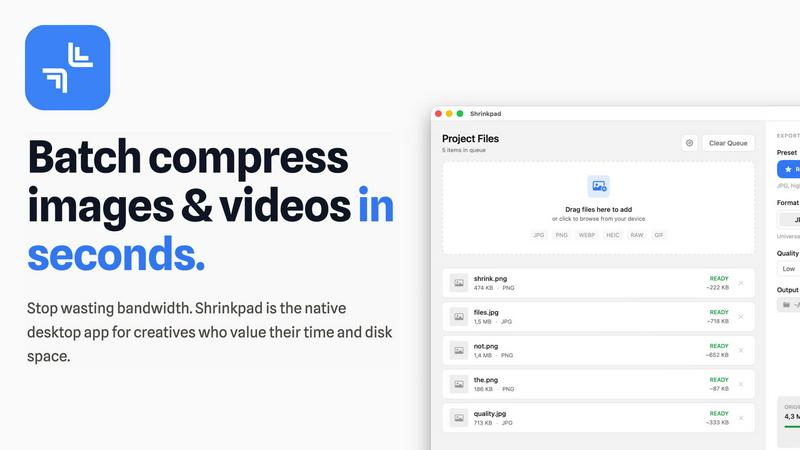
Shrinkpad compresses images and videos in bulk on your Mac to save space and time.
Last updated: February 28, 2026
Visual Comparison
RemoveTexts

Shrinkpad
Feature Comparison
RemoveTexts
Paint to Remove
Take complete control with the intuitive brush tool. Simply paint over the specific text, watermark, or element you want to erase. The AI then works only on the selected areas, giving you pixel-perfect precision. This is perfect for when you only need to remove a certain caption or logo while keeping the rest of the image perfectly intact, all with a few taps on your screen.
Auto Remove All Text
Let the AI handle everything with a single click. This powerful mode automatically scans your entire image, detects every piece of text—regardless of language or font—and removes it all at once. It seamlessly reconstructs the background for each removed element, making it the ultimate tool for quickly cleaning screenshots, memes, or photos cluttered with multiple text overlays in seconds.
Edit & Replace Text
Go beyond simple removal and actively edit your images. This innovative feature allows you to select existing text and replace it with new words. The AI doesn't just overlay new text; it matches the original font style, color, and lighting, making the new text look like it was part of the original image. It’s perfect for updating prices, changing names, or correcting information without starting from scratch.
Remove Objects
While built for text, our AI is equally powerful at removing any unwanted object. Whether it's a stray person in the background, an unsightly trash can, a logo, or any other visual distraction, you can brush over it and watch the AI erase it completely. The technology fills in the space by intelligently analyzing the surrounding pixels, leaving a natural and seamless result.
Shrinkpad
Lightning-Fast Batch Processing
Shrinkpad is engineered for speed, utilizing multi-threaded compression optimized for Apple Silicon. You can process thousands of images and videos in a single batch within minutes, not hours. Unlike web-based tools that crash under heavy loads, Shrinkpad handles massive queues with ease, turning a previously time-consuming chore into a background task that finishes in seconds.
Privacy-First Local Processing
Your sensitive creative assets never leave the security of your Mac. All compression happens locally on your machine using Apple's native frameworks. There are no cloud uploads, no hidden subscriptions for server processing, and no risk of your unreleased work being exposed. Shrinkpad gives you powerful optimization while guaranteeing complete data privacy.
Intelligent Quality Optimization
Stop guessing compression settings. Shrinkpad automatically analyzes the visual complexity of each image and video to apply the perfect compression ratio. This smart detection ensures maximum file size reduction without introducing noticeable artifacts or quality loss, delivering optimized assets that look as good as the originals.
Comprehensive Format Support
Drag and drop virtually any media file and Shrinkpad is ready to go. It supports over 50 formats natively, including JPG, PNG, WEBP, AVIF, HEIC, RAW camera files, MP4, and MOV. This extensive compatibility means you can process mixed batches of photos and videos together without needing multiple specialized tools.
Use Cases
RemoveTexts
Cleaning Product Photos for E-Commerce
Online sellers can instantly remove watermarks, price tags, or promotional text from product images to create a clean, professional catalog. This helps in presenting products without distractions, leading to better customer focus and higher conversion rates on marketplaces like Amazon, Etsy, or Shopify stores.
Preparing Professional Screenshots and Presentations
Professionals and students can clean up software screenshots, UI mockups, or presentation slides by removing irrelevant menus, pop-ups, watermarks, or personal data. This results in polished, distraction-free visuals that communicate ideas clearly and maintain a professional appearance in reports and decks.
Creating Clean Social Media Content
Content creators and social media managers can repurpose images by removing dated captions, subtitles, meme text, or platform-specific overlays. This allows for the creation of fresh, on-brand visuals from existing assets, saving hours of design work and enabling more consistent and engaging content across all channels.
Redacting Sensitive Information
Individuals and professionals in legal, real estate, or administrative fields can use RemoveTexts to quickly and securely redact personal information like names, addresses, license plate numbers, or confidential data from documents and photos before sharing them, ensuring privacy and compliance with ease.
Shrinkpad
Web Designers & Developers
Quickly optimize entire directories of website assets like hero images, product shots, and icons. Reduce bundle sizes and significantly improve website load times and Core Web Vitals like Largest Contentful Paint (LCP). Simply export assets from Figma or Photoshop at 2x/4x resolution and let Shrinkpad batch-optimize and rename them in one go.
Photographers & Content Creators
Manage massive libraries of high-resolution photos and video clips. Reclaim terabytes of storage by compressing RAW files, HEIC images, and 4K video footage without sacrificing quality for your portfolio or client deliveries. Prepare batches of social media content quickly and efficiently.
App & Software Developers
Reduce the overall size of your application bundles by optimizing all embedded images and video resources. Smaller app sizes lead to faster download times for your users and can help you stay under distribution platform size limits, improving the overall user experience.
General Mac Users
Easily tackle "Storage Full" warnings by finding and compressing large media files scattered across your Downloads, Desktop, and Documents folders. Use Folder Mode to drop any directory and instantly compress all discoverable images and videos, freeing up gigabytes of space with minimal effort.
Overview
About RemoveTexts
RemoveTexts is your go-to mobile and web app for instantly cleaning up any image by removing unwanted text. It's a powerful, AI-powered image editing tool designed for simplicity and speed. Forget about complex software like Photoshop or tedious manual selection. With RemoveTexts, you simply upload your photo, and our advanced AI does the heavy lifting. It intelligently detects and erases text—including watermarks, subtitles, date stamps, captions, and branded overlays—while seamlessly reconstructing the original background so no one can tell anything was ever there. It delivers professional, 4K-quality results in under 30 seconds. Built for creators, marketers, social media managers, designers, and anyone who needs pristine visuals, RemoveTexts requires zero design skills. Trusted by over 100,000 users worldwide who have processed more than 100,000 images, it’s the fastest way to get clean, text-free photos directly from your phone or browser.
About Shrinkpad
Shrinkpad is the ultimate native macOS app for creatives who need to reclaim storage and streamline their workflow. It solves the universal problem of bloated media files by offering fast, private, and intelligent batch compression for both images and videos. Built specifically for Mac, it leverages Apple's frameworks to process everything directly on your device. Your files never leave your computer, ensuring complete privacy and eliminating any dependency on slow internet connections or insecure cloud uploads. Whether you're a photographer managing hundreds of RAW files, a designer optimizing website assets, a content creator editing video clips, or simply someone tired of constant "Storage Full" warnings, Shrinkpad is your dedicated solution. It dramatically reduces file sizes by up to 90% while preserving visual quality, supports over 50 formats out of the box, and handles massive batches of files in seconds. With its intuitive drag-and-drop interface and powerful customization, Shrinkpad transforms the tedious task of file optimization into a simple one-click operation, saving you hours of manual work and gigabytes of precious disk space.
Frequently Asked Questions
RemoveTexts FAQ
How does RemoveTexts work?
RemoveTexts uses advanced deep learning inpainting technology, similar to AI models pioneered by leading tech companies. When you paint over text or use auto-remove, the AI analyzes the pixels surrounding the selected area. It then intelligently reconstructs the background by generating new pixels that blend seamlessly with the original image, making the text disappear without a trace.
What image formats and sizes are supported?
The tool supports common web and mobile image formats including JPG, PNG, and WebP. You can upload images up to 10MB in size. The output maintains the original quality and resolution, with support for high-quality 4K results, ensuring your cleaned images look sharp and professional.
Is RemoveTexts really free to use?
Yes, RemoveTexts offers a free online tool that allows you to upload images and remove text without any cost. You can process your images and download the results with no watermarks. The website mentions active premium features, indicating there may be additional advanced capabilities available.
What can't I use RemoveTexts for?
RemoveTexts is designed for ethical editing. It does not support the removal of logos or trademarks for copyright infringement, nor does it support processing NSFW (Not Safe For Work) content. The tool is intended for personal, professional, and creative use to clean and edit your own images or those you have permission to modify.
Shrinkpad FAQ
Can I use Shrinkpad for free?
Yes, Shrinkpad offers a Free Starter tier that includes standard compression for common formats like JPG and PNG. It allows you to process up to 10 files per batch with a maximum file size of 1GB, perfect for trying out the app's core functionality before upgrading.
What file formats does Shrinkpad support?
Shrinkpad supports a wide range of over 50 image and video formats. This includes common types like JPG, PNG, MP4, and MOV, as well as professional formats like WEBP, AVIF, HEIC, and RAW files from various camera manufacturers. A full list is available on the website.
Does Shrinkpad support video compression?
Absolutely. Shrinkpad provides powerful video compression alongside image optimization. You can compress MP4, MOV, and other video formats, often reducing file sizes by 65% or more. This makes it ideal for content creators needing to manage large video project files or clips.
How many files can I process at once?
With the paid Personal or Team plans, you can process an unlimited number of files in a single batch. The app is built to handle massive queues of thousands of assets without crashing, leveraging your Mac's full processing power to work through them efficiently.
Alternatives
RemoveTexts Alternatives
RemoveTexts is an AI-powered image editing tool that specializes in removing text and objects from any image in seconds. It belongs to the category of automated, user-friendly photo editing software designed for quick, professional-grade results without the complexity of traditional programs like Photoshop. Users often explore alternatives for various reasons. Some may seek different pricing models, such as a one-time purchase versus a subscription. Others might need specific features like batch processing, integration with other platforms, or support for different file formats. Platform availability, like a dedicated mobile app versus a web tool, is also a common deciding factor. When choosing an alternative, consider the core functionality you need. Look for reliable AI that can cleanly remove text and inpaint the background. Evaluate the user experience, especially on mobile if that's your primary device. Also, check output quality, processing speed, and the overall value relative to the cost to find the best fit for your workflow.
Shrinkpad Alternatives
Shrinkpad is a native macOS application for batch compression of images and videos. It helps users reclaim storage space by intelligently reducing file sizes directly on their Mac, ensuring privacy and speed. This places it in the media optimization and file management category for creative professionals and everyday users alike. Users often explore alternatives for various reasons. Some may need a solution for Windows or a cross-platform tool, while others might seek different pricing models, specific advanced features, or a different user interface. The search for the right tool is highly personal and depends on individual workflow needs. When evaluating alternatives, key considerations include the platform compatibility, privacy policy regarding file processing, support for your specific file formats, and the efficiency of batch handling. The goal is to find a tool that integrates seamlessly into your routine, saving time and space without compromising on the quality you need.