

Bantr: Offline & Unlimited TTS for Mac
Bantr offers unlimited offline text-to-speech on your Mac, ensuring privacy with expressive, natural voices at your.
AI tool Details
Explore More
Alternatives
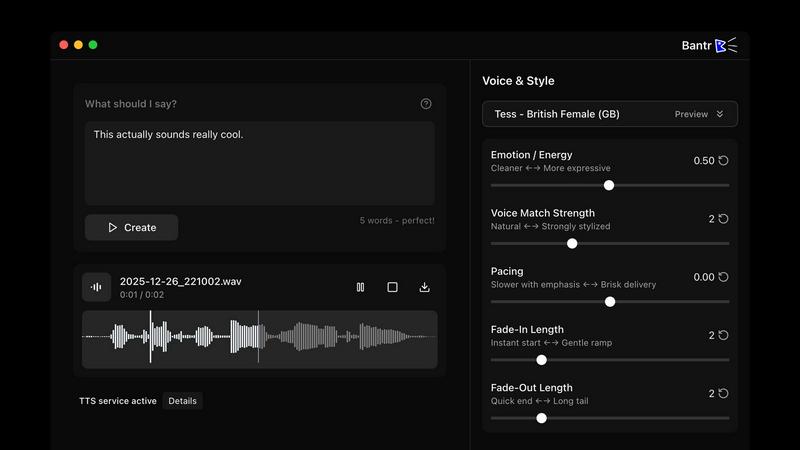
About Bantr: Offline & Unlimited TTS for Mac
Bantr is a cutting-edge text-to-speech (TTS) application specifically designed for Apple Silicon Macs. Unlike conventional TTS tools that rely on cloud services and subscriptions, Bantr operates entirely offline, ensuring that your data remains private and secure. This innovative application harnesses the power of Apple's MLX machine learning framework to produce remarkably expressive and natural-sounding audio. With Bantr, users enjoy limitless access with no quotas or login requirements, making it ideal for creators, educators, developers, and professionals who need high-quality voiceovers. The one-time purchase model at $59.95 grants lifetime access, and it comes with over 150 high-quality voices, providing a versatile solution for various projects. Bantr empowers users by putting professional voice synthesis directly at their fingertips while ensuring complete control over their work and data.
Features
Over 150 High-Quality Voices
Bantr offers an extensive library of more than 150 high-quality voices, allowing users to choose the perfect voice for their projects. This diverse selection caters to various tones, accents, and styles, enhancing the overall user experience.
Offline Functionality
One of Bantr's standout features is its ability to function entirely offline. This means users can generate voiceovers without an internet connection, ensuring privacy and data security, while also eliminating concerns about service interruptions.
Unlimited Usage
With Bantr, users enjoy unlimited access without any restrictions. There are no quotas, no monthly fees, and no need for logins, making it a hassle-free solution for anyone needing consistent TTS capabilities.
Future-Proof Updates
Bantr is committed to continuous improvement, with exciting upcoming features on the roadmap. These include the ability to clone custom voices, support for multiple languages, and improved project management, ensuring that users always have access to the latest advancements in TTS technology.
Use Cases
Video Narration
Creators can use Bantr to generate high-quality voiceovers for videos, making it perfect for YouTube channels, tutorials, and promotional content that require professional audio without the need for studio recording.
Educational Tools
Educators can utilize Bantr to create engaging audio materials for students, including narrated lessons, audiobooks, and interactive learning tools that cater to various learning styles and enhance comprehension.
Game Development
Game developers can leverage Bantr to create character dialogues and immersive storytelling elements, providing unique voices that add depth to their games while ensuring a smooth production process.
Accessibility Solutions
Bantr serves as a valuable resource for individuals with reading difficulties, such as dyslexia, by providing clear and natural-sounding audio for written content, enhancing accessibility and understanding for all users.
Frequently Asked Questions
What platforms does Bantr support?
Bantr is designed exclusively for Apple Silicon Macs, and it is compatible with macOS 15 and above, ensuring optimal performance on the latest hardware.
How does Bantr ensure data privacy?
Bantr operates entirely offline, meaning that no user data is sent to external servers. This architecture ensures that your work and personal information remain secure and private.
Are there any subscription fees?
No, Bantr offers a one-time purchase model that grants users lifetime access to the software and all future updates, eliminating the need for ongoing subscriptions or hidden fees.
What kind of voices are available in Bantr?
Bantr includes over 150 high-quality voices which cater to various accents, tones, and styles, providing users with the flexibility to choose the most suitable voice for their projects.
Similar to Bantr: Offline & Unlimited TTS for Mac


Verla AI
Verla is an AI academic assistant for university and college students, combining AI essay writing, academic research, AI detection, AI humanization

Leadeon
AI growth tool for X and LinkedIn: write posts in your voice, schedule at your best times, find leads on X and see what works.
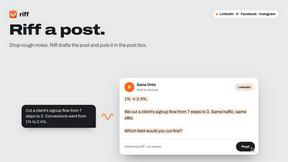
Riff
Free Chrome extension. Paste your rough point and Chrome's built-in AI writes a fresh reply for that post on X, LinkedIn, Facebook or Instagram.

ZombieTrend AI
ZombieTrend AI turns two photos into a cinematic zombie love story video where one person transforms and the other chooses love.

AIPetGen
AIPetGen turns a photo of your dog, cat, or other pet, or a written description, into a new picture or a short animation.

Hotel Lobby AI Video Generator
Turn two photos into a Hotel Lobby dance video in the orange A COLORS SHOW booth
TryH3 - MiniMax H3 Video Generator
Try MiniMax Hailuo H3 video generation in the browser