

ComicsMaker
Turn one scene into a storyboard-ready comic strip with AI, then add dialogue and arrange panels in your browser.
AI tool Details
About ComicsMaker
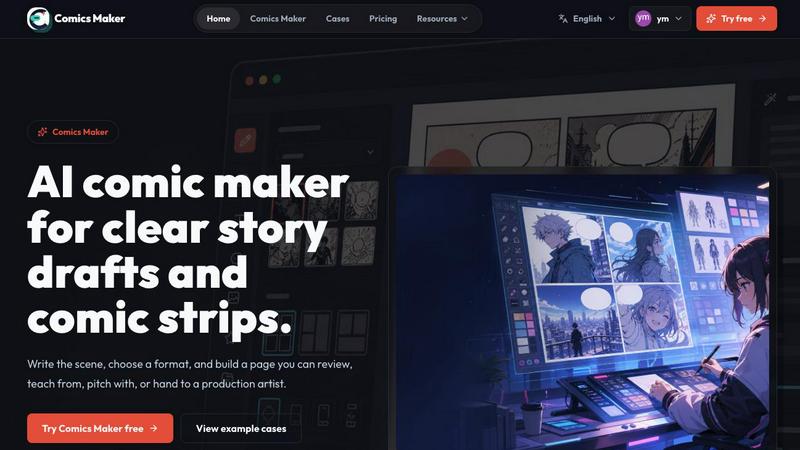
ComicsMaker is an AI-powered comic maker and comic strip maker designed for creators, educators, marketers, and teams who need visual stories fast and efficiently. This tool transforms simple text prompts into fully structured comic panels, manga-style drafts, storyboards, and social-ready comic pages, all while giving users clear control over layout, tone, reading flow, and style direction. Unlike traditional comic creation software that requires extensive artistic skills or hours of manual work, ComicsMaker streamlines the entire process from a rough idea to a polished draft. Users can start with a single scene description, name the character and setting, define the visible action, and specify the emotional change they want to convey. The workspace then helps users plan the beats, generate panels, add dialogue, and arrange the page directly in their browser. This makes it an ideal solution for drafting AI comic strips, prompt-to-panel scenes, character moments, explainer comics, classroom visuals, product storyboards, and campaign concepts. The core value proposition is moving from a blank canvas to a structured comic draft without needing to start from scratch, saving time while maintaining creative control. Key capabilities include being an AI comic generator, comic strip maker, manga panel generator, storyboard creator, text to comic generator, and comprehensive visual storytelling tool.
Features
Scene to Panel Planning
ComicsMaker starts with a single scene description and helps users break it down into structured beats. You write the scene in plain language, specifying the character, setting, visible action, and emotional change. The tool then assists in planning the beats, allowing you to choose between single-panel, three-panel, or 2x2 page formats. This ensures every panel has a clear purpose and contributes to the overall narrative flow.
Flexible Layout Controls
The studio provides a clean middle panel for making layout decisions before investing time in polish. Users can select from multiple page formats including single panel, 3-panel strip, 2x2 page, and vertical flow. The interface keeps panel count, pacing, shot type, and reading order visible at all times, giving you simple controls for size, tone, and production notes. The canvas starts empty by default, ready for your next idea.
Consistent Style Direction
Maintain visual consistency across all panels using style notes, character details, and reference language. ComicsMaker allows you to lock the visual direction before generating images, ensuring every panel belongs to the same world. You can reuse character and environment notes across different projects, and export drafts that an artist or teammate can understand and build upon.
Dialogue and Arrangement Tools
After generating panels, you can add dialogue directly to each panel and arrange the page layout in your browser. Captions and dialogue stay close to the panel plan, making it easy to review pacing and story clarity before generating more images. The workspace supports checking whether each panel has one clear job and reviewing the flow before committing to a longer production pass.
Use Cases
Classroom Visuals and Educational Comics
Teachers and educators can rapidly create explainer comics that break down complex topics into digestible visual sequences. For example, a science teacher can describe a scene showing photosynthesis, set the mood to educational, and generate a 4-panel comic that illustrates each stage. Students benefit from visual learning materials that are consistent and easy to understand, without requiring the teacher to have artistic skills.
Product Storyboards and Marketing Campaigns
Marketers and product teams can draft campaign concepts and product storyboards in minutes. A product manager can describe a scene showing a customer discovering a new feature, set the tone to dramatic, and generate a 2x2 layout that tells the product story. These drafts serve as reviewable assets that can be shared with stakeholders, refined based on feedback, and handed off to designers for final production.
Manga and Comic Strip Creation
Independent creators and manga artists can use ComicsMaker to draft manga-style panels and comic strips quickly. Instead of spending hours on rough sketches, creators can input a scene description, select a shonen or dramatic mood, and generate panel drafts that capture the intended action and emotion. This allows for rapid iteration on story ideas and panel composition before committing to final artwork.
Social Media Visual Content
Social media managers and content creators can produce comic-style posts and stories for platforms like Instagram, Twitter, and Facebook. A marketer can describe a scene showing a brand mascot in a funny situation, set the mood to lighthearted, and generate a 3-panel strip ready for posting. These social-ready comic pages help increase engagement and stand out in crowded feeds.
Frequently Asked Questions
How do I start creating a comic with ComicsMaker?
Begin by opening the studio and writing one scene in plain language. Describe the character, setting, visible action, and the emotional change you want to show. You can specify up to 1600 characters. Then choose a layout format like single panel, 3-panel strip, or 2x2 page, set the mood and tone, and click "Plan beats" to generate your panel structure.
Can I control the style and consistency of generated panels?
Yes, ComicsMaker provides tools to lock the visual direction before generating images. You can add style notes, character details, and reference language to ensure every panel belongs to the same world. These notes can be reused across different projects, and you can export drafts that include all the style information for handoff to artists or teammates.
What file formats and exports are available?
ComicsMaker allows you to export drafts that include prompts, notes, and panels as project data. The current editor and JSON project export follow the same workflow, making it easy to hand off your work to other team members or continue editing later. You can review pacing, dialogue space, and visual direction before generating more images.
Is there a free plan available to test the tool?
Yes, ComicsMaker offers a free plan that includes 10 starter credits for testing image generation. This allows you to try the tool and create initial drafts without any financial commitment. Paid plans increase monthly credits, while the editor and JSON project export follow the same workflow across all plans.
Similar to ComicsMaker
AIPetGen
AIPetGen turns a photo of your dog, cat, or other pet, or a written description, into a new picture or a short animation.

AI Object Remover
Remove unwanted people, objects, text and watermarks from photos with AI

Hotel Lobby AI Video Generator
Turn two photos into a Hotel Lobby dance video in the orange A COLORS SHOW booth

Remove Text
Remove text from images online with AI

TryH3 - MiniMax H3 Video Generator
Try MiniMax Hailuo H3 video generation in the browser

Image to Layers AI
Turn any image into editable transparent PNG/PSD layers with AI
EditTextPhoto
AI-powered image text editor to edit, replace, fix, or translate text in images while preserving the original font, color, size, and style.
ideogram-45
Ideogram AI 4.5 creates precise, high-quality images with sharp typography, native 2K output, and localized edits.