AI tool Details
Explore More
Alternatives
About Mod
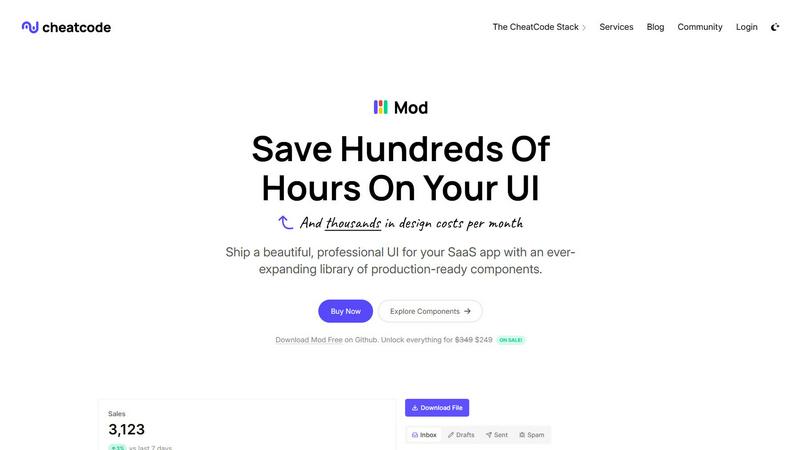
Mod is a comprehensive, framework-agnostic CSS library designed specifically for building modern, polished SaaS application user interfaces. It moves beyond generic component kits by providing a complete design system tailored for the unique needs of software-as-a-service products, from complex dashboards to customer-facing landing pages. Built with a mobile-first and app-centric philosophy, Mod ensures that every interface you create delivers an exceptional user experience across all devices right from the start. It is crafted for solo developers, startups, and development teams who need to ship professional-grade applications faster without the overhead of custom CSS or expensive design resources. By offering a vast library of pre-styled, responsive components and utilities, Mod drastically reduces design debt and front-end development time, allowing you to focus on core application logic and business value. Its core value proposition is enabling developers to build visually consistent, highly functional, and user-friendly SaaS interfaces with minimal effort.
Features
Extensive Component Library
Mod provides over 88 meticulously crafted, production-ready components that cover the entire spectrum of SaaS UI needs. This includes complex data tables, interactive forms, navigation bars, modals, cards, stats widgets, user profile sections, and pricing tables. Each component is built with accessibility and semantic HTML in mind, ensuring a solid foundation. This extensive library means you rarely have to build common UI elements from scratch, significantly accelerating your development workflow and maintaining visual consistency across your entire application.
Deep Customization with 168+ Styles
Beyond pre-built components, Mod offers a powerful system of over 168 utility classes and design tokens for granular control over your application's appearance. This system covers spacing, typography, colors, borders, shadows, and flexbox/grid layouts. It allows you to tweak any component or build completely custom layouts while staying within the cohesive design language of the library. This flexibility ensures your app retains a unique brand identity without sacrificing development speed or design consistency.
Framework-Agnostic & Easy Integration
Mod is designed to work seamlessly with virtually any modern web technology stack. It provides plain CSS files and is compatible with frontend frameworks like Next.js, Nuxt, Svelte, and Vite, as well as backend frameworks like Rails and Django. There's no proprietary syntax or complex setup required; you simply link the CSS and start using the classes. This agnostic approach future-proofs your investment and allows teams with diverse tech stacks to standardize their UI layer using a single, reliable system.
Complete Design System with Themes & Icons
Mod is more than just CSS; it's a full design system. It includes two built-in themes (light and dark mode) that are easy to toggle, ensuring your app meets modern user expectations for theme preference. Furthermore, it bundles a library of over 1,500 icons, providing a consistent iconographic style for every possible UI need. Having themes and icons integrated directly into the system eliminates the hassle of sourcing and styling these assets separately, creating a perfectly unified and professional visual experience.
Use Cases
Rapid SaaS MVP Development
For startups and solo founders building a minimum viable product, speed is critical. Mod allows you to spin up a professional-looking, fully functional SaaS interface in days, not weeks. You can assemble landing pages, authentication flows, and user dashboards using the pre-built components, enabling you to validate your business idea with real users faster without compromising on initial user experience or perceived quality.
Standardizing UI Across Development Teams
In growing teams, inconsistent UI can become a major pain point. Mod serves as a single source of truth for the UI layer. By adopting Mod, teams can ensure that every new feature, page, or microservice has a consistent look and feel. This reduces design review cycles, minimizes CSS conflicts, and onboard new developers more quickly, as they have a well-documented component library to work from immediately.
Modernizing Legacy Application Interfaces
Many established SaaS products suffer from outdated, non-responsive user interfaces. Mod provides a clear path for a visual overhaul without a complete rewrite. Developers can incrementally replace old CSS with Mod's classes and components, section by section. This allows for a gradual, low-risk modernization that immediately improves mobile responsiveness, accessibility, and overall user satisfaction.
Building Internal Admin Dashboards
Internal tools and admin panels need to be functional and clear, but often don't justify a large design investment. Mod is perfect for this use case. Its data-rich components like tables, charts, and filters allow developers to quickly build powerful, intuitive admin interfaces that are easy for internal teams to use, all while maintaining a clean and professional aesthetic that feels part of the main product family.
Frequently Asked Questions
Is Mod a JavaScript framework or a CSS library?
Mod is exclusively a CSS library. It provides styling, components via CSS classes, and design tokens. It does not include JavaScript behavior for interactive components like dropdowns or modals. This intentional design keeps it lightweight and flexible, allowing you to use your preferred JavaScript framework (like React, Vue, or Svelte) to add functionality while Mod handles all the visual presentation and responsive layout.
How does Mod handle responsiveness and mobile-first design?
Mod is built from the ground up with a mobile-first approach. Every component and utility class is designed to look and function perfectly on small screens first. Responsive modifiers are then used to adapt the layout for larger breakpoints. This ensures your SaaS application delivers an optimal user experience on smartphones and tablets by default, which is crucial for user onboarding and engagement in today's mobile-centric world.
Can I customize the colors and branding to match my company?
Absolutely. While Mod comes with beautiful default themes, it is built for customization. The library uses CSS custom properties (variables) for its core color palette, typography, and spacing. You can easily override these variables in your own stylesheet to align the entire component library with your brand's primary colors, secondary colors, fonts, and more, ensuring a unique brand identity.
What is included in the yearly updates?
The yearly update guarantee ensures your license includes all new components, features, and improvements released for Mod within a year of your purchase. This means the library evolves with modern design trends and web standards, and you receive these updates at no additional cost. It protects your investment and ensures your application's UI foundation remains current and supported.