

Subclip
Subclip is an all-in-one AI video editor that streamlines editing, auto-generates subtitles, and dubs in multiple languages effortlessly.
AI tool Details
Explore More
Alternatives
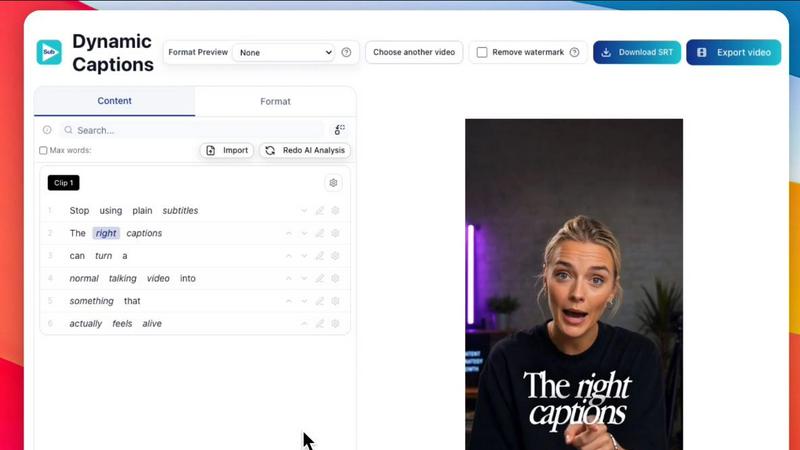
About Subclip
Subclip is an innovative AI-powered video editing platform designed specifically for creators, marketers, and educators. This user-friendly tool transforms the video editing process, allowing users to edit videos as simply as editing a text document. By utilizing an intuitive drag-and-drop interface, Subclip empowers users to manipulate video transcripts effortlessly. Key functionalities include voice cloning to re-record segments of videos, automatic removal of silences and filler words, accurate subtitle generation, and multi-language dubbing while keeping the original background music intact. Whether you are a YouTuber, podcaster, or part of a content team, Subclip streamlines your entire video production workflow. With its focus on speed and simplicity, Subclip eliminates the complexities associated with traditional video editing tools, providing intuitive, AI-driven features that significantly reduce editing time. The freemium pricing model, which includes a free tier and affordable paid plans, makes Subclip accessible for everyone looking to enhance their video content.
Features
Rough Cut using Text Transcript
Edit your video transcripts as if you are working in a Google Document. This feature allows for instant trimming of mistakes and updates to the video timeline without the tedious manual rework typically associated with traditional editing methods. Export your non-linear editing (NLE) timeline directly to popular editing software like DaVinci Resolve, Final Cut Pro, and Adobe Premiere Pro.
AI Clipping
Subclip's AI engine intelligently scans your videos for high-energy segments, punchlines, and key emotional shifts, identifying the most engaging clips automatically. This feature simplifies the editing process, allowing creators to focus on producing compelling content rather than sifting through hours of raw footage.
One-Click Unlimited Captions
With this feature, users can generate unlimited subtitles effortlessly and export video minutes with local transcription in over 48 languages. This accessibility makes your content more inclusive and shareable across diverse audiences, enhancing viewer engagement and reach.
AI Dubbing with Voice Clone
Transform your video into over 21 languages using AI voice dubbing that maintains the original tone and emotion. This feature is particularly useful for creators looking to reach a global audience without needing to re-record their voice, making international content creation simpler than ever.
Use Cases
Subclip for Creators & Podcasters
For creators and podcasters, Subclip is a game-changer, allowing them to effortlessly clip long-form videos and maximize viewership. With its streamlined features, creators can produce engaging short clips that resonate with their audience, all while saving valuable editing time.
Subclip for Coaches
Educators and coaches can use Subclip to dub their recorded courses or instructional videos into 20+ languages. By leveraging voice cloning technology, they can maintain their unique voice, ensuring that their teaching style is preserved across different languages.
Subclip for Vloggers
Vloggers can take advantage of Subclip's capabilities to add captions, B-Roll, and background audio, while removing noise and unwanted silences. The one-click export feature allows them to publish high-quality content quickly and efficiently without the hassle of traditional video editing.
Subclip for Agencies & Freelancers
Agencies and freelancers will find Subclip invaluable for increasing output without sacrificing quality. With unlimited transcription, export capabilities, and a collaborative workspace, teams can work together seamlessly to produce high-quality video content at a fraction of the usual cost.
Frequently Asked Questions
What platforms does Subclip support for exporting videos?
Subclip allows you to export videos directly to popular platforms like YouTube and X (formerly Twitter). More platforms such as Instagram and TikTok will be added soon, making it easier to share your content across various social media channels.
How does AI voice cloning work in Subclip?
The AI voice cloning feature enables users to create a digital version of their voice that can be used to dub videos in multiple languages. This technology maintains the original tone and emotion, ensuring that the content feels authentic even when presented in different languages.
Can I collaborate with my team on Subclip projects?
Yes, Subclip offers a collaborative workspace where users can share projects with team members, gather feedback, and work together in real time. This feature enhances teamwork and streamlines the video editing process.
How does Subclip help with transcription and captioning?
Subclip automatically generates unlimited subtitles and transcriptions in over 48 languages. This feature allows users to create accessible content for a wider audience while ensuring that the subtitling is accurate and easy to read.
Similar to Subclip

Oravaa
Oravaa’s human-sounding Voice AI handles your 24/7 calls, qualifies leads, and books appointments instantly.

Hush Touch | Voice-to-Text for MacOS
Hush Touch is offline voice-to-text software for Mac that learns your vocabulary for smarter, accurate dictation.

Glossa
Glossa instantly translates your sermons into 100 languages so your whole community can worship together.

Bantr: Offline & Unlimited TTS for Mac
Bantr offers unlimited offline text-to-speech on your Mac, ensuring privacy with expressive, natural voices at your.

KaiCalls
KaiCalls is your 24/7 AI phone agent that instantly answers calls and captures leads for your business.

Vowen
Vowen is your private voice interface that turns speech into text and actions across all your apps.
Bargou One
Bargou One is your all-in-one mobile app for seamless AI chat, creation, translation, and voice assistance.