

HypeShare
HypeShare lets you send and receive large files securely with end-to-end encryption, no signup required, and up to 10GB free.
AI tool Details
Explore More
Alternatives
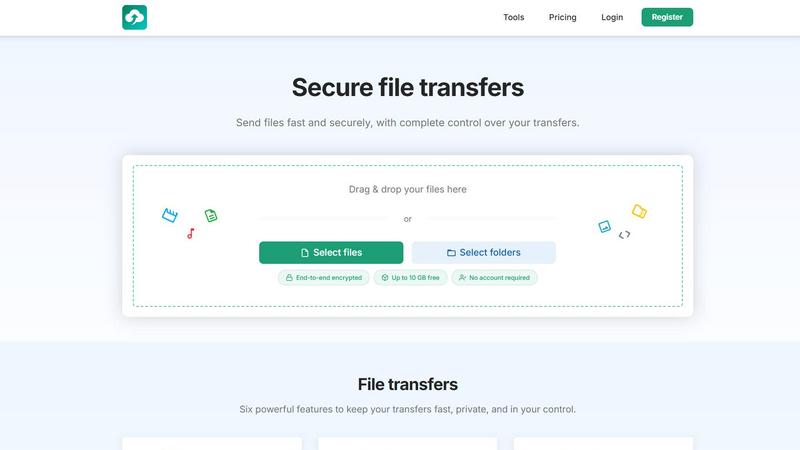
About HypeShare
HypeShare is a secure file transfer platform built for users who prioritize speed and privacy. It allows you to send files up to 10GB without creating an account, making it an ideal solution for quick, one-off transfers. For those who need more, a free account unlocks 20GB of storage and access to encrypted transfers, custom expiry links, and file request pages. These request pages let others upload files directly to you without needing an account on their end, streamlining collaboration. The platform is designed for freelancers, agencies, and teams who find traditional file-sharing tools bloated and slow. HypeShare focuses on a mobile-first, app-centric experience, ensuring that every action from drag-and-drop to sharing is intuitive and fast. It offers end-to-end encryption for all transfers, password protection, and control over download limits and expiration dates. With Pro plans, users unlock larger transfers, download notifications, and priority support. HypeShare is not just about sending files; it is about maintaining complete control over your data with a no-friction interface that works seamlessly on any device.
Features
End-to-End Encryption
HypeShare ensures that every file you transfer is protected with end-to-end encryption. This means your data is encrypted on your device before it is sent and can only be decrypted by the intended recipient. No one, not even HypeShare, can access your files during transit or at rest. This feature is critical for freelancers and businesses handling sensitive documents, contracts, or personal information. It provides peace of mind that your transfers remain private and secure from unauthorized access.
File Requests
Create a custom request link that allows anyone to upload files directly to your HypeShare dashboard. The sender does not need an account, login, or password. You can set an expiration date for each request, receive email notifications when files are uploaded, and accept any file type. This feature is perfect for collecting assets from clients, receiving large design files from collaborators, or gathering submissions for projects. It transforms your dashboard into a personal upload page, simplifying the intake process.
Custom Expiry Links and Download Limits
Gain complete control over your shared files by setting automatic expiration dates and defining how many times a transfer can be downloaded. This prevents files from lingering online indefinitely and ensures that only the intended audience can access them. You can create links that self-destruct after a single download or expire after 24 hours. This level of granularity is essential for time-sensitive projects, confidential data, or sharing with clients who need temporary access.
Password Protection
Add an extra layer of security to your transfers by requiring recipients to enter a password before downloading. This feature is ideal for sharing sensitive files like legal documents, financial reports, or personal media. You can set a unique password for each transfer and share it separately via email or messaging apps. Combined with encryption and expiry links, password protection ensures that only authorized individuals can access your files, even if the link is shared publicly.
Use Cases
Freelancers Sending Large Design Files
Freelancers often need to send large design files, video projects, or high-resolution images to clients. With HypeShare, you can upload files up to 10GB without an account or up to 200GB with a Pro plan. The platform provides a fast, no-friction alternative to email attachments or bloated cloud storage. You can set custom expiry links and password protection to ensure your work remains secure. The file request feature also allows clients to send you feedback or assets directly, streamlining the entire workflow.
Agencies Collecting Client Assets
Agencies frequently need to collect a variety of assets from clients, such as logos, photographs, or brand guidelines. Using HypeShare’s file request feature, you can create a custom upload page with a unique link. Clients can upload files without creating an account, and you receive instant email notifications. You can set an expiry date for the request and accept any file type. This eliminates the back-and-forth of email attachments and ensures all assets are stored in one organized location.
Teams Collaborating on Confidential Projects
Teams working on confidential projects require a secure method for sharing sensitive data. HypeShare provides end-to-end encryption, password protection, and download limits to keep files safe. You can share project updates, contracts, or financial reports with team members, knowing that access is controlled and temporary. The download notification feature alerts you when files are accessed, providing an audit trail. This makes HypeShare an ideal tool for remote teams, legal departments, and financial advisors.
Individuals Sharing Personal Media
Individuals who want to share personal photos, videos, or large documents with family and friends can do so quickly and privately. HypeShare allows you to create a transfer link without an account and share it via email or messaging. You can set an expiration date and password to keep your media secure. The platform is mobile-first, so you can easily upload files from your phone or tablet. This use case is perfect for sharing wedding photos, vacation videos, or important documents with loved ones.
Pricing
HypeShare offers three tiers to suit different needs. The Guest plan requires no account and allows 5 transfers per month with up to 10 files per transfer and a maximum file size of 10GB. The Free plan provides 10 transfers per month, 20GB of storage, and 30 days of data retention. The most popular Pro plan costs 8.99 USD per month and includes unlimited transfers, 1000GB of storage, unlimited downloads per transfer, and priority support. All plans include file encryption, password protection, and custom expiry links. Yearly billing is available for additional savings.
Frequently Asked Questions
Do I need an account to send files?
No, you can send files up to 10GB without creating an account. This is ideal for quick, one-off transfers. If you need more storage, larger file sizes, or features like file requests and custom expiry links, you can sign up for a free account which provides 20GB of storage and additional controls.
How secure are my transfers?
All transfers on HypeShare are protected with end-to-end encryption. This means your files are encrypted on your device before upload and can only be decrypted by the recipient. You can also add password protection and set expiration dates for an extra layer of security. HypeShare does not have access to your decrypted files.
Can I receive files from others without them having an account?
Yes, HypeShare’s file request feature allows you to create a custom upload page. You share the link with anyone, and they can upload files directly to your dashboard without needing an account, login, or password. You receive email notifications when files are uploaded, and you can set an expiration date for the request.
What happens to my files after the transfer expires?
Files are automatically deleted from HypeShare’s servers after the transfer’s expiration date or after the maximum number of downloads is reached. For guest users, data is retained for 7 days. Free accounts retain data for 30 days, and Pro accounts offer unlimited data retention. Once deleted, files cannot be recovered.
Similar to HypeShare
Whop Trends
Spot trending Whop products early with daily market data to scale your income.
Blueberry
Blueberry is an all-in-one Mac app that streamlines web app development by integrating your editor, terminal, and.
Shrinkpad
Shrinkpad compresses images and videos in bulk on your Mac to save space and time.

Skene
Skene transforms your codebase into a self-driven growth engine that empowers your product and enhances user experience.
Yellow Systems
Yellow Systems crafts custom software solutions that drive growth for startups and enterprises using cutting-edge AI.

MVPable
MVPable helps you quickly create an MVP with tailored plans and vetted builders for your product idea.

Agenta
Agenta is the open-source platform for teams to build and manage reliable LLM apps together.